



鲲鹏KAE硬加速参考实践:实现Java加解密算法性能飞跃
发表于 2026/03/09
0
1 非商用声明
该文档提供的内容为参考实践,仅供用户参考使用,用户可参考实践文档构建自己的软件,按需进行安全、可靠性加固,但不建议直接将相关Demo或镜像文件集成到商用产品中。
2 背景介绍
2.1 业务场景
在业务运行中,银行与三方机构(如人民银行、证监会等外部监管及合作机构)以及内部生产网与办公网之间,高频交互涉及多类业务领域的敏感数据。为符合《网络安全法》、《数据安全法》及相关金融行业监管规定,所有向外发送的数据文件均须采用国家商用密码算法(国密)进行加密传输,以保障数据在传输过程中的机密性与完整性。然而,传统依赖CPU进行软件加解密的做法存在显著性能瓶颈:加密过程中CPU占用率高、处理延迟大,导致文件生成与审核周期延长,严重制约业务办理效率。
2.2 传统加解密
Java 加解密机制概述:
Java 提供了一套标准化、可扩展的密码服务架构,其核心由 Java Cryptography Architecture (JCA) 和 Java Cryptography Extension (JCE) 构成。该架构采用“提供者(Provider)模型”,将算法实现与调用接口解耦,使得开发者可以灵活切换底层密码库,而无需修改业务代码。Provider 是 JCA/JCE 的插件机制,封装了具体的密码算法实现,例如 AES、SM4、RSA 等算法。每个 Provider 是一个 java.security.Provider 的子类,注册后即可被 Cipher、MessageDigest、Signature 等引擎类调用。
传统Java加解密问题:传统Java加解密运算由CPU执行,加解密运算执行过程CPU占用率高,会存在性能瓶颈。
2.3 KAE加解密
KAE概述:
KAE(Kunpeng Accelerator Engine,鲲鹏加速引擎)是基于鲲鹏处理器提供的硬件加速解决方案,包含了KAE加解密和KAE解压缩。
KAE加解密用于加速SSL(Secure Sockets Layer)/TLS(Transport Layer Security)应用,KAE解压缩用于加速数据压缩、解压,可以显著降低处理器消耗,提高处理器效率。此外,加速引擎对应用层屏蔽了其内部实现细节,用户通过OpenSSL、Tongsuo、BoringSSL、Zlib标准接口即可以实现快速迁移现有业务。
有关KAE的详细介绍可参考KAE开源社区:https://gitcode.com/boostkit/KAE
Java加解密的硬加速:毕昇JDK支持KAE Provider,通过KAE Provider使能鲲鹏KAE加解密硬加速。
3 方案介绍
3.1 方案简介
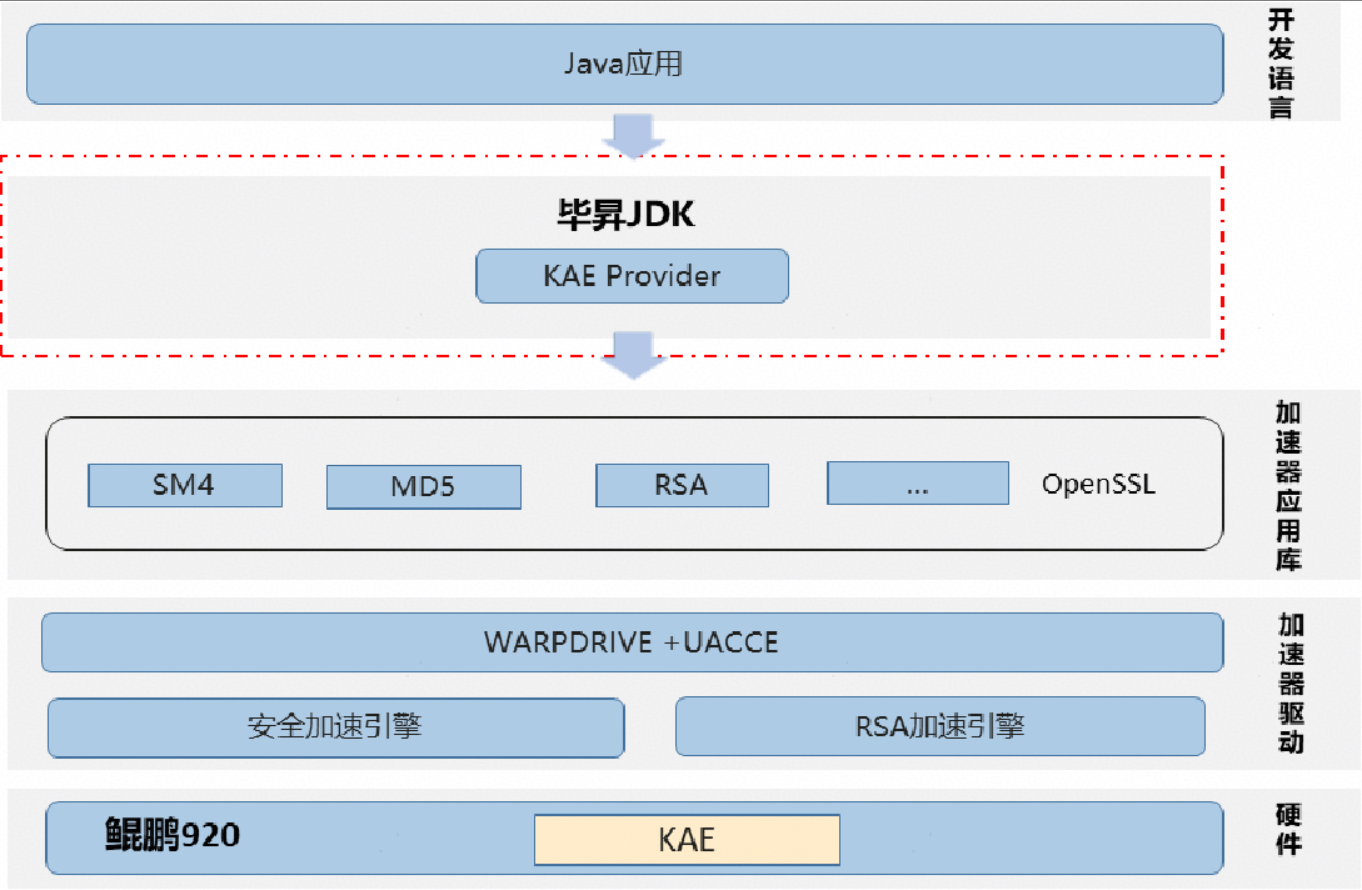
通过鲲鹏KAE硬加速,优化JAVA加解密算法性能,方案架构图如下:
3.2 推荐使能KAE硬件加速的算法
推荐使用鲲鹏服务器KAE硬件加速的算法列表:
算法 | 920服务器 | 920新型号服务器 |
|---|---|---|
摘要算法 | MD5 | MD5 |
对称加密算法 | SM4 | - |
非对称加密算法 | RSA | RSA |
3.3 约束
920服务器安装鲲鹏KAE加速引擎之前需要先安装相应的License,License安装成功之后,操作系统才能识别到加速器设备。
TaiShan K系列服务器硬件KAE加速引擎已默认开启,无需申请License。 920新型号后续更新BIOS可以免license使用,具体BIOS版本待发布再更新。
具体License申请使用操作可参考《华为服务器iBMC许可证 使用指导》。
3.4 推荐配置
920服务器使能KAE硬件加速推荐配置:
CPU | Kunpeng920 7260 |
|---|---|
OS | openEuler 22.03 LTS-SP4 |
KAE | KAE2.0 |
JDK | bishengJDK1.8 |
OpenSSL | OpenSSL 1.1.1a或以上版本 |
4 使用指导
4.1 整体流程
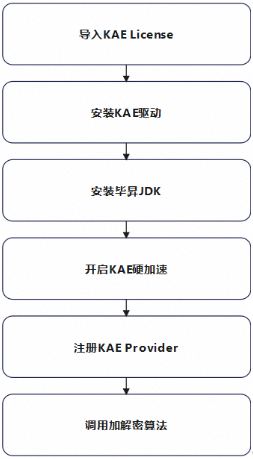
KAE硬加速优化Java加解密算法流程
4.2 具体步骤
步骤 1 导入KAE License
在 iBMC中,选择iBMC管理 -> 许可证管理,在最右侧有"+安装" 按钮,点击后导入License文件。
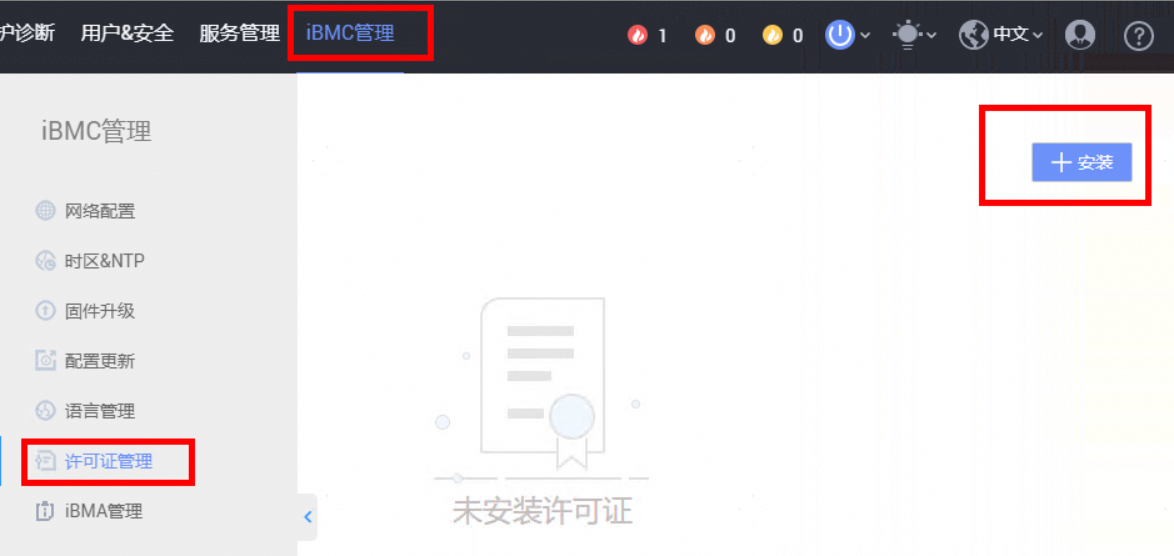
重启OS后生效。
步骤 2 安装KAE驱动
# 安装依赖
yum install -y make kernel-devel-`uname -r` libtool numactl-devel openssl-devel lz4-devel libzstd-devel chrpath cmake libunwind-devel patch
# 设置环境变量
export OPENSSL_ENGINES=/usr/local/lib/engines-1.1
export LD_LIBRARY_PATH=$LD_LIBRARY_PATH:/usr/local/lib
方式1:源码安装
# 拉取源码
git clone https://gitcode.com/boostkit/KAE.git -b kae2
# 执行安装脚本
cd KAEsh build.sh all
方式2:RPM包安装。
kae-driver包和OS版本强相关,如果kernel-devel版本不匹配,则建议重新自行编译对应OS的rpm包。
rpm包获取链接:https://gitcode.com/boostkit/KAE/releases
# 以openEuler22.03 SP4为例
unzip openeuler22.03_sp4.zip
cd openeuler22.03_sp4
rpm -ivh kae-driver-2.0.3-1.aarch64.rpm
rpm -ivh kae-openssl-2.0.3-1.aarch64.rpm
rpm -ivh kae-zip-2.0.3-1.aarch64.rpm
步骤 3 安装毕昇JDK
参考:毕昇JDK8安装指南。
# 下载安装包
wget https://gitee.com/link?target=https%3A%2F%2Fmirrors.huaweicloud.com%2Fkunpeng%2Farchive%2Fcompiler%2Fbisheng_jdk%2Fbisheng-jdk-8u462-b11-linux-aarch64.tar.gz
tar -zxvf  bisheng-jdk-8u462-b11-linux-aarch64.tar.gz
cd /path/to/jdk/bisheng-jdk1.8.0_462
export JAVA_HOME=`pwd`
export PATH=$JAVA_HOME/bin:$PATH
步骤 4 开启KAE硬加速
设置KAE引擎。
export OPENSSL_ENGINES=/usr/local/lib/engines-1.1配置$JAVA_HOME/jre/lib/kaeprovider.conf,配置内容如下:
kae.md5=true # 配置md5使用KAEProvider,该值默认为true,通常情况下不需要显式定义
kae.digest.useKaeEngine=true # 配置digest算法使能KAE硬件加速,该值默认为true,通常情况下不需要显式定义
kae.log=true # 开启KAE日志
kae.log.file=/home/user/kae.log # 设置KAE日志路径
kae.libcrypto.useGlobalMode=true # 使用RTLD_GLOBAL模式加载libcrypto,KAE2.0建议添加该配置项
步骤 5 注册KAE Provider
方式 1: 使用Security API 添加KAE Provider ,并设置其优先级。
例:设置KAE Provider为最高优先级。
Security.insertProviderAt(new org.openeuler.security.openssl.KAEProvider(), 1);方式 2:修改$JAVA_HOME/jre/lib/security/java.security文件,添加KAE Provider,并设置其优先级。
例: 设置KAE Provider为最高优先级。
security.provider.1=org.openeuler.security.openssl.KAEProvider
security.provider.2=sun.security.provider.Sun
security.provider.3=sun.security.rsa.SunRsaSign
security.provider.4=sun.security.ec.SunEC
security.provider.5=com.sun.net.ssl.internal.ssl.Provider
security.provider.6=com.sun.crypto.provider.SunJCE
security.provider.7=sun.security.jgss.SunProvider
security.provider.8=com.sun.security.sasl.Provider
security.provider.9=org.jcp.xml.dsig.internal.dom.XMLDSigRI
security.provider.10=sun.security.smartcardio.SunPCSC
security.provider.11=sun.security.mscapi.SunMSCAPI
步骤 6 调用加解密算法
1.调用KAE硬件加速优化的MD5算法。
import java.security.*;
import java.util.Arrays;
import java.security.Security;
import org.openeuler.security.openssl.KAEProvider;
public class Test {
  public static void main(String[] args) throws NoSuchAlgorithmException {
      Security.insertProviderAt(new KAEProvider(), 1); // 设置KAE Provider为最高优先级
      String algorithm = "MD5"; // or SHA-256, SHA-384
      MessageDigest md = MessageDigest.getInstance(algorithm);
      md.update("helloWorld".getBytes());
      byte[] res = md.digest();
      System.out.println("res = " + Arrays.toString(res));
  }
}
2.调用KAE硬件加速优化的SM4算法。
import java.nio.charset.StandardCharsets;
import java.security.*;
import javax.crypto.*;
import javax.crypto.spec.IvParameterSpec;
import javax.crypto.spec.SecretKeySpec;
public class Test {
    static {
        // 注册KAE Provider
        Security.insertProviderAt(new org.openeuler.security.openssl.KAEProvider(), 1);
    }

    // 定义算法,算法配置参数,秘钥size,sm4块size
    private static final String ALGORITHM = "SM4";
    private static final String TRANSFORMATION = "SM4/CBC/PKCS5Padding";
    private static final int KEY_SIZE = 16;
    private static final int IV_SIZE = 16;
    /**
     * 生成随机密钥
     */
    public static byte[] generateKey() {
        byte[] key = new byte[KEY_SIZE];
        new SecureRandom().nextBytes(key);
        return key;
    }
    /**
     * 生成随机IV
     */
    public static byte[] generateIV() {
        byte[] iv = new byte[IV_SIZE];
        new SecureRandom().nextBytes(iv);
        return iv;
    }
    /**
     * 主测试方法
     */
    public static void main(String[] args) throws Exception {
        // 生成密钥和IV
        byte[] keyBytes = generateKey();
        byte[] ivBytes = generateIV();

        // 创建密钥和IV参数规范
        SecretKeySpec keySpec = new SecretKeySpec(keyBytes, ALGORITHM);
        IvParameterSpec ivSpec = new IvParameterSpec(ivBytes);

        // 加密
        Cipher cipher = Cipher.getInstance(TRANSFORMATION);
        cipher.init(Cipher.ENCRYPT_MODE, keySpec, ivSpec);

        String plainText = "这是一段需要被加密的明文";
        byte[] plainBytes = plainText.getBytes(StandardCharsets.UTF_8);
        byte[] encrypted = cipher.doFinal(plainBytes);

        System.out.println("原始明文: " + plainText);
        System.out.println("加密后长度: " + encrypted.length + " 字节");
        System.out.println("加密结果(Hex): " + bytesToHex(encrypted));

        // 解密验证
        cipher.init(Cipher.DECRYPT_MODE, keySpec, ivSpec);
        byte[] decrypted = cipher.doFinal(encrypted);
        String decryptedText = new String(decrypted, StandardCharsets.UTF_8);

        System.out.println("解密后明文: " + decryptedText);
        System.out.println("加解密验证: " + plainText.equals(decryptedText));
    }

    /**
     * 将字节数组转换为十六进制字符串
     */
    private static String bytesToHex(byte[] bytes) {
        StringBuilder hexString = new StringBuilder();
        for (byte b : bytes) {
            String hex = Integer.toHexString(0xff & b);
            if (hex.length() == 1) {
                hexString.append('0');
            }
            hexString.append(hex);
        }
        return hexString.toString();
    }
}3.调用KAE硬件加速优化的RSA算法。
import java.security.*;
import javax.crypto.Cipher;
import javax.crypto.KeyGenerator;
public class Test {
    // 注册Provider
    static {
        Security.insertProviderAt(new org.openeuler.security.openssl.KAEProvider(), 1);
    }
    public static void main(String[] args) throws Exception {
        // 创建KeyPairGenerator,用于生成公钥/私钥对:
        KeyPairGenerator kpGen = KeyPairGenerator.getInstance("RSA");
        kpGen.initialize(1024);
        KeyPair kp = kpGen.generateKeyPair();
        Person kaeRSA = new Person("kaeRSA", kp.getPublic(), kp.getPrivate());
        // 明文:
        byte[] plain = "这是一段用RSA加密的明文".getBytes("UTF-8");
        // 创建公钥/私钥对:
        // 用kaeRSA的公钥加密:
        byte[] pk = kaeRSA.getPublicKey();
        System.out.println("public key: " + bytesToHex(pk));
        byte[] encrypted = kaeRSA.encrypt(plain);
        System.out.println("encrypted: " + bytesToHex(encrypted));
        // 用kaeRSA的私钥解密:
        byte[] sk = kaeRSA.getPrivateKey();
        System.out.println("private key: " + bytesToHex(sk));
        byte[] decrypted = kaeRSA.decrypt(encrypted);
        System.out.println(new String(decrypted, "UTF-8"));
    }
    private static String bytesToHex(byte[] bytes) {
        StringBuilder sb = new StringBuilder();
        for (byte b : bytes) {
            sb.append(String.format("%02x", b));
        }
        return sb.toString();
    }
}
class Person {
    String name;
    // 公钥:
    PublicKey pk;
    // 私钥:
    PrivateKey sk;
    public Person(String name,PublicKey pk,PrivateKey sk) throws GeneralSecurityException {
        this.name = name;
        this.pk = pk;
        this.sk = sk;
    }
    // 把私钥导出为字节
    public byte[] getPrivateKey() {
        return this.sk.getEncoded();
    }
    // 把公钥导出为字节
    public byte[] getPublicKey() {
        return this.pk.getEncoded();
    }
    // 用公钥加密:
    public byte[] encrypt(byte[] message) throws GeneralSecurityException {
        Cipher cipher = Cipher.getInstance("RSA");
        cipher.init(Cipher.ENCRYPT_MODE, this.pk);
        return cipher.doFinal(message);
    }
    // 用私钥解密:
    public byte[] decrypt(byte[] input) throws GeneralSecurityException {
        Cipher cipher = Cipher.getInstance("RSA");
        cipher.init(Cipher.DECRYPT_MODE, this.sk);
        return cipher.doFinal(input);
    }
}
调用算法后查看kae.log,提示”enable KAE hardware acceleration“ 代表成功使用KAE硬件加速。
----结束↵
5 典型文件加密场景参考实践
SM4 是一款安全、高效、自主、实用的国产对称加密算法,不仅满足高安全需求,还在资源受限环境中表现出色。随着国家对信息安全可信要求的提升,SM4 已成为金融、政务、通信、物联网等关键领域的首选加密标准之一。
5.1 场景介绍
银行与三方机构之间存在高频数据交互需求,涉及客户数据项保密信息,中间传送数据文件需要进行国密(SM4)加密后,才能进行数据传送,保证数据安全,传统方式使用CPU软算方式,CPU占用率高,性能差 。银行的应用大部分采用JAVA语言开发,国密加解密操作直接调用JDK标准库接口进行数据加解密操作,鲲鹏920服务器集成KAE加速器,结合毕昇JDK实现国密加密硬加速,提升加密性能。
5.2 demo测试与结果
软件版本对比:
软件 | 传统方案 | 硬加速方案 |
|---|---|---|
JDK | openJDK1.8 | 毕昇JDK1.8 |
Provider | BC Provider 1.70 | KAE Provider(KAE2.0) |
5.2.1 不使能KAE硬加速
传统SM4加解密通过openJDK+BC Provider实现,测试demo如下:
import java.security.*;
import java.util.*;
import java.io.*;
import javax.crypto.*;
import javax.crypto.spec.*;
import java.nio.channels.FileChannel;
import java.nio.ByteBuffer;
import java.nio.charset.StandardCharsets;
import org.bouncycastle.jce.provider.BouncyCastleProvider;
public class SM4FileEncryptorBC {
    // 注册Provider
    static {
        // 注册BC Provider
        Security.insertProviderAt(new BouncyCastleProvider(), 1);
    }
    // 定义算法,算法参数(模式,填充格式),秘钥size,IVsize,缓冲区size
    private static final String ALGORITHM = "SM4";
    private static final String TRANSFORMATION = "SM4/CBC/PKCS5Padding";
    private static final int KEY_SIZE = 16; // 128位
    private static final int IV_SIZE = 16;  // SM4块大小
    private static final int BUFFER_SIZE = 64 * 1024; // 64KB缓冲区

    /**
     * 生成随机密钥
     */
    public static byte[] generateKey() {
        byte[] key = new byte[KEY_SIZE];
        new SecureRandom().nextBytes(key);
        return key;
    }
    /**
     * 生成随机IV
     */
    public static byte[] generateIV() {
        byte[] iv = new byte[IV_SIZE];
        new SecureRandom().nextBytes(iv);
        return iv;
    }
    /**
     * 加密文件 - BC Provider版本
     */
    public static void encryptFile(File inputFile, File outputFile, byte[] key, byte[] iv)
            throws Exception {
        if (key.length != KEY_SIZE) {
            throw new IllegalArgumentException("密钥必须是16字节");
        }
        if (iv.length != IV_SIZE) {
            throw new IllegalArgumentException("IV必须是16字节");
        }
        // 打屏提示:开始加密文件名
        System.out.println("开始加密: " + inputFile.getName());

        // 创建密钥规范     和      初始化向量参数规范
        SecretKeySpec keySpec = new SecretKeySpec(key, ALGORITHM);
        IvParameterSpec ivSpec = new IvParameterSpec(iv);
        // 获取Cipher 用于调用BC Provider提供的SM4算法
        Cipher cipher = Cipher.getInstance(TRANSFORMATION);
        cipher.init(Cipher.ENCRYPT_MODE, keySpec, ivSpec);
        long startTime = System.currentTimeMillis();
        // 开始加密文件
        try (FileInputStream fis = new FileInputStream(inputFile);
             FileOutputStream fos = new FileOutputStream(outputFile)) {
            // 1. 写入IV到文件头部
            fos.write(iv);
            // 2. 分块加密
            byte[] buffer = new byte[BUFFER_SIZE];
            int bytesRead;
            long totalRead = 0;
            while ((bytesRead = fis.read(buffer)) != -1) {
                byte[] encrypted;
                if (bytesRead == BUFFER_SIZE) {
                    // 普通块使用update提高性能
                    encrypted = cipher.update(buffer, 0, bytesRead);
                } else {
                    // 最后一块使用doFinal处理填充
                    encrypted = cipher.doFinal(buffer, 0, bytesRead);
                }
                if (encrypted != null) {
                    fos.write(encrypted);
                }
                totalRead += bytesRead;
                // 显示进度(每10MB)
                if (totalRead % (10 * 1024 * 1024) < bytesRead) {
                    float percent = (totalRead * 100.0f) / inputFile.length();
                    System.out.printf("加密进度: %.1f%%\n", percent);
                }
            }
        }
        long duration = System.currentTimeMillis() - startTime;
        System.out.println("加密完成! 耗时: " + duration + "ms");
    }
    /**
     * 解密文件 - BC Provider版本
     */
    public static void decryptFile(File inputFile, File outputFile, byte[] key)
            throws Exception {
        System.out.println("开始解密: " + inputFile.getName());
        long startTime = System.currentTimeMillis();
        try (FileInputStream fis = new FileInputStream(inputFile);
             FileOutputStream fos = new FileOutputStream(outputFile)) {
            // 1. 从文件头部读取IV
            byte[] iv = new byte[IV_SIZE];
            int ivBytes = fis.read(iv);
            if (ivBytes != IV_SIZE) {
                throw new IOException("文件格式错误: 无法读取完整IV");
            }
            System.out.println("读取IV: " + bytesToHex(iv).substring(0, 16) + "...");
            SecretKeySpec keySpec = new SecretKeySpec(key, ALGORITHM);
            IvParameterSpec ivSpec = new IvParameterSpec(iv);
            // 获取Cipher实例
            Cipher cipher = Cipher.getInstance(TRANSFORMATION);
            cipher.init(Cipher.DECRYPT_MODE, keySpec, ivSpec);
            // 2. 分块解密
            byte[] buffer = new byte[BUFFER_SIZE + 32]; // 预留填充空间
            int bytesRead;
            long totalRead = 0;
            long fileSize = inputFile.length() - IV_SIZE; // 减去IV大小

            while ((bytesRead = fis.read(buffer)) != -1) {
                byte[] decrypted;
                if (fis.available() > 0) {
                    // 不是最后一块
                    decrypted = cipher.update(buffer, 0, bytesRead);
                } else {
                    // 最后一块
                    decrypted = cipher.doFinal(buffer, 0, bytesRead);
                }
                if (decrypted != null) {
                    fos.write(decrypted);
                }
                totalRead += bytesRead;
                // 显示进度
                if (totalRead % (10 * 1024 * 1024) < bytesRead) {
                    float percent = (totalRead * 100.0f) / fileSize;
                    System.out.printf("解密进度: %.1f%%\n", percent);
                }
            }
        }
        long duration = System.currentTimeMillis() - startTime;
        System.out.println("解密完成! 耗时: " + duration + "ms");
    }
    /**
     * BC Provider是否正常工作
     */
    public static void testKAEProvider() throws Exception {
        System.out.println("=== 测试BC Provider ===");
        // 列出所有Provider
        Provider[] providers = Security.getProviders();
        System.out.println("已注册的Provider:");
        for (Provider p : providers) {
            System.out.println("  " + p.getName() + " v" + p.getVersion() +
                    " - " + p.getInfo());
        }
        // 测试SM4算法
        System.out.println("\n测试SM4算法:");
        byte[] key = generateKey();
        byte[] iv = generateIV();
        String plaintext = "Hello BC Provider!";
        SecretKeySpec keySpec = new SecretKeySpec(key, ALGORITHM);
        IvParameterSpec ivSpec = new IvParameterSpec(iv);
        // 加密
        Cipher cipher = Cipher.getInstance(TRANSFORMATION);
        cipher.init(Cipher.ENCRYPT_MODE, keySpec, ivSpec);
        byte[] encrypted = cipher.doFinal(plaintext.getBytes(StandardCharsets.UTF_8));
        // 解密
        cipher.init(Cipher.DECRYPT_MODE, keySpec, ivSpec);
        byte[] decrypted = cipher.doFinal(encrypted);
        String result = new String(decrypted, StandardCharsets.UTF_8);
        System.out.println("测试结果: " + (plaintext.equals(result) ? "✓ 成功" : "✗ 失败"));
    }
    /**
     * 主测试方法
     */
    public static void main(String[] args) throws Exception {
        System.out.println("========== SM4文件加密测试(BC Provider) ==========\n");
        // 1. 测试BC Provider
        testKAEProvider();
        // 2. 准备测试数据
        byte[] key = generateKey();
        byte[] iv = generateIV();
        if (args.length != 1) {
            throw new Exception("输入参数有且只能有一个:待加密文件路径,当前入参数量:" + args.length);
        }
        String filepath = args[0];
        File originalFile = new File(filepath);
        if (!originalFile.exists()) {
            throw new Exception("路径不存在,请输入正确的文件路径");
        }
        if (!originalFile.isFile()) {
            throw new Exception("输入的路径是目录,请输入待加密文件的路径");
        }
        String prePath = originalFile.getParent();
        File encryptedFile = new File(prePath+"/"+"E_"+originalFile.getName()+".enc");
        File decryptedFile = new File(prePath+"/"+"D_"+originalFile.getName()+".dec");
        System.out.println("将在如下目录生成加密文件和解密文件" + prePath);
        System.out.println("待加密文件路径:" + filepath);
        // 4. 加密文件
        System.out.println("\n=== 加密文件 ===");
        encryptFile(originalFile, encryptedFile, key, iv);
        // 5. 解密文件
        System.out.println("\n=== 解密文件 ===");
        decryptFile(encryptedFile, decryptedFile, key);
        // 6. 验证结果
        System.out.println("\n=== 验证结果 ===");
        verifyFiles(originalFile, decryptedFile);
    }
    /**
     * 验证两个文件是否相同
     */
    private static void verifyFiles(File file1, File file2) throws IOException {
        if (file1.length() != file2.length()) {
            System.out.println("文件大小不一致!");
            return;
        }
        try (FileInputStream fis1 = new FileInputStream(file1);
             FileInputStream fis2 = new FileInputStream(file2)) {
            byte[] buf1 = new byte[8192];
            byte[] buf2 = new byte[8192];
            boolean match = true;
            while (true) {
                int len1 = fis1.read(buf1);
                int len2 = fis2.read(buf2);
                if (len1 != len2 || !Arrays.equals(buf1, buf2)) {
                    match = false;
                    break;
                }
                if (len1 == -1) break;
            }
            System.out.println("文件验证: " + (match ? "✓ 完全一致" : "✗ 不一致"));
        }
    }
    /**
     * 字节数组转十六进制字符串
     */
    private static String bytesToHex(byte[] bytes) {
        StringBuilder sb = new StringBuilder();
        for (byte b : bytes) {
            sb.append(String.format("%02x", b));
        }
        return sb.toString();
    }
}
编译运行:
# 修改环境变量,使用openJDK
# 将bcprov-jdk15on-1.70.jar复制到测试demo同级目录
# bcprov-jdk15on-1.70.jar下载链接:https://repo1.maven.org/maven2/org/bouncycastle/bcprov-jdk15on/1.70/bcprov-jdk15on-1.70.jar
# 编译
javac -cp "./bcprov-jdk15on-1.70.jar" SM4FileEncryptorBC.java
#运行
taskset -c 32-35 java -cp ".:./bcprov-jdk15on-1.70.jar" SM4FileEncryptorBC <文件路径,如"/data/test.txt">
5.2.2 使能KAE硬加速
使用KAE硬加速,需要安装好KAE并配置毕昇JDK,并配置好KAE引擎和kaeprovider.conf,具体可参考3.1.2,测试demo如下:
import java.security.*;
import java.util.*;
import java.io.*;
import javax.crypto.*;
import javax.crypto.spec.*;
import java.nio.channels.FileChannel;
import java.nio.ByteBuffer;
import java.nio.charset.StandardCharsets;
public class SM4FileEncryptorKAE {
    // 注册Provider
    static {
        // 注册KAE Provider
        Security.insertProviderAt(new org.openeuler.security.openssl.KAEProvider(), 1);
    }
    // 定义算法,算法配置参数,秘钥size,IVsize,缓冲区size
    private static final String ALGORITHM = "SM4";
    private static final String TRANSFORMATION = "SM4/CBC/PKCS5Padding";
    private static final int KEY_SIZE = 16; // 128位
    private static final int IV_SIZE = 16;  // SM4块大小
    private static final int BUFFER_SIZE = 64 * 1024; // 64KB缓冲区

    /**
     * 生成随机密钥
     */
    public static byte[] generateKey() {
        byte[] key = new byte[KEY_SIZE];
        new SecureRandom().nextBytes(key);
        return key;
    }
    /**
     * 生成随机IV
     */
    public static byte[] generateIV() {
        byte[] iv = new byte[IV_SIZE];
        new SecureRandom().nextBytes(iv);
        return iv;
    }
    /**
     * 加密文件 - KAE Provider版本
     */
    public static void encryptFile(File inputFile, File outputFile, byte[] key, byte[] iv)
            throws Exception {
        if (key.length != KEY_SIZE) {
            throw new IllegalArgumentException("密钥必须是16字节");
        }
        if (iv.length != IV_SIZE) {
            throw new IllegalArgumentException("IV必须是16字节");
        }
        // 打屏提示:开始加密文件名,密钥、IV的16进制
        System.out.println("开始加密: " + inputFile.getName());
        System.out.println("密钥: " + bytesToHex(key).substring(0, 16) + "...");
        System.out.println("IV: " + bytesToHex(iv).substring(0, 16) + "...");
        // 创建密钥规范     和      初始化向量参数规范
        SecretKeySpec keySpec = new SecretKeySpec(key, ALGORITHM);
        IvParameterSpec ivSpec = new IvParameterSpec(iv);
        // 获取KAE Provider支持的Cipher
        Cipher cipher = Cipher.getInstance(TRANSFORMATION);
        cipher.init(Cipher.ENCRYPT_MODE, keySpec, ivSpec);
        long startTime = System.currentTimeMillis();
        // 开始加密文件
        try (FileInputStream fis = new FileInputStream(inputFile);
             FileOutputStream fos = new FileOutputStream(outputFile)) {
            // 1. 写入IV到文件头部
            fos.write(iv);
            // 2. 分块加密
            byte[] buffer = new byte[BUFFER_SIZE];  //创建buffer数组,用于fis读取待加密数据
            int bytesRead;  //一次读取的字节数
            long totalRead = 0; //总共读取的字节数

            while ((bytesRead = fis.read(buffer)) != -1) {  //循环处理读取的待加密数据
                byte[] encrypted;   //创建encrypted数组,用于fos输出加密后数据

                if (bytesRead == BUFFER_SIZE) { //不是最后一次读取,未读取完
                    // 普通块使用update提高性能
                    encrypted = cipher.update(buffer, 0, bytesRead);    //使用cipher调用sm4加密算法的update()接口,加密中间数据
                } else {    //最后一次读取,全部读取完
                    // 最后一块使用doFinal处理填充
                    encrypted = cipher.doFinal(buffer, 0, bytesRead);   //doFinal()方法用于加密最后一块数据,相比与update,多了填充
                }
                if (encrypted != null) {
                    fos.write(encrypted);   //加密后数据通过fos输出
                }
                totalRead += bytesRead;     //记录已加密字节数

                // 显示进度(每10MB)
                if (totalRead % (10 * 1024 * 1024) < bytesRead) {
                    float percent = (totalRead * 100.0f) / inputFile.length();      //已读取的字节长度 除以 总输入字节长度
                    System.out.printf("加密进度: %.1f%%\n", percent);
                }
            }
        }
        long duration = System.currentTimeMillis() - startTime;     //计算加密耗时
        System.out.println("加密完成! 耗时: " + duration + "ms");
    }
    /**
     * 解密文件 - KAE Provider版本
     */
    public static void decryptFile(File inputFile, File outputFile, byte[] key)
            throws Exception {
        System.out.println("开始解密: " + inputFile.getName());
        long startTime = System.currentTimeMillis();
        try (FileInputStream fis = new FileInputStream(inputFile);
             FileOutputStream fos = new FileOutputStream(outputFile)) {
            // 1. 从文件头部读取IV
            byte[] iv = new byte[IV_SIZE];
            int ivBytes = fis.read(iv);
            if (ivBytes != IV_SIZE) {
                throw new IOException("文件格式错误: 无法读取完整IV");
            }
            System.out.println("读取IV: " + bytesToHex(iv).substring(0, 16) + "...");
            SecretKeySpec keySpec = new SecretKeySpec(key, ALGORITHM);
            IvParameterSpec ivSpec = new IvParameterSpec(iv);
            // 获取Cipher实例
            Cipher cipher = Cipher.getInstance(TRANSFORMATION);
            cipher.init(Cipher.DECRYPT_MODE, keySpec, ivSpec);
            // 2. 分块解密
            byte[] buffer = new byte[BUFFER_SIZE + 32]; // 预留填充空间
            int bytesRead;
            long totalRead = 0;
            long fileSize = inputFile.length() - IV_SIZE; // 减去IV大小

            while ((bytesRead = fis.read(buffer)) != -1) {
                byte[] decrypted;
                if (fis.available() > 0) {
                    // 不是最后一块
                    decrypted = cipher.update(buffer, 0, bytesRead);
                } else {
                    // 最后一块
                    decrypted = cipher.doFinal(buffer, 0, bytesRead);
                }
                if (decrypted != null) {
                    fos.write(decrypted);
                }
                totalRead += bytesRead;
                // 显示进度
                if (totalRead % (10 * 1024 * 1024) < bytesRead) {
                    float percent = (totalRead * 100.0f) / fileSize;
                    System.out.printf("解密进度: %.1f%%\n", percent);
                }
            }
        }
        long duration = System.currentTimeMillis() - startTime;
        System.out.println("解密完成! 耗时: " + duration + "ms");
    }
    /**
     * 验证KAE Provider是否正常工作
     */
    public static void testKAEProvider() throws Exception {
        System.out.println("=== 测试KAE Provider ===");
        // 列出所有Provider
        Provider[] providers = Security.getProviders();
        System.out.println("已注册的Provider:");
        for (Provider p : providers) {
            System.out.println("  " + p.getName() + " v" + p.getVersion() +
                    " - " + p.getInfo());
        }
        // 测试SM4算法
        System.out.println("\n测试SM4算法:");
        byte[] key = generateKey();
        byte[] iv = generateIV();
        String plaintext = "Hello KAE Provider!";
        SecretKeySpec keySpec = new SecretKeySpec(key, ALGORITHM);
        IvParameterSpec ivSpec = new IvParameterSpec(iv);
        // 加密
        Cipher cipher = Cipher.getInstance(TRANSFORMATION);
        cipher.init(Cipher.ENCRYPT_MODE, keySpec, ivSpec);
        byte[] encrypted = cipher.doFinal(plaintext.getBytes(StandardCharsets.UTF_8));
        // 解密
        cipher.init(Cipher.DECRYPT_MODE, keySpec, ivSpec);
        byte[] decrypted = cipher.doFinal(encrypted);
        String result = new String(decrypted, StandardCharsets.UTF_8);
        System.out.println("测试结果: " + (plaintext.equals(result) ? "✓ 成功" : "✗ 失败"));
    }
    /**
     * 主测试方法
     */
    public static void main(String[] args) throws Exception {
        System.out.println("========== SM4文件加密测试(KAE Provider) ==========\n");
        // 1. 测试KAE Provider
        testKAEProvider();
        // 2. 准备测试数据
        byte[] key = generateKey();
        byte[] iv = generateIV();
        if (args.length != 1) {
            throw new Exception("输入参数有且只能有一个:待加密文件路径,当前入参数量:" + args.length);
        }
        String filepath = args[0];
        File originalFile = new File(filepath);
        if (!originalFile.exists()) {
            throw new Exception("路径不存在,请输入正确的文件路径");
        }
        if (!originalFile.isFile()) {
            throw new Exception("输入的路径是目录,请输入待加密文件的路径");
        }
        String prePath = originalFile.getParent();
        File encryptedFile = new File(prePath+"/"+"E_"+originalFile.getName()+".enc");
        File decryptedFile = new File(prePath+"/"+"D_"+originalFile.getName()+".dec");
        System.out.println("将在如下目录生成加密文件和解密文件" + prePath);
        System.out.println("待加密文件路径:" + filepath);
        // 4. 加密文件
        System.out.println("\n=== 加密文件 ===");
        encryptFile(originalFile, encryptedFile, key, iv);
        // 5. 解密文件
        System.out.println("\n=== 解密文件 ===");
        decryptFile(encryptedFile, decryptedFile, key);
        // 6. 验证结果
        System.out.println("\n=== 验证结果 ===");
        verifyFiles(originalFile, decryptedFile);
    }
    /**
     * 验证两个文件是否相同
     */
    private static void verifyFiles(File file1, File file2) throws IOException {
        if (file1.length() != file2.length()) {
            System.out.println("文件大小不一致!");
            return;
        }
        try (FileInputStream fis1 = new FileInputStream(file1);
             FileInputStream fis2 = new FileInputStream(file2)) {
            byte[] buf1 = new byte[8192];
            byte[] buf2 = new byte[8192];
            boolean match = true;
            while (true) {
                int len1 = fis1.read(buf1);
                int len2 = fis2.read(buf2);
                if (len1 != len2 || !Arrays.equals(buf1, buf2)) {
                    match = false;
                    break;
                }
                if (len1 == -1) break;
            }
            System.out.println("文件验证: " + (match ? "✓ 完全一致" : "✗ 不一致"));
        }
    }
    /**
     * 字节数组转十六进制字符串
     */
    private static String bytesToHex(byte[] bytes) {
        StringBuilder sb = new StringBuilder();
        for (byte b : bytes) {
            sb.append(String.format("%02x", b));
        }
        return sb.toString();
    }
}
编译运行:
# 修改环境变量,使用bishengJDK
# 编译
javac SM4FileEncryptorKAE.java
#运行
taskset -c 32-35 java SM4FileEncryptorKAE <文件路径,如"/data/test.txt">
5.2.3 测试结果
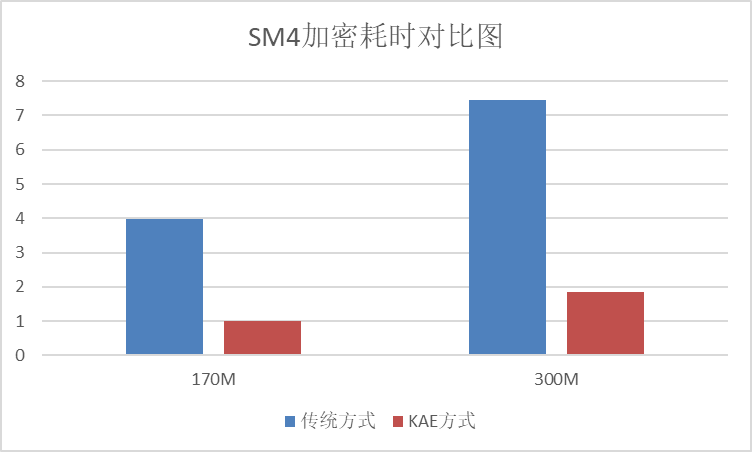
加密耗时对比:
解密耗时对比:
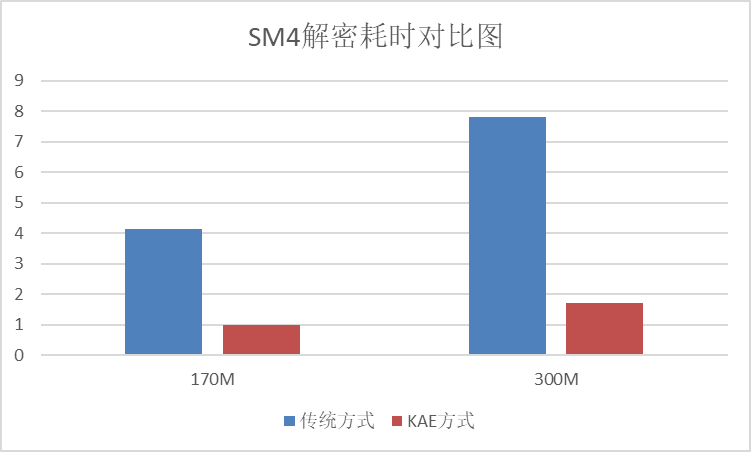
传统方案加解密耗时约为KAE硬加速方案的4倍,大包场景下,KAE硬加速方案的效果更明显。