
配置机密虚拟机
按照上述流程搭建好环境后,就可以启动机密虚拟机。
libvirt方式启动
- 将制作机密虚拟机qcow2镜像生成的qcow2镜像文件拷贝至目标环境。

- 创建并编辑libvirt启动机密虚拟机的cvm.xml,编辑内容如下:
<domain type='kvm' xmlns:qemu="http://libvirt.org/schemas/domain/qemu/1.0">
  <name>cvm</name>
  <memory unit='GiB'>8</memory>
  <vcpu placement='static'>4</vcpu>
  <cputune>
    <vcpupin vcpu='0' cpuset='0'/>
    <vcpupin vcpu='1' cpuset='1'/>
    <vcpupin vcpu='2' cpuset='2'/>
    <vcpupin vcpu='3' cpuset='3'/>
    <emulatorpin cpuset='0-3'/>
  </cputune>
    <numatune>
    <memnode cellid='0' mode='strict' nodeset='0'/>
  </numatune>
  <os>
    <type arch='aarch64' machine='virt'>hvm</type>
    <loader readonly='yes' type='rom'>/usr/share/edk2/aarch64/QEMU_EFI.fd</loader>
     <boot dev='hd'/>
  </os>
  <features>
    <acpi/>
    <gic version='3'/>
  </features>
  <cpu mode='host-passthrough'>
    <topology sockets='1' dies='1' clusters='1' cores='4' threads='1'/>
           <numa>
      <cell id='0' cpus='0-3' memory='8' unit='GiB'/>
    </numa>
  </cpu>
  <on_poweroff>destroy</on_poweroff>
  <on_reboot>restart</on_reboot>
  <on_crash>destroy</on_crash>
  <devices>
    <emulator>/usr/libexec/qemu-kvm</emulator>
         <console type='pty'/>
    <disk type='file' device='disk' model='virtio-non-transitional'>
      <driver name='qemu' type='qcow2' queues='2' cache='none' iommu='on'/>
      <source file='/home/virsh/cvm/openEuler-24.03-SP3-cvm-aarch64.qcow2'/>
      <target dev='vda' bus='virtio'/>
    </disk>
<interface type='bridge'>
<source bridge='virbr0'/>
<driver iommu='on' event_idx='off'/>
<model type='virtio-non-transitional'/>
</interface>
  </devices>
  <launchSecurity type='cvm'/>
  <qemu:commandline>
    <qemu:arg value='-object'/>
    <qemu:arg value='tmm-guest,id=tmm0,sve-vector-length=128,num-pmu-counters=1'/>
  </qemu:commandline>
</domain>
- “sve-vector-length”和“num-pmu-counters”属于可选配置参数。只有当SVE特性开启后,才可配置sve-vector-length。
- cputune中emulatorpin的cpuset范围要与vcpupin的cpuset范围重合,否则会出现ttyAMA0超时问题。
- 对于频繁启动、销毁机密虚拟机等压力测试场景,推荐关闭virtio-net的event_idx机制以提升virtio网络稳定性,配置示例如下。
<interface type='bridge'>
<source bridge='virbr0'/>
<driver iommu='on' event_idx='off'/>
<model type='virtio-non-transitional'/>
</interface>
- 启动前机密虚拟机的libvirt配置xml文件内容应做如下修改。
修改vda disk的source file路径为1文件系统绝对路径。

- 使用virsh define定义虚拟机配置。
virsh define cvm.xml

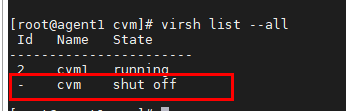
- 执行以下命令查看虚拟机定义。
virsh list --all
Name与xml中<name>cvm</name>一致。
- 关闭SELinux,详情可参见SELinux配置。
- 执行以下命令启动机密虚拟机。
virsh start cvm

- 执行以下命令进入机密虚拟机串口。
virsh console cvm
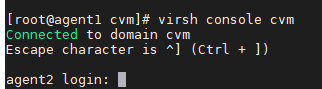
镜像默认用户为root。
QEMU命令行启动
- 将制作机密虚拟机qcow2镜像生成的qcow2镜像文件拷贝至目标环境。

- 创建并编辑QEMU命令行启动机密虚拟机的run-qemu.sh,编辑内容如下。
#!/bin/sh MAC_ADDR_0=DE:AD:BE:EF:FA:28 function launch_uefi() { taskset -c 0 /usr/libexec/qemu-kvm \ -M virt,usb=off,gic-version=host,accel=kvm,kvm-type=cvm \ --enable-kvm \ -bios /usr/share/edk2/aarch64/QEMU_EFI.fd \ -cpu host \ -m 2048 \ -smp 1 \ -no-user-config \ -nographic \ --no-reboot \ -object tmm-guest,id=tmm0,num-pmu-counters=1 \ -drive if=none,file=/home/virsh/cvm/openEuler-24.03-SP3-cvm-aarch64.qcow2,format=qcow2,id=disk01 \ -device virtio-blk-pci-non-transitional,drive=disk01,num-queues=1,bootindex=1,iommu_platform=on \ -netdev tap,id=vnet,ifname=tap0,script=/home/uefi/qemu-ifup,queues=2 \ -device virtio-net-pci-non-transitional,netdev=vnet,iommu_platform=on } function launch_uefi_normal() { /usr/libexec/qemu-kvm \ -M virt,usb=off,gic-version=host,accel=kvm \ --enable-kvm \ -bios /usr/share/edk2/aarch64/QEMU_EFI.fd \ -cpu host \ -m 2048 \ -smp 1\ -no-user-config \ -nographic \ --no-reboot \ -drive if=none,file=/home/virsh/cvm/openEuler-24.03-SP3-cvm-aarch64.qcow2,format=qcow2,id=disk01 \ -device virtio-blk-pci-non-transitional,drive=disk01,num-queues=1,bootindex=1 \ -netdev tap,id=vnet,ifname=tap0,script=/home/uefi/qemu-ifup,queues=2 \ -device virtio-net-pci,netdev=vnet,mac=${MAC_ADDR_0} } if [ "$1" == "u" ] then launch_uefi fi # Launch cVM to test KATA if [ "$1" == "nu" ] then launch_uefi_normal fi- launch_uefi表示启动机密虚拟机,launch_uefi_normal表示启动普通虚拟机。
- 虚拟机如果需要连接网络,新建qemu-ifup文件并将以下内容拷贝进文件,其中“switch = virbr0”中的网桥根据实际环境配置。
#!/bin/sh
set -x
switch=virbr0
if [ -n "$1" ];then
        ip tuntap add $1 mode tap user `whoami`
        ip link set $1 up
        sleep 1s
        ip link set $1 master $switch
        exit 0
else
        echo "Error: no interface specified"
        exit 1
fi
- 启动前run-qemu.sh脚本文件内容应做如下修改。
修改vda disk的source file路径为1文件系统绝对路径。

镜像默认用户为root。
使能多NUMA
在libvirt方式启动的步骤2创建的机密虚拟机xml基础上修改配置。
- 支持虚拟NUMA node绑定一个物理NUMA范围。虚拟机安全内存将会在指定NUMA范围内分配,libvirt虚拟机配置中关于绑定物理NUMA范围示例如下。
<numatune>
          <memnode cellid='0' mode='strict' nodeset='1-3' />
</numatune>
对于上述配置,虚拟机安全内存将会尝试在NUMA 1、2、3上分配。等价写法为:nodeset='1,2,3'。
- 支持在多NUMA上分配安全内存,以支持启动大虚拟机,配置示例如下。
<numatune> <memnode cellid='0' mode='strict' nodeset='0' /> <memnode cellid='1' mode='strict' nodeset='3' /> </numatune> <cpu mode='host-passthrough'> <topology sockets='1' dies='1' clusters='1' cores='8' threads='1'/> <numa> <cell id='0' cpus='0-3' memory='4' unit='GiB'/> <cell id='1' cpus='4-7' memory='4' unit='GiB'/> </numa> </cpu>- 对于上述配置,机密虚拟机将在NUMA 0和NUMA 3上各分配4GB安全内存。
- 配置示例中vCPU的数量为8,cvm.xml中对应配置修改如下:<vcpu placement='static'>8</vcpu>。
- 已知开源问题及解决方案请参见启动虚拟机失败,QEMU报错。
父主题: 部署软件