
report分析命令
命令功能
支持对采集生成的JSON文件进行分析,输出终端报告、Excel报告和HTML报告,其终端报告为Summary数据,Excel报告包含Summary数据和可视化时序图表,HTML报告提供更好的指标可视化能力,指标覆盖范围详见具体报告。
命令格式
1
|
./ksys report [-h] -i INPUT [-o OUTPUT] [--parse TYPE LOG_DIRECTORY] [-c] [--verbose] [-l {0,1,2,3}] |
参数说明
|
参数 |
参数选项 |
参数说明 |
||
|---|---|---|---|---|
|
-h/--help |
- |
可选参数,获取帮助信息。 |
||
|
-i/--input |
- |
必选参数,指定JSON文件的路径,该JSON文件必须是使用collect命令采集得到的。 |
||
|
-o/--output |
- |
可选参数,指定Excel文件和HTML文件的存放路径,不指定则在当前目录下生成格式为“Y_M_D_H_M_S_report.xlsx”的Excel文件和“Y_M_D_H_M_S_report.html”的HTML文件。 |
||
|
--parse |
- |
可选参数,指定应用类型以及对应日志文件的存放目录,需要先后输入应用类型,再输入对应日志的存放目录,用空格分隔。 例如:
存放目录下各应用日志文件的格式要求如下:
|
||
|
-c/--cpu |
- |
可选参数,保存各CPU的时序数据到Excel结果文件中。 |
||
|
--verbose |
- |
可选参数,显示采集指标的详细解释,默认不显示。若指定--verbose参数,指标的详细解释根据操作系统语言类型展示。
说明:
若环境不支持中文显示,将自动切换至英文。 |
||
|
-l/--log-level |
0/1/2/3 |
可选参数,设置日志级别,默认为1。
|
使用示例
- 执行以下命令,查看report命令支持的功能信息:
1./ksys report -h
返回信息如下:
 1
 2
 3
 4
 5
 6
 7
 8
 9
10
11
12
13
14
15
16
17
18
19
20
21
22
23
24
25
26
27
28
29
30
31
32
33
34
35
36
USAGE
     ksys report [-h] -i INPUT [-o OUTPUT] [--parse TYPE LOG_DIRECTORY] [-c] [--verbose] [-l {0,1,2,3}]

DESCRIPTION
    Create a report command line task.

options:
    -h, --help
    show this help message and exit

    -i INPUT, --input INPUT
    Input the full path of the JSON file. This file must be collected by running the collect command.

    -o OUTPUT, --output OUTPUT
    Output the full path.

    --parse TYPE LOG_DIRECTORY
    Input the report type and directory. The following report types are supported:
        mysql: errorlog, generallog, and slowlog reports of MySQL 5.7.27 to 8.0.5.
        flink: jobmanager and taskmanager system-level logs of Flink 1.20.1 to 2.0.0.
        redis: Redis-server logs of Redis 5.0.12 to 6.0.20.
        spark: system-level logs of Spark 3.1.1 to 3.2.1.
        kafka: system-level logs of Kafka 2.8.2-1 to 2.13-4.
        openGauss: system-level logs of openGauss 5.0.0LTS to 7.0.0.RC.
        general: reports can be generated by performance test tools such as Sysbench.
                 Other reports can also be generated but they must meet specific formats. For details, see README.

    -c, --cpu
    Save the time sequence data of each CPU to the Excel file.
    If the input JSON file is collected using the -p option, this option is invalid.

    --verbose
    Display more metric message. Language of description follows system locale (LC_MESSAGES/LANG env). Language is zh now.

    -l {0,1,2,3}, --log-level {0,1,2,3}
    Set the log level (0=DEBUG, 1=INFO, 2=WARNING, 3=ERROR), which defaults to 1(INFO).
- 如果当前采集的业务存在日志,可以在分析时关联业务日志。
./ksys report -i /home/test/2026_06_14_15_11_20_report.json --parse spark /home/test/
业务日志对齐分析任务可以实现业务数据和系统数据的时间线对齐,会正常返回分析后的Summary数据,基本和采集系统指标返回信息一样。区别在于如果时间线有交集且存在业务数据,会额外保存业务数据JSON文件,并在Excel文件的第一个表格页保存时序业务数据。

2026_06_14_15_11_20_report.json为通过ksys collect命令生成的JSON文件。
返回信息以鲲鹏920新型号处理器的服务器为例:
1
2
3
4
Save statistics and time series data to an Excel file and an HTML file. Please wait.
Data saved successfully at /home/test/2026_06_14_16_04_57_service.json
The report has been saved to /home/test/2026_06_14_16_04_57_report.xlsx
The report has been saved to /home/test/2026_06_14_16_04_58.html
静态采集报告说明
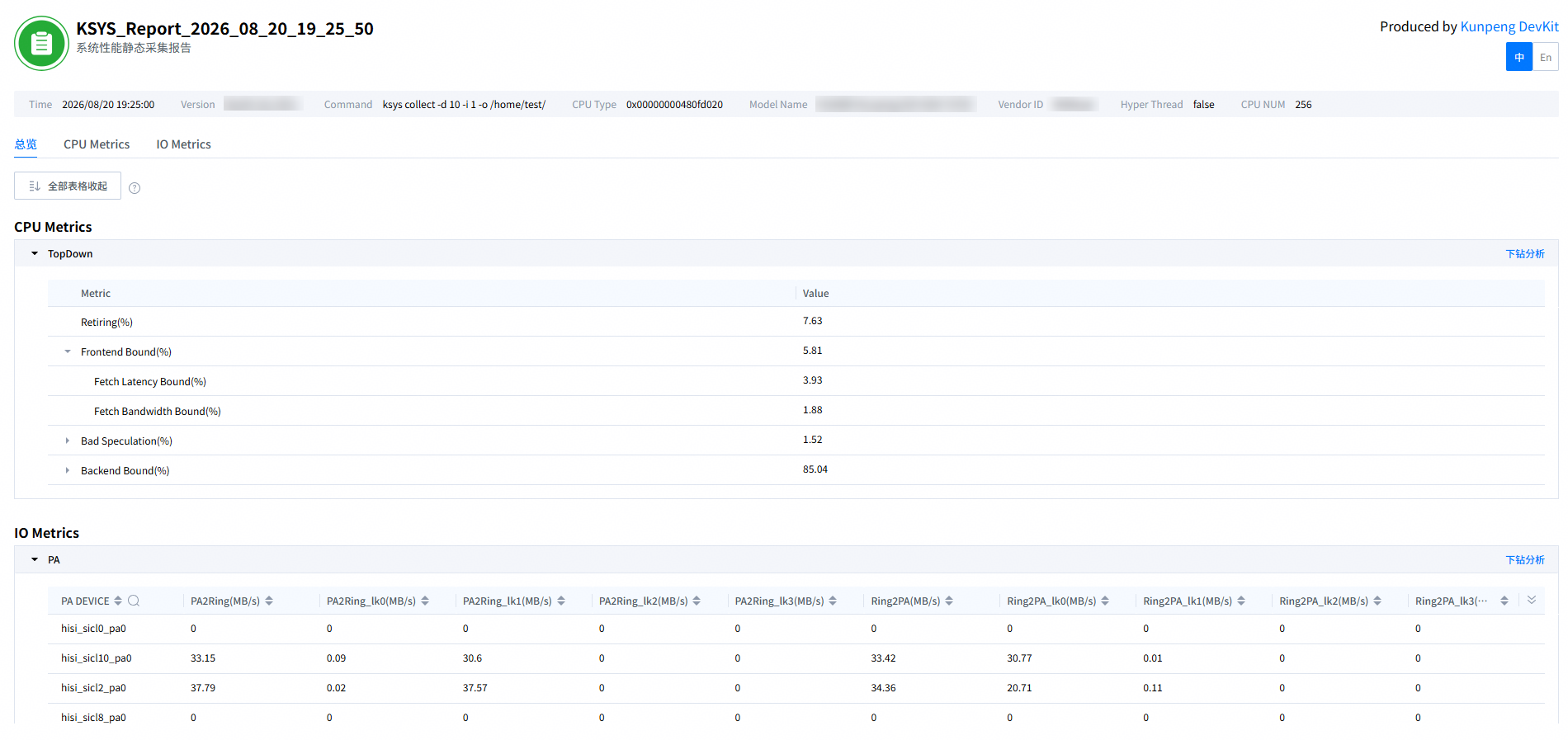
执行report分析命令生成HTML格式的静态采集报告,静态采集报告以及结果参数说明如图1、表2所示。
|
参数 |
说明 |
|---|---|
|
Time |
报告采集时间。 |
|
Version |
鲲鹏性能定界工具版本。 |
|
Command |
鲲鹏性能定界工具的collect采集命令。 |
|
CPU Type |
CPU编码。 |
|
Model Name |
服务器类型。 |
|
Vendor ID |
供应商信息。 |
|
Hyper Thread |
是否支持超线程。 |
|
CPU NUM |
CPU核数量,用于说明性能数据的统计范围和并行规模。 |
|
总览 |
|
|
CPU Metrics |
CPU指标。 |
|
IO Metrics |
IO指标。 |
- 静态采集报告支持选择单指标进行分析。
- 鼠标悬停总览表格中的指标上会显示指标详细解释。
- 在总览表格中单击
 或
或 可一键全部展开或收起页面下方所有表格;单击表头末尾
 按钮可筛选表头;单击“下钻分析”按钮,会进入到对应的指标分析页面。
 - 单击“时序趋势”列的折线图,可打开时序趋势图,查看更详细的时序数据。