Obtaining Security Memory Information
To facilitate O&M in the REE, you can run libvirt virsh commands to view the secure memory usage in the TEE.
- Deploy the secure memory observability drivers.
- Install the virtCCA_driver package.
yum install -y virtCCA_driver
depmod -a
- Load the TMM driver.
modprobe tmm_driver
- Run the following commands to verify that the tmm_driver driver is loaded and check if sysfs exists:
lsmod | grep tmm
ls /sys/kernel/tmm

- Install the virtCCA_driver package.
- Run the following commands to obtain secure memory information through libvirt:
- Obtaining coarse-grained secure memory information
virsh tmm tmm_memory_info
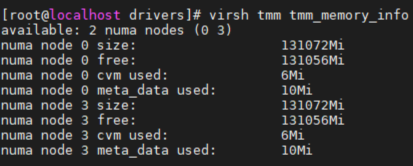
The following information is obtained:
- Number of NUMA nodes with secure memory
- Specific node IDs
- Total secure memory of the nodes
- Free secure memory of the nodes
- Memory used by the metadata of the nodes
- Memory used by the cVMs on the nodes
- Obtaining fine-grained secure memory information
virsh tmm tmm_memory_info --detail
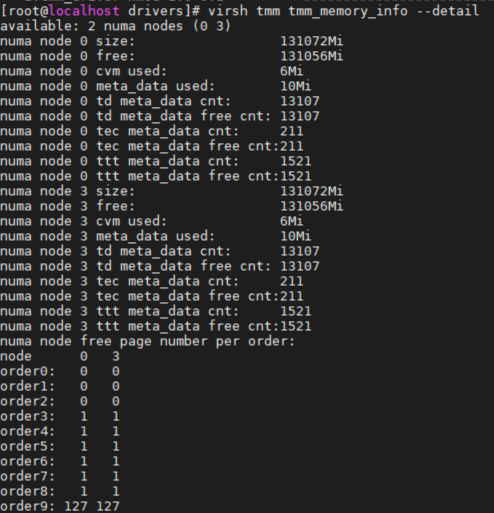
- In addition to the coarse-grained secure memory information, the obtained information also includes the total number of metadata records and the number of idle metadata records on each NUMA node as well as the number of idle page tables on each NUMA node.
- The memory size at each level of page is as follows:
- Metadata stores necessary information data objects for running cVMs. Metadata is classified into reserved metadata and extended metadata. After reserved metadata is used up, metadata is extended to generate new metadata. Table 1 describes the metadata types.
- Run the cat command on kernel attribute files to obtain secure memory information.
- Display the secure memory usage of each NUMA node.
cat /sys/kernel/tmm/memory_info
- Display the total number and the count of free metadata on each NUMA node.
cat /sys/kernel/tmm/slab_info
- Display the number of free page tables on each NUMA node.
cat /sys/kernel/tmm/buddy_info
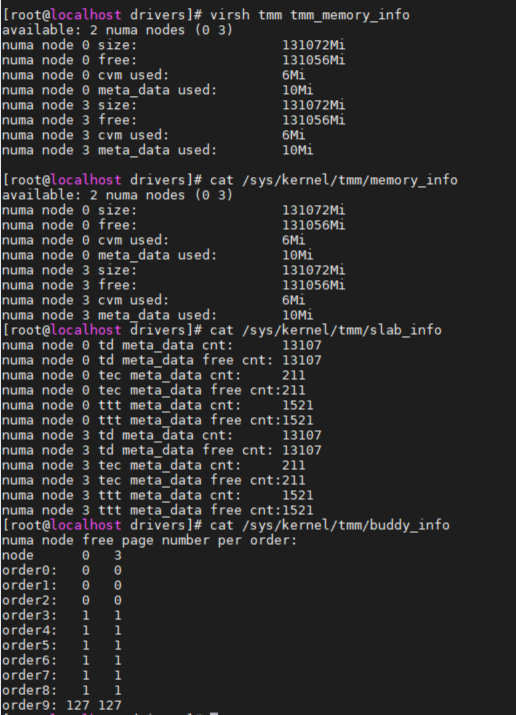
- Display the secure memory usage of each NUMA node.
- Obtaining coarse-grained secure memory information

Parent topic: Feature Usage