Importing a Dependency Dictionary
A dependency dictionary is provided in the tool. If you have custom dependencies to supplement, fill in the dictionary template and import them. If you import a private dependency dictionary, the tool preferentially uses this private dependency dictionary.
Prerequisites
You have logged in to the Kunpeng DevKit.

- Only the administrator devadmin can import the dependency dictionary.
- The dependency dictionary cannot be decrypted without the OpenSSL component on the OS. Ensure that the OpenSSL version in the current environment is 1.0.2k or later. An outdated version may pose security risks.
- The dependency dictionary cannot be imported when a task is ongoing.
- For details about how to rectify common dependency dictionary management failures, see Common Problems in Dependency Dictionary Management.
- After the Kunpeng DevKit is upgraded to the 24.0.RC2 version, the Maven dictionary file maven_custom.csv imported earlier is changed to dependency_custom.csv.
Procedure
- Click
 in the upper right corner. In the navigation tree on the left, choose Tool Settings > Porting Advisor. The Dependency Dictionary Management page is displayed by default.
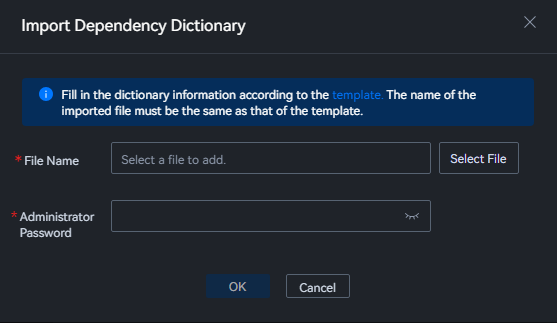
 - Click Import Dependency Dictionary. See Figure 1.
- Click template to obtain the template, fill in the dictionary information, and click Select File to upload the template. Enter the administrator password and click OK.
Parent topic: Dependency Dictionary Management