Deploying Core Components
To build a secure virtualization environment and to support isolated execution and secure boot for TEE, the required software components must be deployed. This section describes how to compile and install components such as libvirt, QEMU, the host kernel, and EDK2 using source code.
Compilation environment:
openEuler 24.03 LTS SP3
Downloading compilation dependencies:
sudo yum install ninja-build libcap-ng-devel libattr-devel glib2-devel numactl-devel libslirp-devel liburing-devel meson.noarch ncurses-devel openssl-devel elfutils-libelf-devel dwarves gnutls-devel yajl-devel libtirpc-devel python3-docutils libxml2-devel rpcgen libpciaccess-devel meson
sudo yum groupinstall "Development Tools"
Installing libvirt Using the Yum Repository
- Install libvirt from the openEuler 24.03 LTS SP3 repository.
Install the libvirt software package, version 27 or later.
yum install libvirt

- To enable the dtb dump parameter passthrough in libvirt, you must modify the libvirt configuration to ensure that the QEMU startup user matches the current OS user.
- View the current user.
whoami

- Open the /etc/libvirt/qemu.conf file.
vim /etc/libvirt/qemu.conf
- Press i to enter the insert mode and change the values of user and group to root.
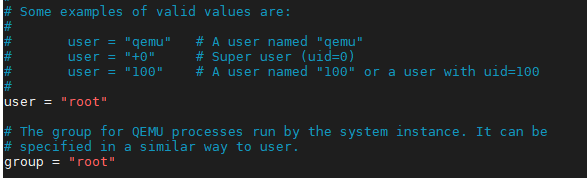
- Press Esc to exit the insert mode. Type :wq! and press Enter to save the file and exit.
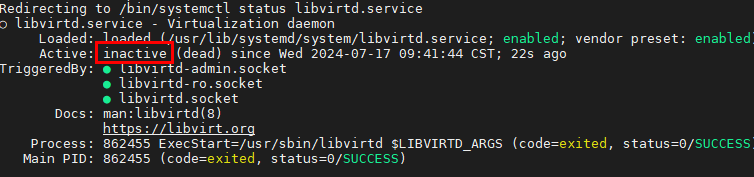
- Check the libvirtd status.
systemctl status libvirtd
If the libvirtd status is inactive, run the following command to start libvirtd. Otherwise, skip this step to step 2.f.systemctl start libvirtd
- Reload the libvirtd configuration.
systemctl reload libvirtd
- View the current user.
Installing QEMU Using the Yum Repository
- Check the QEMU version from the openEuler 24.03 LTS SP3 repository, and install the QEMU package, version 71 or later.
yum list | grep qemu

- Install QEMU from the openEuler 24.03 LTS SP3 repository.
yum install -y qemu liburing-devel telnet
The default QEMU path is /usr/libexec/qemu-kvm.
Installing the Host Kernel Using the Yum Repository
- Check the available kernel versions in the openEuler 24.03 LTS SP3 repository.
yum list --showduplicates kernel
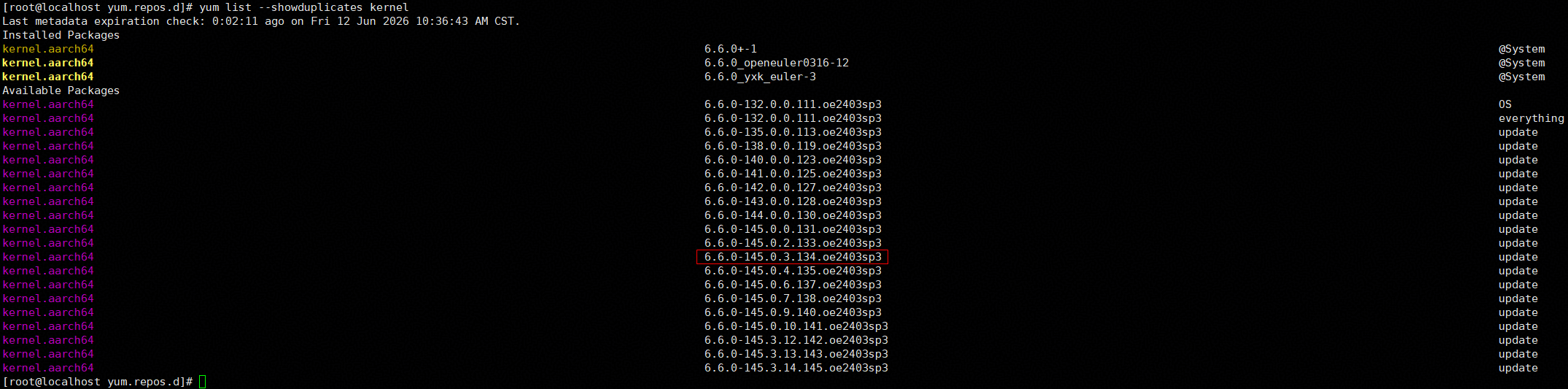
- Install the kernel, version 6.6.0-145.0.3.134.oe2403sp3 or later.
yum install kernel-6.6.0-145.0.3.134.oe2403sp3.aarch64

- Run the reboot command to restart the server and select the newly installed kernel to apply the changes.
Deploying EDK2
- Download the EDK2 source code.
git clone https://gitee.com/confidential_computing/edk2-tianocore.git -b stable/202505
- Perform the compilation.
cd edk2-tianocore/
git submodule update --init --recursive
source edksetup.sh
make -j -C BaseTools
build -b RELEASE -a AARCH64 -t GCC5 -D CC_MEASUREMENT_ENABLE=TRUE -p ArmVirtPkg/ArmVirtQemu.dsc
The generated .fd file is stored in Build/ArmVirtQemu-AARCH64/RELEASE_GCC5/FV/QEMU_EFI.fd.
- Set the size of the QEMU_EFI.fd file to 64 MB.
fallocate -l $((64 * 1024 * 1024)) /usr/share/edk2/aarch64/QEMU_EFI.fd
Parent topic: Software Deployment