Configuring cVMs
After you set up the necessary operating environment, you can start cVMs.
Startup with libvirt
- Download the QCOW2 image to the target environment.
cd /home
wget https://repo.openeuler.org/openEuler-24.03-LTS-SP3/virtual_machine_img/aarch64/openEuler-24.03-LTS-SP3-aarch64.qcow2.xz

- First, start the common VM using nvm.xml, and modify the guest kernel boot parameters.
<domain type='kvm' xmlns:qemu="http://libvirt.org/schemas/domain/qemu/1.0">
  <name>nvm</name>
  <memory unit='GiB'>8</memory>
  <vcpu placement='static'>4</vcpu>
  <cputune>
    <vcpupin vcpu='0' cpuset='0'/>
    <vcpupin vcpu='1' cpuset='1'/>
    <vcpupin vcpu='2' cpuset='2'/>
    <vcpupin vcpu='3' cpuset='3'/>
    <emulatorpin cpuset='0-3'/>
  </cputune>
    <numatune>
    <memnode cellid='0' mode='strict' nodeset='0'/>
  </numatune>
  <os>
    <type arch='aarch64' machine='virt'>hvm</type>
    <loader readonly='yes' type='rom'>/home/edk2/Build/ArmVirtQemu-AARCH64/RELEASE_GCC5/FV/QEMU_EFI.fd</loader>
     <boot dev='hd'/>
  </os>
  <features>
    <acpi/>
    <gic version='3'/>
  </features>
  <cpu mode='host-passthrough'>
    <topology sockets='1' dies='1' clusters='1' cores='4' threads='1'/>
           <numa>
      <cell id='0' cpus='0-3' memory='8' unit='GiB'/>
    </numa>
  </cpu>
  <on_poweroff>destroy</on_poweroff>
  <on_reboot>restart</on_reboot>
  <on_crash>destroy</on_crash>
  <devices>
    <emulator>/home/qemu/build/qemu-system-aarch64</emulator>
         <console type='pty'/>
    <disk type='file' device='disk' model='virtio-non-transitional'>
      <driver name='qemu' type='qcow2' queues='2' cache='none' iommu='on'/>
      <source file='/home/openEuler-24.03-SP3-cvm-aarch64.qcow2'/>
      <target dev='vda' bus='virtio'/>
    </disk>
<interface type='bridge'>
<source bridge='virbr0'/>
<driver iommu='on' event_idx='off'/>
<rom bar='off' file=''/>
<model type='virtio-non-transitional'/>
</interface>
  </devices>
</domain>
- Start the cVM. Create and edit the cvm.xml file for libvirt to start the cVM.
<domain type='kvm' xmlns:qemu="http://libvirt.org/schemas/domain/qemu/1.0">
  <name>cvm</name>
  <memory unit='GiB'>8</memory>
  <vcpu placement='static'>4</vcpu>
  <cputune>
    <vcpupin vcpu='0' cpuset='0'/>
    <vcpupin vcpu='1' cpuset='1'/>
    <vcpupin vcpu='2' cpuset='2'/>
    <vcpupin vcpu='3' cpuset='3'/>
    <emulatorpin cpuset='0-3'/>
  </cputune>
    <numatune>
    <memnode cellid='0' mode='strict' nodeset='0'/>
  </numatune>
  <os>
    <type arch='aarch64' machine='virt'>hvm</type>
    <loader readonly='yes' type='rom'>/home/edk2/Build/ArmVirtQemu-AARCH64/RELEASE_GCC5/FV/QEMU_EFI.fd</loader>
     <boot dev='hd'/>
  </os>
  <features>
    <gic version='3'/>
  </features>
  <cpu mode='host-passthrough'>
    <topology sockets='1' dies='1' clusters='1' cores='4' threads='1'/>
           <numa>
      <cell id='0' cpus='0-3' memory='8' unit='GiB'/>
    </numa>
  </cpu>
  <on_poweroff>destroy</on_poweroff>
  <on_reboot>restart</on_reboot>
  <on_crash>destroy</on_crash>
  <devices>
    <emulator>/home/qemu/build/qemu-system-aarch64</emulator>
         <console type='pty'/>
    <disk type='file' device='disk' model='virtio-non-transitional'>
      <driver name='qemu' type='qcow2' queues='2' cache='none' iommu='on'/>
      <source file='/home/openEuler-24.03-SP3-cvm-aarch64.qcow2'/>
      <target dev='vda' bus='virtio'/>
    </disk>
<interface type='bridge'>
<source bridge='virbr0'/>
<driver iommu='on' event_idx='off'/>
<rom bar='off' file=''/>
<model type='virtio-non-transitional'/>
</interface>
  </devices>
<launchSecurity type='cca'/>
</domain>
Based on the nvm.xml configuration, the following is newly added to cvm.xml:
<launchSecurity type='cca'/>
Alternatively, enable the Kunpeng CCA acceleration API (see Enabling Hugepage Memory for details).
<launchSecurity type='cca' hisi-cca-enable='yes'/>
In stress tests such as frequently starting and destroying cVMs, you are advised to disable the event_idx mechanism of virtio-net to improve the virtio network stability. The following is a configuration example:<interface type='bridge'> <source bridge='virbr0'/> <driver iommu='on' event_idx='off'/> <model type='virtio-non-transitional'/> </interface>
- Run virsh define to define the cVM configuration.
virsh define cvm.xml

- View the cVM definition.
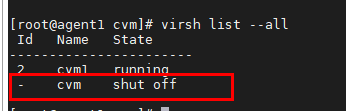
virsh list --all
The value of Name is the same as <name>cvm</name> in the XML file.
- Disable SELinux. For details, see SELinux Configuration.
- Start the cVM.
virsh start cvm

- Connect to the serial port of the cVM.
virsh console cvm
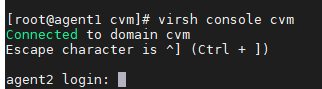
The default image user is root.
Enabling Multiple NUMA Nodes
Modify the cVM XML file created in step 2 of Startup with libvirt.
- A virtual NUMA node can be bound to a range of physical NUMA nodes. The secure memory space for the cVM is allocated within the specified NUMA node range. The following is an example of the bound physical NUMA node range in the libvirt cVM configuration:
<numatune>
          <memnode cellid='0' mode='strict' nodeset='1-3' />
</numatune>
For the preceding configuration, the secure memory space will be allocated from NUMA nodes 1, 2, and 3. The configuration is nodeset='1,2,3'.
- Secure memory can be allocated from multiple NUMA nodes to start a large cVM. See the example configuration:
<numatune> <memnode cellid='0' mode='strict' nodeset='0' /> <memnode cellid='1' mode='strict' nodeset='3' /> </numatune> <cpu mode='host-passthrough'> <topology sockets='1' dies='1' clusters='1' cores='8' threads='1'/> <numa> <cell id='0' cpus='0-3' memory='4' unit='GiB'/> <cell id='1' cpus='4-7' memory='4' unit='GiB'/> </numa> </cpu>- For the preceding configuration, the cVM will be allocated 4 GB of secure memory from both of NUMA nodes 0 and 3.
- In the example configuration, the number of vCPUs is 8. Modify the configuration in the cvm.xml file as follows: <vcpu placement='static'>8</vcpu>.
Parent topic: Software Deployment