Enabling Device Passthrough
Enabling device passthrough requires enabling the virtCCA and SMMU security features as well as compiling the kernel. It is used in scenarios that require confidential virtualization or security isolation.
- The Virtualized Arm Confidential Compute Architecture with TrustZone (virtCCA) device passthrough function does not support stage 1 system memory management unit (SMMU).
- The virtCCA device passthrough function does not support device authentication.
Enabling the virtCCA and SMMU Secure-Mode Initialization
- Open the grub.cfg file.
vim /boot/efi/EFI/openEuler/grub.cfg
- Press i to enter the insert mode and add the following parameters to the HOST OS location:
virtcca_cvm_host=1 arm_smmu_v3.disable_ecmdq=1 vfio_pci.disable_idle_d3=1
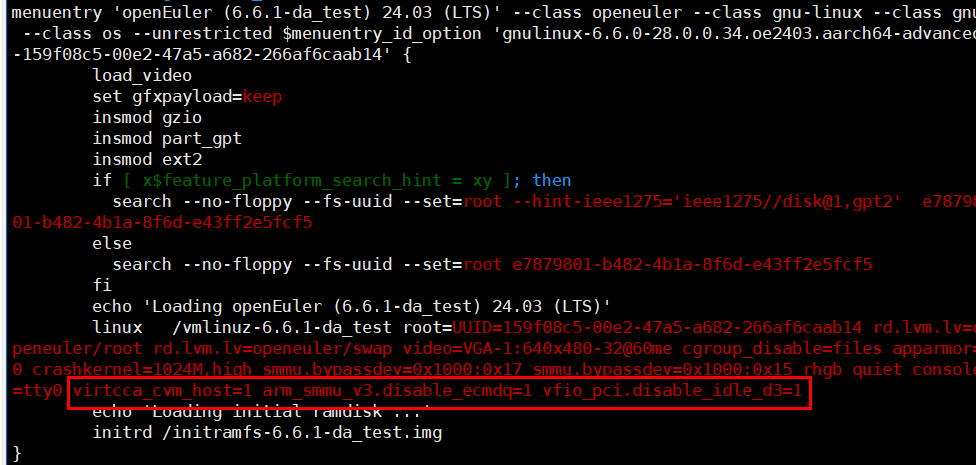
- Press Esc to exit the insert mode. Type :wq! and press Enter to save the file and exit.
(Optional) Compiling the Guest OS
- Generate the default configuration.
- Go to the kernel directory and modify the defconfig file.
cd /usr/src/linux-6.6.0-98.0.0.103.oe2403sp2.aarch64/ vim arch/arm64/configs/openeuler_defconfig
The kernel version is subject to the installed kernel source version. Replace the example kernel directory with the actual one.
- Press i to enter the insert mode and modify the compilation options as follows:
CONFIG_NET_9P=y CONFIG_NET_9P_VIRTIO=y CONFIG_VIRTIO_BLK=y CONFIG_SCSI_VIRTIO=y CONFIG_VIRTIO_NET=y CONFIG_VIRTIO=y CONFIG_VIRTIO_PCI_LIB=y CONFIG_VIRTIO_PCI=y CONFIG_EXT4_FS=y # CONFIG_DEBUG_INFO_BTF is not set CONFIG_SOFTLOCKUP_DETECTOR=y CONFIG_LOCKUP_DETECTOR=y CONFIG_PREEMPT_NONE=y
- Press Esc to exit the insert mode. Type :wq! and press Enter to save the file and exit.
- Modify Kconfig.
- Modify the /block/Kconfig file.
- Open the drivers/block/Kconfig file.
vim drivers/block/Kconfig
- Press i to enter the insert mode and change tristate "Virtio block driver" to the following:
bool "Virtio block driver"

- Press Esc to exit the insert mode. Type :wq! and press Enter to save the file and exit.
- Open the drivers/block/Kconfig file.
- Modify the drivers/net/Kconfig file.
- Open the drivers/net/Kconfig file.
vim drivers/net/Kconfig
- Press i to enter the insert mode and change tristate "Virtio network driver" to the following:
bool "Virtio network driver"

- Press Esc to exit the insert mode. Type :wq! and press Enter to save the file and exit.
- Open the drivers/net/Kconfig file.
- Modify the drivers/virtio/Kconfig file.
- Open the drivers/virtio/Kconfig file.
vim drivers/virtio/Kconfig
- Press i to enter the insert mode and change tristate under config VIRTIO_PCI_LIB to bool.

- Change tristate "PCI driver for virtio devices" as follows:
bool "PCI driver for virtio devices"

- Press Esc to exit the insert mode. Type :wq! and press Enter to save the file and exit.
- Open the drivers/virtio/Kconfig file.
- Modify the /block/Kconfig file.
- Generating the .config file.
make openeuler_defconfig
- Go to the kernel directory and modify the defconfig file.
- Add the NVMe SSD and NIC driver configurations. Enable compilation options such as BLK_DEV_NVME, NVME_CORE, VXLAN, MLXFW, IOMMUFD, VFIO, MLX5_VFIO_PCI, and MLX5_CORE.
- Open menuconfig.
make menuconfig
- On the menuconfig screen, input / to go to the search screen. On the search screen, input the compilation option to be enabled and press Enter to search for the option.

- After the search is complete, input 1 to enable the dependency option (NVME_CORE in this example).

- Press Space to change the NVME_CORE mode from M to *. After the setting is complete, NVME_CORE is enabled.

- Press Esc twice to return to the previous menu.

- BLK_DEV_NVME is enabled after the dependency option is enabled.

- Enable all compilation options, save the settings, and run the following commands to perform the compilation. The compilation result takes effect after the VM is restarted.
export LOCALVERSION="-$(uname -r | cut -d- -f2-)" make include/config/kernel.release make -j$(nproc) make modules_install make install sync
- Open menuconfig.
Parent topic: Enabling Confidential Device Passthrough
