Function Scanning Mode
You can add the --funcs parameter to the ./tiancheng function command to scan and analyze specified functions in a file or file directory.
Prerequisites
Assume that the Tiancheng Code Optimizer is installed in /home/tiancheng-x.x.x-Linux-Kunpeng.
Function Scanning
- Scan a specified function in a file and generate an analysis report. In this example, the BrotliOptimizeHuffmanCountsForRle function contained in /home/demo/input.cpp is scanned and the analysis report is stored in /home/demo. Replace the example parameter values with actual values.
./tiancheng function -i /home/demo/entropy_encode.c --funcs BrotliOptimizeHuffmanCountsForRle -o /home/demo -r /path/to/code_project

Scan the BrotliOptimizeHuffmanCountsForRle function in /home/demo/entropy_encode.c. The vectorization check report and JSON report files are generated in /home/demo. In addition, specify the project root directory /path/to/code_project to avoid missing header files.
Command output:
Compile database file does not exist or is unreachable.
Target functions to analyze:
  - BrotliOptimizeHuffmanCountsForRle // Indicates that the function to be analyzed is BrotliOptimizeHuffmanCountsForRle.

----------------------------------------------------------------------
Start to locate function: BrotliOptimizeHuffmanCountsForRle
----------------------------------------------------------------------
[Locator] Analyzing: BrotliOptimizeHuffmanCountsForRle
  -> [Match] /home/demo/entropy_encode.c: 248-377 // Matched the entropy_encode.c source file containing the BrotliOptimizeHuffmanCountsForRle function. Lines 248-377 indicate the line range where the function is located.

================================================================================
Analyzing file: /home/demo/entropy_encode.c // Analyzes the entropy_encode.c source file.
--------------------------------------------------------------------------------
compile_commands.json not found under: /path/to/code_project
Recursively collecting include paths as fallback.

[Scan] Target  : /home/demo/entropy_encode.c
[Scan] Mode    : direct scan (source file)
[Scan] Entry   : /home/demo/entropy_encode.c

Start to scan code.

[Match Found] Function: BrotliOptimizeHuffmanCountsForRle at /home/demo/entropy_encode.c:248 // Indicates that the BrotliOptimizeHuffmanCountsForRle function is successfully matched.
  [FilterAnchors] Limiting from 37 to 10 anchors // Indicates that the number of anchors to be filtered is limited to 10 (down from 37).
  [CallDepth] Function 'BrotliOptimizeHuffmanCountsForRle': original anchors=37, filtered=10 → disabling interprocedural analysis // Indicates that the call depth is restricted and cross-function analysis is disabled.

Vectorization check task is being executed. Please wait...
Scanning start time: 2026/08/13 18:21:08
For the details information, please check:
Successfully generated vectorization report: /home/demo/Vectorization_Source_20260813_182108_186_7001.html // Indicates the path to the HTML vectorization check report file.
Successfully generated vectorization optimization result: /home/demo/Vectorization_Optimization_Result_20260813_182108_186_7001.json // Indicates the path to the JSON report file.
The scanning task is complete, and the analysis result is saved to the specified output directory.
- Scan a specified function in a file directory and generate an analysis report. In this example, the BrotliOptimizeHuffmanCountsForRle function contained in /path/to/code_project is scanned and the analysis report is stored in /home/demo. Replace the example parameter values with actual values.
./tiancheng function --funcs BrotliOptimizeHuffmanCountsForRle -o /home/demo -r /path/to/code_project
Scan the BrotliOptimizeHuffmanCountsForRle function in the code_project project under /path/to. The vectorization check report and JSON report files are generated in /home/demo. In addition, specify the project root directory /path/to/code_project to avoid missing header files.
Command output:
Compile database file does not exist or is unreachable.
Target functions to analyze:
  - BrotliOptimizeHuffmanCountsForRle // Indicates that the function to be analyzed is BrotliOptimizeHuffmanCountsForRle.

----------------------------------------------------------------------
Start to locate function: BrotliOptimizeHuffmanCountsForRle
----------------------------------------------------------------------
[Locator] Analyzing: BrotliOptimizeHuffmanCountsForRle
  -> [Match] /path/to/code_project/enc/entropy_encode.c: 248-377 // Matched the entropy_encode.c source file containing the BrotliOptimizeHuffmanCountsForRle function. Lines 248-377 indicate the line range where the function is located.

================================================================================
Analyzing file: /path/to/code_project/enc/entropy_encode.c // Analyzes the entropy_encode.c source file.
--------------------------------------------------------------------------------
compile_commands.json not found under: /path/to/code_project
Recursively collecting include paths as fallback.

[Scan] Target  : /path/to/code_project/enc/entropy_encode.c
[Scan] Mode    : direct scan (source file)
[Scan] Entry   : /path/to/code_project/enc/entropy_encode.c

Start to scan code.

[Match Found] Function: BrotliOptimizeHuffmanCountsForRle at /path/to/code_project/enc/entropy_encode.c:248 // Indicates that the BrotliOptimizeHuffmanCountsForRle function is successfully matched.
  [FilterAnchors] Limiting from 37 to 10 anchors // Indicates that the number of anchors to be filtered is limited to 10 (down from 37).
  [CallDepth] Function 'BrotliOptimizeHuffmanCountsForRle': original anchors=37, filtered=10 → disabling interprocedural analysis // Indicates that the call depth is restricted and cross-function analysis is disabled.

Vectorization check task is being executed. Please wait...
Scanning start time: 2026/08/13 18:23:02
For the details information, please check:
Successfully generated vectorization report: /home/demo/Vectorization_Source_20260813_182302_454_9198.html // Indicates the path to the HTML vectorization check report file.
Successfully generated vectorization optimization result: /home/demo/Vectorization_Optimization_Result_20260813_182302_454_9198.json // Indicates the path to the JSON report file.
The scanning task is complete, and the analysis result is saved to the specified output directory.
The output directory contains two types of analysis reports. You can view the reports as needed.
- JSON report file: contains only vectorizable code snippets that have been successfully optimized. It is suited for scenarios where optimization results need to be quickly extracted.
- HTML report file: provides a comprehensive view and displays three types of code: vectorizable, potentially vectorizable, and non-vectorizable. It is suitable for in-depth analysis of scenarios with optimization potential.
Viewing a Vectorization Check Report
- View an HTML vectorization check report file. The report includes the loop vectorization check result, function vectorization check result, and task information.
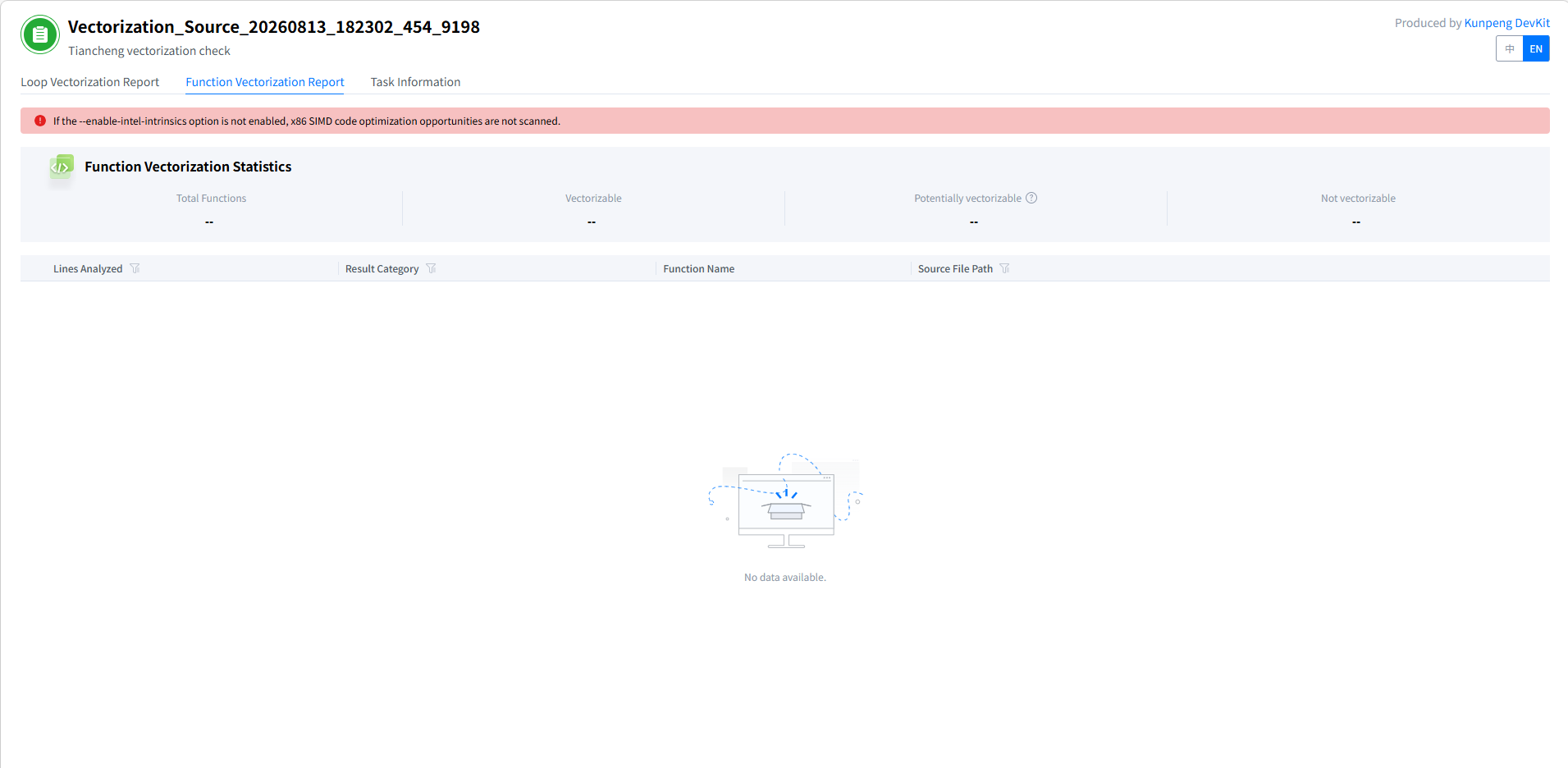
The function vectorization check report is generated only when the x86 Intel intrinsics analysis feature is enabled. If this feature is disabled, the function vectorization check report contains no data.
Click Loop Vectorization Report to view the loop vectorization check result. The following figure shows the details. For details about the report parameters, see Table 1.
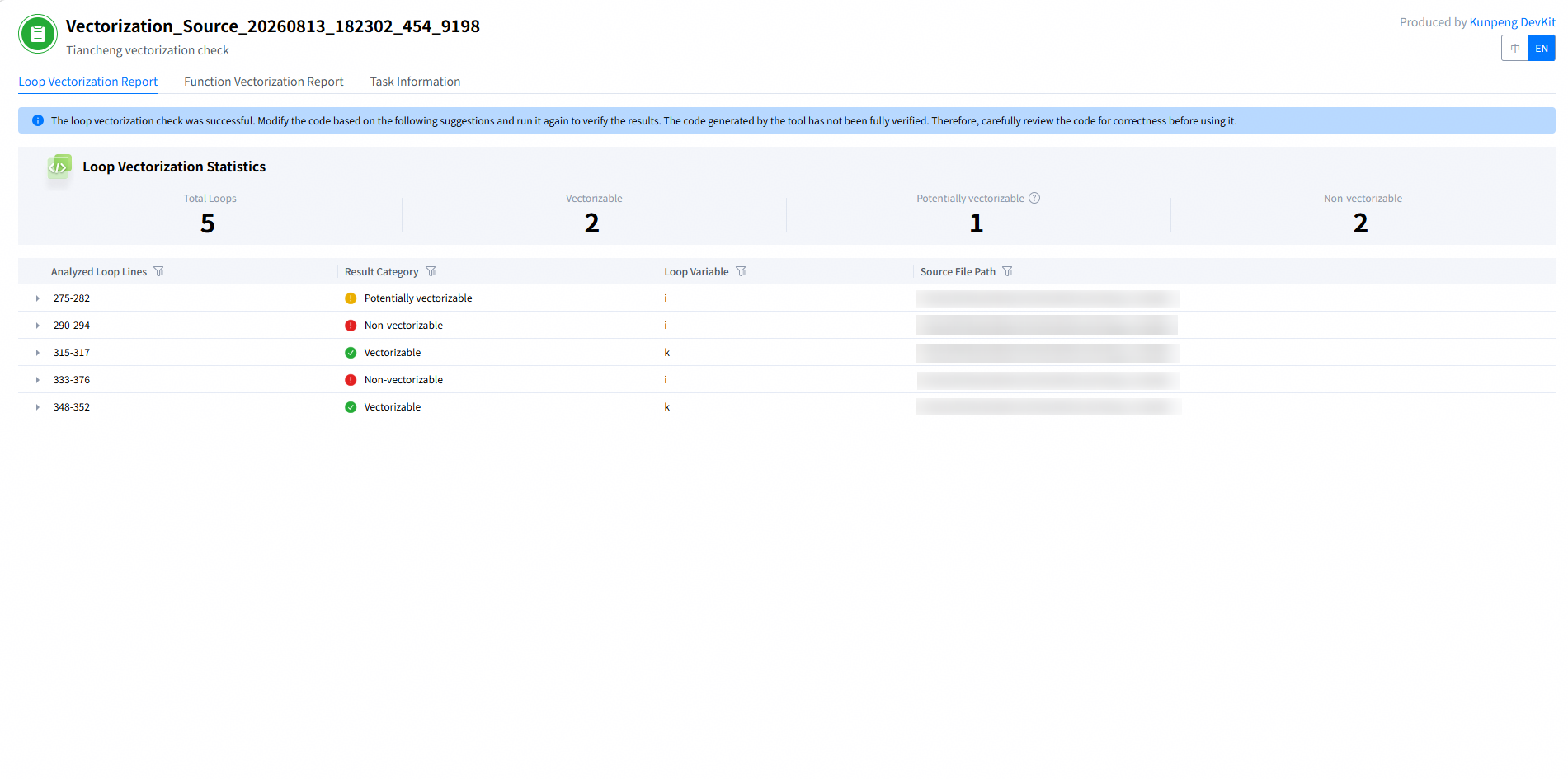
Table 1 Parameters in the loop vectorization check report Parameter
Description
Loop Vectorization Statistics
Total Loops
Total number of loops scanned in the source file.
Vectorizable
Number of vectorizable loops in the source file.
Potentially vectorizable
Number of loops that can be vectorized only after special processing (such as function inlining) is performed.
Non-vectorizable
Number of non-vectorizable loops in the source file.
Analyzed Loop Lines
Source line numbers of the code identified as a loop optimization candidate.
Result Category
Loop types that can be detected by the Tiancheng Code Optimizer, including vectorizable, potentially vectorizable, and non-vectorizable.
Loop Variable
Variable used in the loop iteration.
Source File Path
Path to the source file containing the loop.
You can filter different loop types in Result Category. By default, all loop types are selected. You can click any row to expand the specific loop analysis process.
Click Analyzed Loop Lines to expand a loop analysis process, which can be vectorizable, potentially vectorizable, or non-vectorizable. Table 2 describes the parameters of the loop analysis process.
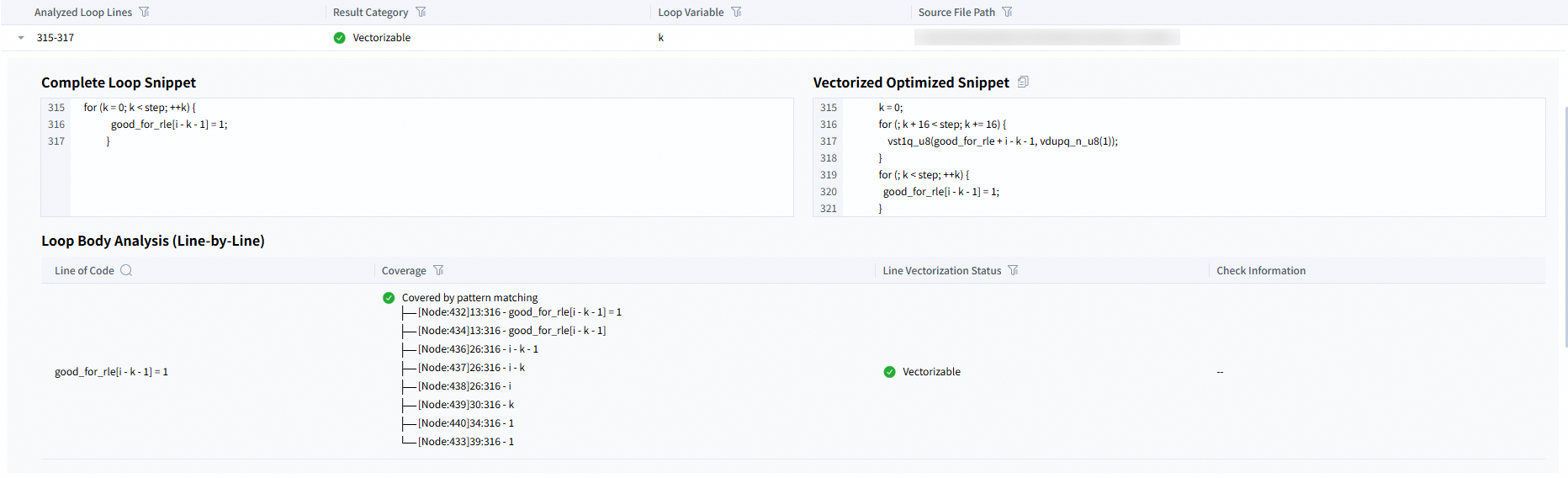
- The following figure shows the process of analyzing a vectorizable loop. As shown in the example, copy the vectorized optimized code snippet, replace the corresponding code in the source file (lines 315 to 317), and save the modified file to complete the rewrite.
For modules that support rewriting, the Tiancheng Code Optimizer directly provides optimized code snippets. For modules that cannot be matched for rewriting, the tool outputs vectorization check information during line-by-line analysis of the loop body. You can optimize the code based on the vectorization check result.
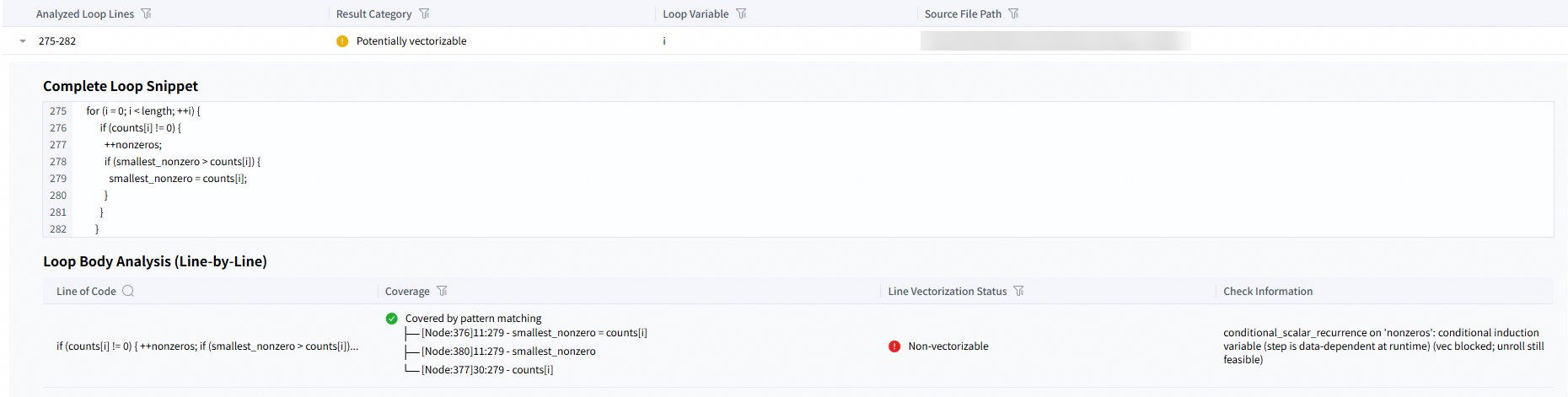
- The following figure shows the potentially vectorizable loop analysis process. Based on the check result, you can view the reason why the code at the corresponding location in the source file (lines 275 to 282) is potentially vectorizable.
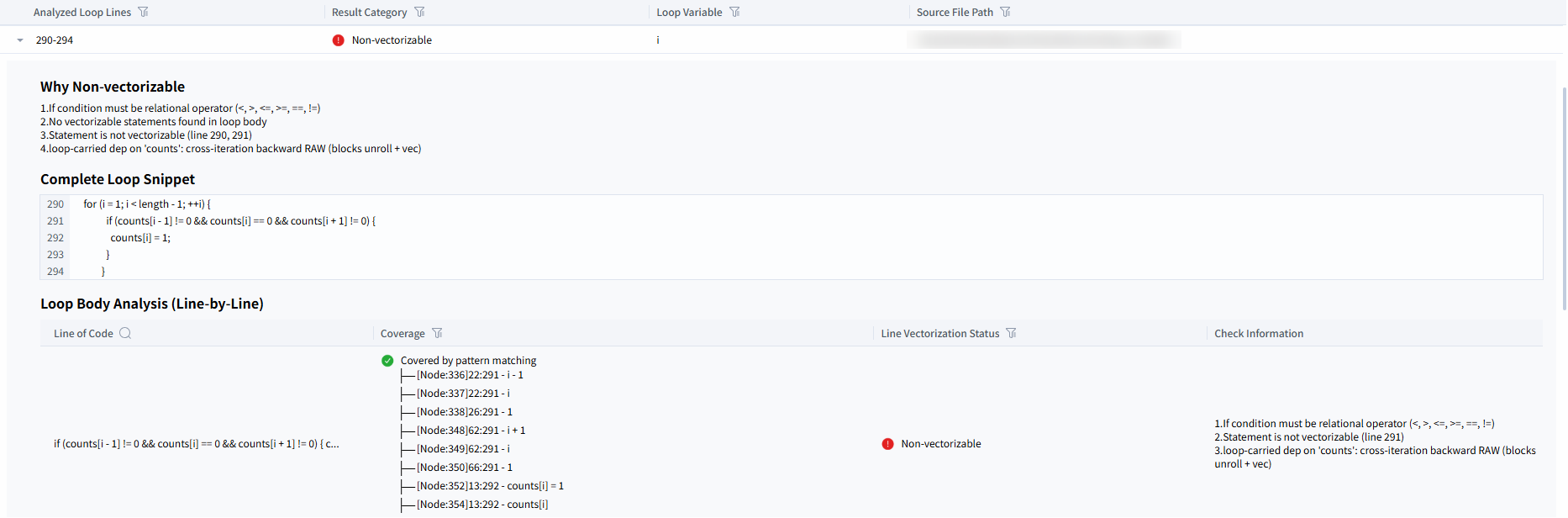
- The following figure shows the non-vectorizable loop analysis process. Based on the check result, you can view the reason why the code at the corresponding location in the source file (lines 290 to 294) is not vectorizable.
Table 2 Parameters of the loop analysis process Type
Parameter
Description
Vectorizable
Complete Loop Snippet
Code snippet of the loop in the source file.
Vectorized Optimized Snippet
Code snippet of the loop after being vectorized by the Tiancheng Code Optimizer.
Potentially vectorizable
Complete Loop Snippet
Code snippet of the loop in the source file.
Non-vectorizable
Why Non-vectorizable
Reason why the Tiancheng Code Optimizer determines that the loop is not vectorizable.
Complete Loop Snippet
Code snippet of the loop in the source file.
Common parameters
Loop Body Analysis (Line-by-Line)
Loop analysis process performed by the Tiancheng Code Optimizer.
Lines of Code
Lines of code for the loop body.
Coverage
Indicates whether it is covered by a vectorization mode of the Tiancheng Code Optimizer.
Line Vectorization Status
Vectorization status of a single line of code in the loop body, which can be vectorizable, potentially vectorizable, or non-vectorizable.
Check Information
Result of code line analysis performed by the Tiancheng Code Optimizer.
NOTE:If the code line vectorization status is vectorizable, no check information is displayed. If the status is potentially vectorizable or non-vectorizable, the cause or suggestion is displayed.
When the x86 Intel intrinsics analysis feature is disabled, the function vectorization check report contains no data. For details, see the following figure:
Click Task Information to view the information about the current check report. See the following figure. For details about the task information parameters, see Table 3.
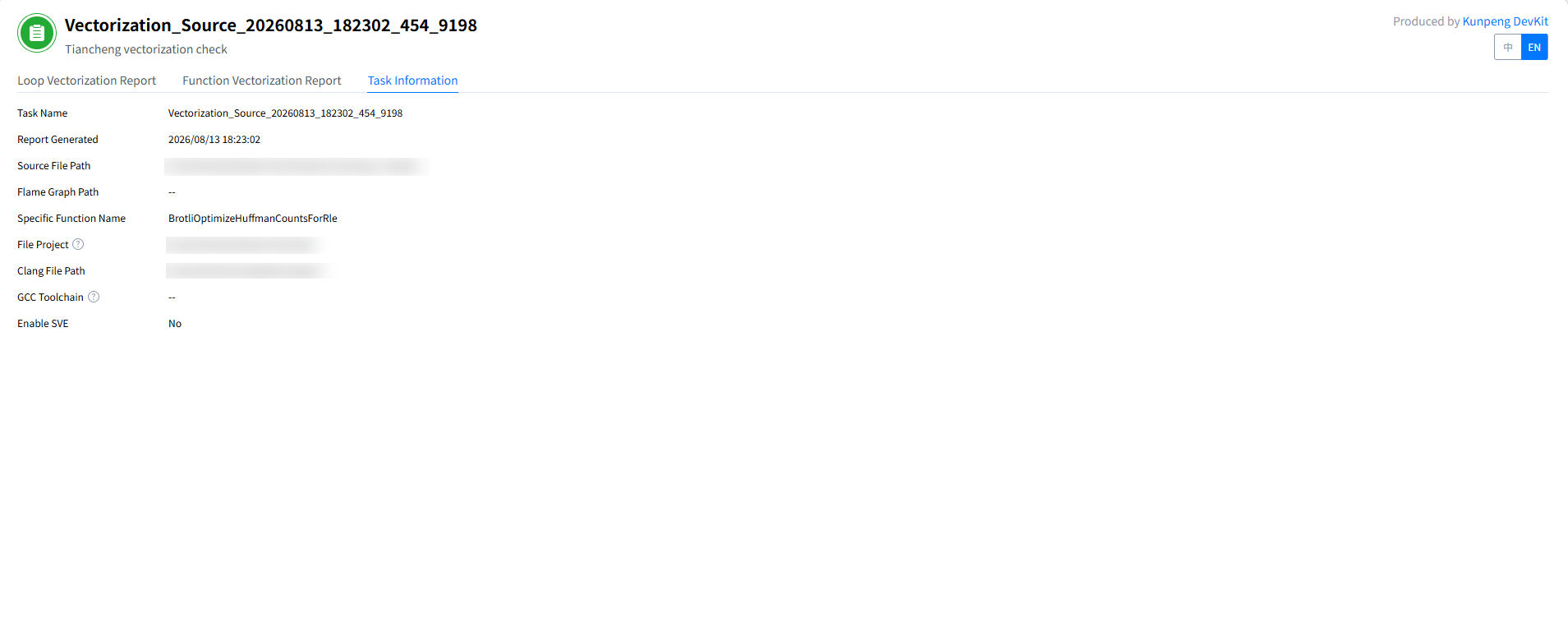
In the Task Information tab page, you can quickly view the report name, report generation time, and source code path.
Table 3 Task information parameters Parameter
Description
Task Name
Name of the check task automatically created by the Tiancheng Code Optimizer.
Report Generated
Time when the Tiancheng Code Optimizer generates the report.
Source File Path
Path to the source file containing the scanned source code.
Flame Graph Path
Path to the scanned flame graph SVG file.
Specific Function Name
Name of the scanned function.
File Project
Root directory of the project containing the source file to be analyzed.
Clang File Path
Directory of the Clang built-in header file (for example, stddef.h).
GCC Toolchain
GCC installation directory, which is used as the toolchain path for code analysis.
Enable SVE
Indicates whether to convert the instruction set to the SVE instruction set.
The HTML report focuses on diagnostic analysis. You need to manually adjust the code structure based on the provided suggestions and verify the optimization effect again.
- The following figure shows the process of analyzing a vectorizable loop. As shown in the example, copy the vectorized optimized code snippet, replace the corresponding code in the source file (lines 315 to 317), and save the modified file to complete the rewrite.
- View a JSON report file.
Open the generated JSON report file and analyze and confirm the modification points.
vim /home/demo/Vectorization_Optimization_Result_20260813_182302_454_9198.json
The JSON file content is as follows:
{
  "advisor_items": [
    {
      "opt_file": {
        "begin_line": 315,
        "description": "",
        "end_line": 317,
        "fileName": "/path/to/code_project/enc/entropy_encode.c",
        "headerFile": {
          "name": "#include <arm_neon.h>",
          "operation": "add"
        },
        "headerLocBegin": 11,
        "headerLocEnd": 11,
        "sample_code": "          k = 0;\n          for (; k + 16 < step; k += 16) {\n              vst1q_u8(good_for_rle + i - k - 1, vdupq_n_u8(1));\n          }\n          for (; k < step; ++k) {\n            good_for_rle[i - k - 1] = 1;\n          }"
      }
    },
    {
      "opt_file": {
        "begin_line": 348,
        "description": "",
        "end_line": 352,
        "fileName": "/path/to/code_project/enc/entropy_encode.c",
        "headerFile": {
          "name": "#include <arm_neon.h>",
          "operation": "add"
        },
        "headerLocBegin": 11,
        "headerLocEnd": 11,
        "sample_code": "        k = 0;\n        for (; k + 4 < stride; k += 4) {\n            vst1q_u32(counts + i - k - 1, vdupq_n_u32(count));\n        }\n        for (; k < stride; ++k) {\n          /* We don't want to change value at counts[i],\n             that is already belonging to the next stride. Thus - 1. */\n          counts[i - k - 1] = (uint32_t)count;\n        }"
      }
    }
  ],
  "code": 0,
  "recognizedPattern": 2
}
Table 4 Field description Field
Description
advisor_items
Array of code optimization suggestions. Each item in the array is a code tuning optimization.
opt_file
Detailed information about a single optimization suggestion.
begin_line
Start line number of the code to be optimized.
In the example, the start line number is 315.
description
Detailed description of the optimization suggestion.
end_line
End line number of the code to be optimized.
In the example, the end line number is 317.
fileName
Path to the analyzed source file.
In the example, the path is /path/to/code_project/enc/entropy_encode.c.
headerFile
Header file processing information used in the vectorization process.
In the example, "name": "#include <arm_neon.h>" indicates the target header file to be added or replaced in the source code, which is used to enable the NEON instruction set. "operation": "add" indicates the operation type for processing the specified header file.
The options of operation are:
- add: adds a target header file during scalar code vectorization.
- replace: replaces the existing x86 header file with the corresponding Arm header file during x86-to-Arm vectorization porting.
headerLocBegin
Start line number where the header file will be inserted.
- If the value is -1, the header file is already included in the code and does not need to be manually added.
- If the value is a positive integer, it indicates the start line number where the header file will be inserted.
In the example, the start line number is 11.
headerLocEnd
End line number where the header file will be inserted.
- If the value is -1, the header file is already included in the code and does not need to be manually added.
- If the value is a positive integer, it indicates the end line number where the header file will be inserted.
In the example, the end line number is 11.
sample_code
Recommended code vectorization sample, which can be directly used to replace the current code.
The following is an example of optimized code:
k = 0;\n for (; k + 16 < step; k += 16) {\n vst1q_u8(good_for_rle + i - k - 1, vdupq_n_u8(1));\n }\n for (; k < step; ++k) {\n good_for_rle[i - k - 1] = 1;\n }code
Tool execution status code.
- The value 0 indicates execution success.
- A non-zero value indicates an interruption.
In the example, 0 indicates that the tool is executed successfully.
recognizedPattern
Number of code snippets to be optimized.
In the example, the number is 2.
Rewrite the code based on the JSON report.
- View advisor_items, which contains all identified optimization suggestions.
- For each optimization suggestion, check the begin_line and end_line fields to determine the code range to be replaced.
- Copy the vectorized code from sample_code and replace the code in the source file between begin_line and end_line.
- Check the headerLocBegin and headerLocEnd fields.
- If the value is -1, the header file already exists and does not need to be added.
- If the value is a positive integer, add the header file declaration in headerFile to the specified location.
- Save the modified file to complete the automatic rewrite.