Remote Cluster Collection Information Baseline Comparison and Diagnosis
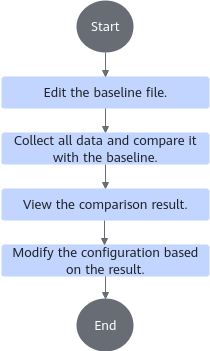
You can customize a baseline file as the server performance benchmark. Then you can use the Kunpeng Health Inspector to collect the actual running data of the server. It diagnoses the server and determines its status by comparing it with the baseline.
Prerequisites
The Kunpeng Health Inspector is installed in /home/devkit-kspect-x.x.x-Linux-aarch64.
Procedure
- Go to the tool directory.
cd /home/devkit-kspect-x.x.x-Linux-aarch64

- Replace the example tool path /home/devkit-kspect-x.x.x-Linux-aarch64 with the actual path.
- To ensure a stable SSH connection, you are advised to verify that the SSH client configuration on the local host (the host on which the Kunpeng Health Inspector is running) is compatible before collecting data. If your system is a newer Linux distribution (such as RHEL/CentOS 8/9 or Ubuntu 22.04 or later), configuration conflicts may cause data collection to fail. For details, see "'Match all' with No Other Mixed Conditions" Error During Data Collection.
- View the baseline template file.
ll documents
Command output:
total 32
-rw-------. 1 root root 12519 Feb 24 20:04 base.xlsx
-rw-------. 1 root root  9005 Feb 24 20:04 collect_commands.txt
-rw-------. 1 root root   458 Feb 24 20:04 server_config.xlsx
drwx------. 2 root root  4096 Feb 24 20:04 templates
- Edit the baseline file.
You can use Excel to edit the base.xlsx file and write the baseline file based on the usage description in base.xlsx. The following is a customized content example of the baseline file:
- Fill in the table as required. If the impact or suggested modification is not provided, it will appear as -- in the comparison report where inconsistencies exist.
- The devkit-kspect-x.x.x-Linux-aarch64/documents/templates directory provides the template files for UnifiedBus, including the optical networking template file (jd_ub_optics.xlsx), electrical networking template file (jd_ub_electric.xlsx), and version information template file (jd_ub_version_415.xlsx and jd_ub_version_429.xlsx).
Table 1 Baseline file example Path
Baseline Value
Collection Item
Impact
Change Method
Software->Library Info->libstdc++
installed
C++ standard library provided by GCC
If it is missing, UBSE startup fails.
Software->Library Info->libboundscheck
installed
C secure function library
If it is missing, UBSE startup fails.
Software->Library Info->libxml2
installed
C XML parsing library
If it is missing, UBSE startup fails.
Software->Library Info->libtpsa
not installed
libtpsa library
If it is missing, UBSE startup fails.
Software->Library Info->tar
installed
Base library for the tar command
If it is missing, UBSE startup fails.
memory->OS Memory Info->Transparent Huge Pages Defrag
madvise
Memory compaction for dynamic compound pages
Memory compaction is not performed in the background to avoid interference from background noise.
memory->OS Memory Info->Transparent Huge Pages
always
Transparent huge pages
Enabling THP may trigger automatic page management in the system. When THP is set to always, 4 KB small pages are combined into 2 MB large pages. This process is transparent to users and applications and increases the TLB hit ratio. However, background CPU activity may increase, and the performance benefits are not always stable. Transparent huge pages cannot always be allocated as 2 MB pages, especially after the system runs for a long time and memory becomes fragmented.
memory->OS Memory Info->Automatic NUMA Balancing
Disabled
numa_balancing
NUMA balancing must be disabled to avoid interference with Unified-based communication. If a service container is bound to a NUMA node and the node memory meets service requirements, it is recommended to disable this feature to avoid the overhead caused by background scanning.
OS->Operating System->Printk Loglevel(console | default | min | boot)
7 | 4 | 1 | 7
printk log level
The console_loglevel value (the first parameter value) limits the log levels printed to the terminal. Messages with a priority higher than this value are printed to the console.
bios->BIOS detail Info->Memory Frequency
Auto
Core-level power saving mode
LPI is used to optimize power consumption management and resource allocation. Disabling LPI can improve CPU performance.
bios->BIOS detail Info->Custom Refresh Rate
Auto
High-performance mode
If the performance mode is not enabled, the interrupt packet sending performance deteriorates from the μs level to the ms level.
bios->BIOS detail Info->Custom Power Policy
Performance
Overclocking mode
If the performance mode is not enabled, the interrupt packet sending performance deteriorates from the μs level to the ms level.
bios->BIOS detail Info->Die Interleaving
Disabled
When HiBoost is enabled, this option is set to Auto by default.
If the performance mode is not enabled, the interrupt packet sending performance deteriorates from the μs level to the ms level.
- Edit the server configuration file.
Use Excel to edit the server.config.xlsx file. Create the server configuration file based on the configuration descriptions in server.config.xlsx.

- The password in the server configuration file is stored in plaintext in the Excel file, posing a risk of information disclosure.
- You are advised to clear the file content or store the file properly after use.
- You are advised to set file access permissions to protect sensitive information after using the Excel configuration file.
Table 2 Parameters in the server configuration file Parameter
Description
Server Alias
(Optional) Alias of the server whose data is to be collected.
IP Address
(Mandatory) IP address of the server whose data is to be collected.
Port
(Optional) Port number of the server whose data is to be collected. The default value is 22.
User Name
(Mandatory) OS user name of the server whose data is to be collected.
Authentication Mode
(Mandatory) Server login mode. The options are as follows:
- password: Set the Password parameter.
- private_key: Set Private Key Path and (optional) Private Key Password.
Password
(Optional) User password. This parameter is required only when the authentication mode is set to password.
Private Key Path
(Optional) This parameter is required only when the authentication mode is set to private_key.
Private Key Password
(Optional) This parameter is required only when the authentication mode is private_key and the private key file has a password.
BMC Collection Method(Optional) BMC collection mode.
- password: Use the BMC user name and password for login. You need to enter the BMC IP address, BMC user name, and BMC password.
- In-band: The remote node must support
in-band collection. Otherwise, the collection will be skipped automatically. - Default: BMC data is not collected.
BMC IP
(Optional) BMC IP address. This parameter is required only when the BMC collection mode is set to password.
BMC User Name
(Optional) BMC user name. This parameter is required only when the BMC collection mode is set to password.
iBMC Password
(Optional) BMC password. This parameter is required only when the BMC collection mode is set to password.
- Upload the edited baseline file base.xlsx and server configuration file server_config.xlsx to /home on the server.
- Generate the collection report and compare it with the baseline.
./kspect cluster -i /home/server_config.xlsx --diff_base /home/base.xlsx
- If you do not want to customize the baseline file, you can use the baseline template provided by the tool for comparison. The following is an example of the command for using the optical networking baseline template:
./kspect cluster -i /home/server_config.xlsx --diff_base /home/devkit-kspect-x.x.x-Linux-aarch64/documents/templates/jd_ub_optics.xlsx
- If server cluster information fails to be collected, resolve the issue following instructions in Some Connections Fail During High-Concurrency Data Collection.
Command output:
Do you want to clear the password information from the server configuration file after the collection is complete? (Y/N) [default: N]: n
Data collection started for these servers: xxx.xxx.xxx.xxx:22(server_3);  xxx.xxx.xxx.xxx:22(server_4);  xxx.xxx.xxx.xxx:22(server_5)
The baseline file contains BMC/BIOS parameters. However, BMC information is not configured for the following servers. BMC collection will be skipped for: xxx.xxx.xxx.xxx:22(server_4)
Data collection completed successfully for xxx.xxx.xxx.xxx:22(server_3).
The archive file /home/devkit-kspect-x.x.x-Linux-aarch64/output/kspect-report-xxxxxxxx-xxxxxx-xxx.xxx.xxx.xxx-22.tar.gz has been generated.
Data collection completed successfully for xxx.xxx.xxx.xxx:22(server_5).
The archive file /home/devkit-kspect-x.x.x-Linux-aarch64/output/kspect-report-xxxxxxxx-xxxxxx-xxx.xxx.xxx.xxx-22.tar.gz has been generated.
Data collection completed successfully for xxx.xxx.xxx.xxx:22(server_4).
The archive file /home/devkit-kspect-x.x.x-Linux-aarch64/output/kspect-report-xxxxxxxx-xxxxxx-xxx.xxx.xxx.xxx-22.tar.gz has been generated.
Collection completed: 3/3 succeeded.
Cluster Baseline Comparison Result
───────────────────────────────────────────────────────────────────
  Node        Connection                 Status    Mismatch/Total
───────────────────────────────────────────────────────────────────
  server_3    root@xxx.xxx.xxx.xxx:22    Consistent      0/13
  server_5    root@xxx.xxx.xxx.xxx:22    Inconsistent    6/13
  server_4    root@xxx.xxx.xxx.xxx:22    Inconsistent    6/13
───────────────────────────────────────────────────────────────────
Total: 3 nodes | Matched: 1 | Mismatched: 2 | Collection failed: 0
Report generated: /home/devkit-kspect-x.x.x-Linux-aarch64/output/cluster_diff_report_20260814-163036737884.xlsx
[WARNING] The server configuration file /home/devkit-kspect-x.x.x-Linux-aarch64/documents/server_config.xlsx contains plaintext passwords. Keep the passwords secure or delete them after use.
Baseline comparison supports regular expressions and range matching ([a,b]). Units are supported in range matching. For example, [50,]Mib indicates a match for values greater than or equal to 50 MiB.
- If you do not want to customize the baseline file, you can use the baseline template provided by the tool for comparison. The following is an example of the command for using the optical networking baseline template:
- Modify the server based on the inconsistent items in the comparison report