bios
Command Function
Collects BIOS information, including the boot type, cache mode, and PCIe rate.

- Data collection supports the
BMC mode (login required),in-band mode, and the mode that skips BMC. When ipmitool is used for data collection, the report will not include information from modules that strongly depend on the BMC. - The in-band mode can be used only by the root user.
- If the in-band mode is not supported, you need to download and install iBMA. For details, see iBMA 2.0 User Guide.
Syntax
1
|
./kspect bios [-h] |
Parameter Description
|
Parameter |
Description |
|---|---|
|
None |
Collects BIOS information, including the boot type, cache mode, and PCIe rate. |
|
-h/--help |
Obtains help information. |
Example
Collect BIOS information.
1
|
./kspect bios
|
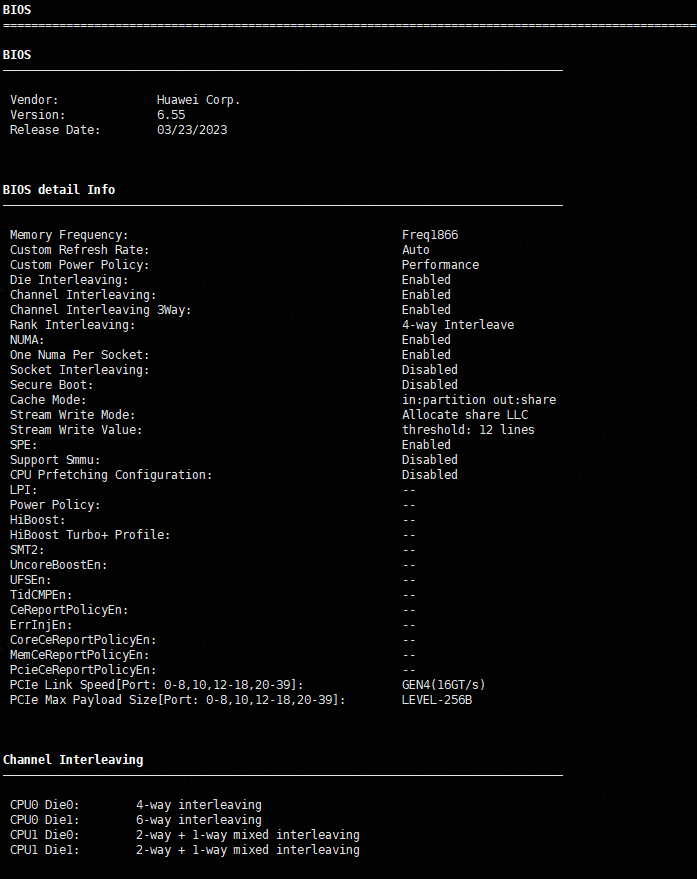
Figure 1 BIOS information
|
Type |
Description |
|---|---|
|
BIOS |
Displays basic BIOS information, including the vendor, version, and date. |
|
BIOS detail Info |
Displays detailed BIOS information.
|
|
Channel Interleaving |
Displays the CPU channel interleaving information. |
|
JSON Report |
The generated report is saved in the Tool_installation_path/output/kspect-bios-YYYYMMDD-HHMMSS and the file name is kspect-bios-xxxxxxxx-xxxxxx.json. |
Parent topic: Kunpeng Health Inspector Subcommand Parameters