VM Startup Failure
Symptom
When using the domain command in the Kunpeng Health Inspector, the VM fails to start after host huge page parameters, VM huge pages, and memory binding settings are configured. The following figure shows the error message:

Probable Causes
The free huge page memory on the
Handling Procedure
If the number of huge pages is insufficient to meet the VM memory requirements, use either of the following methods to resolve this issue.
- Edit the VM configuration file to delete the binding content.
- View all VMs and obtain the names of the VMs that fail to be started.
virsh list --all
The command output is similar to the following:
 Id   Name                           State
----------------------------------------------
 6    centos8.1-xxx.xxx.xxx.xxx_1    running
 16   centos8.1-xxx.xxx.xxx.xxx_2    running
 17   centos8.1-xxx.xxx.xxx.xxx_3    running
 18   centos8.1-xxx.xxx.xxx.xxx_4    running
 19   centos8.1-xxx.xxx.xxx.xxx_5    running
 20   centos8.1-xxx.xxx.xxx.xxx_6    running
 21   centos8.1-xxx.xxx.xxx.xxx_7    running
 22   centos8.1-xxx.xxx.xxx.xxx_8    running
 23   centos8.1-xxx.xxx.xxx.xxx_9    running
 24   centos8.1-xxx.xxx.xxx.xxx_10   running
 -    centos8.1-xxx.xxx.xxx.xxx      shut off
- Edit the VMs whose state is shut off.
virsh edit centos8.1-xxx.xxx.xxx.xxx

Replace centos8.1-xxx.xxx.xxx.xxx in the example with the name of a VM that fails to be started.
The command output is similar to the following:
<domain type='kvm'> <name>centos8.1-xxx.xxx.xxx.xxx</name> <uuid>4140adad-d94e-45c6-951a-ab7d94e70925</uuid> <metadata> <libosinfo:libosinfo xmlns:libosinfo="http://libosinfo.org/xmlns/libvirt/domain/1.0"> <libosinfo:os id="http://centos.org/centos/8"/> </libosinfo:libosinfo> </metadata> <memory unit='KiB'>8388608</memory> <currentMemory unit='KiB'>8388608</currentMemory> <memoryBacking> <hugepages> <page size='xxxxxxx' unit='KiB'/> </hugepages> </memoryBacking> <vcpu placement='static'>8</vcpu> <iothreads>1</iothreads> <cputune> <vcpupin vcpu='0' cpuset='36'/> <vcpupin vcpu='1' cpuset='37'/> <vcpupin vcpu='2' cpuset='38'/> <vcpupin vcpu='3' cpuset='39'/> <vcpupin vcpu='4' cpuset='32'/> <vcpupin vcpu='5' cpuset='33'/> <vcpupin vcpu='6' cpuset='34'/> <vcpupin vcpu='7' cpuset='35'/> <emulatorpin cpuset='0'/> <iothreadpin iothread='1' cpuset='1'/> </cputune> <numatune> <memory mode='strict' nodeset='1'/> </numatune> <os firmware='efi'> <type arch='aarch64' machine='virt-8.2'>hvm</type> <firmware> <feature enabled='no' name='enrolled-keys'/> <feature enabled='no' name='secure-boot'/> </firmware> <loader readonly='yes' type='pflash'>/usr/share/edk2/aarch64/QEMU_EFI-pflash.raw</loader> <nvram template='/usr/share/edk2/aarch64/vars-template-pflash.raw'>/var/lib/libvirt/qemu/nvram/centos8.1-xxx.xxx.xxx.xxx_VARS.raw</nvram> <boot dev='hd'/> </os> <features> <acpi/> <gic version='3'/> </features> <cpu mode='host-passthrough' check='none'/> <clock offset='utc'/> <on_poweroff>destroy</on_poweroff> <on_reboot>restart</on_reboot> <on_crash>destroy</on_crash> <devices> <emulator>/usr/libexec/qemu-kvm</emulator> <disk type='file' device='disk'> <driver name='qemu' type='qcow2' cache='none' io='native'/> <source file='/home/kvm/images/centos8.1-xxx.xxx.xxx.xxx.img'/> <target dev='vda' bus='virtio'/> <address type='pci' domain='0x0000' bus='0x05' slot='0x00' function='0x0'/> </disk> <disk type='file' device='cdrom'> <driver name='qemu' type='raw'/> <target dev='sda' bus='scsi'/> <readonly/> <address type='drive' controller='0' bus='0' target='0' unit='0'/> </disk> ... - Press i to enter the insert mode. Modify the configuration file by locating and deleting the memory mode and page size settings under <numatune> and <memoryBacking>, respectively.
  <numatune>
    <memory mode='strict' nodeset='1'/>
  </numatune>
  <memoryBacking>
    <hugepages>
      <page size='xxxxxxx' unit='KiB'/>
    </hugepages>
  </memoryBacking>
The following is an example of the configuration file after the deletion:
<domain type='kvm'>
  <name>centos8.1-xxx.xxx.xxx.xxx</name>
  <uuid>4140adad-d94e-45c6-951a-ab7d94e70925</uuid>
  <metadata>
    <libosinfo:libosinfo xmlns:libosinfo="http://libosinfo.org/xmlns/libvirt/domain/1.0">
      <libosinfo:os id="http://centos.org/centos/8"/>
    </libosinfo:libosinfo>
  </metadata>
  <memory unit='KiB'>8388608</memory>
  <currentMemory unit='KiB'>8388608</currentMemory>
  <memoryBacking>
    <hugepages>
    </hugepages>
  </memoryBacking>
  <vcpu placement='static'>8</vcpu>
  <iothreads>1</iothreads>
  <cputune>
    <vcpupin vcpu='0' cpuset='36'/>
    <vcpupin vcpu='1' cpuset='37'/>
    <vcpupin vcpu='2' cpuset='38'/>
    <vcpupin vcpu='3' cpuset='39'/>
    <vcpupin vcpu='4' cpuset='32'/>
    <vcpupin vcpu='5' cpuset='33'/>
    <vcpupin vcpu='6' cpuset='34'/>
    <vcpupin vcpu='7' cpuset='35'/>
    <emulatorpin cpuset='0'/>
    <iothreadpin iothread='1' cpuset='1'/>
  </cputune>
  <numatune>
  </numatune>
  <os firmware='efi'>
    <type arch='aarch64' machine='virt-8.2'>hvm</type>
    <firmware>
      <feature enabled='no' name='enrolled-keys'/>
      <feature enabled='no' name='secure-boot'/>
    </firmware>
    <loader readonly='yes' type='pflash'>/usr/share/edk2/aarch64/QEMU_EFI-pflash.raw</loader>
    <nvram template='/usr/share/edk2/aarch64/vars-template-pflash.raw'>/var/lib/libvirt/qemu/nvram/centos8.1-xxx.xxx.xxx.xxx_VARS.raw</nvram>
    <boot dev='hd'/>
  </os>
  <features>
    <acpi/>
    <gic version='3'/>
  </features>
  <cpu mode='host-passthrough' check='none'/>
  <clock offset='utc'/>
  <on_poweroff>destroy</on_poweroff>
  <on_reboot>restart</on_reboot>
  <on_crash>destroy</on_crash>
  <devices>
    <emulator>/usr/libexec/qemu-kvm</emulator>
    <disk type='file' device='disk'>
      <driver name='qemu' type='qcow2' cache='none' io='native'/>
      <source file='/home/kvm/images/centos8.1-xxx.xxx.xxx.xxx.img'/>
      <target dev='vda' bus='virtio'/>
      <address type='pci' domain='0x0000' bus='0x05' slot='0x00' function='0x0'/>
    </disk>
    <disk type='file' device='cdrom'>
      <driver name='qemu' type='raw'/>
      <target dev='sda' bus='scsi'/>
      <readonly/>
      <address type='drive' controller='0' bus='0' target='0' unit='0'/>
    </disk>
...
The contents of VM configuration files may vary. Locate and delete the memory mode and page size settings under <numatune> and <memoryBacking>, respectively, in your VM's configuration file. This operation disables memory binding to a NUMA node and huge page settings for a VM. If you still need these features, use the domain command to bind the VM to another NUMA node.
- Press Esc, type :wq!, and press Enter to save the file and exit.
- Start the VM.
- View all VMs and obtain the names of the VMs that fail to be started.
- Change the number of huge pages on the physical machine.
- Check the current number of huge pages on the physical machine.
sysctl -n vm.nr_hugepages
Information similar to the following is displayed:
100
- Temporarily change the number of huge pages on the physical machine.
sysctl -w vm.nr_hugepages=150
Information similar to the following is displayed:
vm.nr_hugepages = 150
- The number of huge pages in the example is for reference only. Use the actual value for your system.
- The temporary number of huge pages on the physical machine can be estimated by dividing the total huge page memory (the number of huge pages multiplied by the huge page size) by the number of NUMA nodes. Set the number of huge pages to a value greater than the total memory of all VMs bound to the current NUMA node. If the VM still fails to start, try a larger value until it starts successfully. Monitor memory usage and avoid exceeding 70% of the maximum memory capacity.
- Start the VM again. If the VM still fails to start, continue increasing the number of huge pages on the physical machine until the VM starts successfully.
- Go to the tool directory and enter the interactive configuration interface.
cd devkit-kspect-x.x.x-Linux-aarch64
./kspect domain
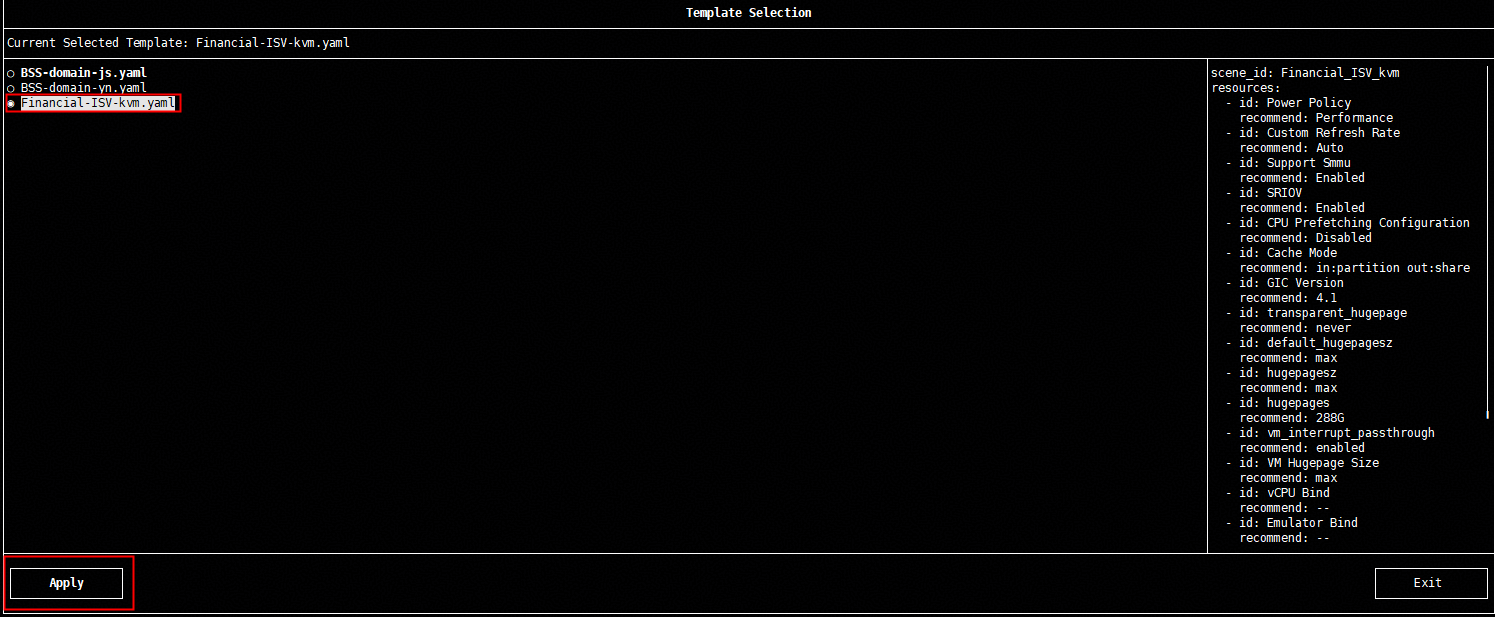
- Select the Financial-ISV-kvm.yaml template file and click Apply.
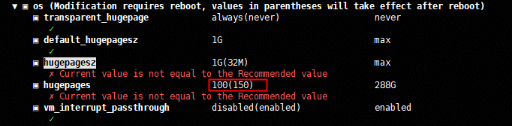
- Change the number of huge pages on the physical machine to the value specified in 2 that allows the VM to start successfully. The change does not take effect immediately. Restart the server for the change to take effect. The value in parentheses is the value that will take effect after the restart.
- Restart the server and start the VM again.
- Check the current number of huge pages on the physical machine.