domain Subcommand Parameters
Command Function
Configures scenario-specific parameters in interactive mode.

- You can select and view multiple configuration templates, and save or revert selected templates.
- Full functionality of the text-based user interface (TUI) requires the terminal emulator to meet the following requirements:
- xterm style.
- Dark interface color.
- UTF-8 encoding format.
- It is recommended to use the latest version of MobaXterm. The draggable divider in the TUI requires the terminal emulator to support mouse movement event reporting. You can run the following command to check whether this feature is supported.
printf '\033[?1003h\033[?1006h'
After entering the command, move the mouse. If this feature is supported, the output will be as follows:

The restoration command is as follows:
printf '\033[?1003l\033[?1006l'
Syntax
./kspect domain [-h]
Parameter Description
|
Parameter |
Description |
|---|---|
|
None |
Goes to the scenario-specific parameter configuration screen. |
|
-h/--help |
Obtains help information. |
Directory Description
The resource directory for scenario-specific parameter configurations is structured as follows:
├── resource
│   ├── backups
│   ├── libraries
│   │   ├── bios
│   │   ├── grub.sh
│   │   ├── kvm.sh
│   │   ├── nic.sh
│   │   ├── swap.sh
│   │   └── sysctl.sh
│   ├── resource.yaml
│   └── templates
│       ├── BSS-domain-js.yaml
│       ├── BSS-domain-yn.yaml
│       └── Financial-ISV-kvm.yaml
|
Directory |
Description |
|---|---|
|
backups |
Backup directory of the scenario-specific configuration file. When parameter changes are applied, a backup of the previous configuration is automatically generated and stored in this directory. |
|
libraries |
Atomic capability library folder containing executable files.
NOTE:
The tool provides the following executable files to ensure that parameter changes take effect permanently: If the parameter changes do not take effect after the server is restarted, check the relevant system configuration files.
|
|
resource.yaml |
Mapping files for specific executable files. |
|
templates |
Scenario-specific configuration template directory. The tool provides three template files: BSS-domain-js.yaml, BSS-domain-yn.yaml, and Financial-ISV-kvm.yaml. |
Example
- Go to the interactive user interface.
1./kspect domain - Select a template.
By default, the BSS-domain-js.yaml file is selected. Click Apply. The page for setting parameters is displayed.
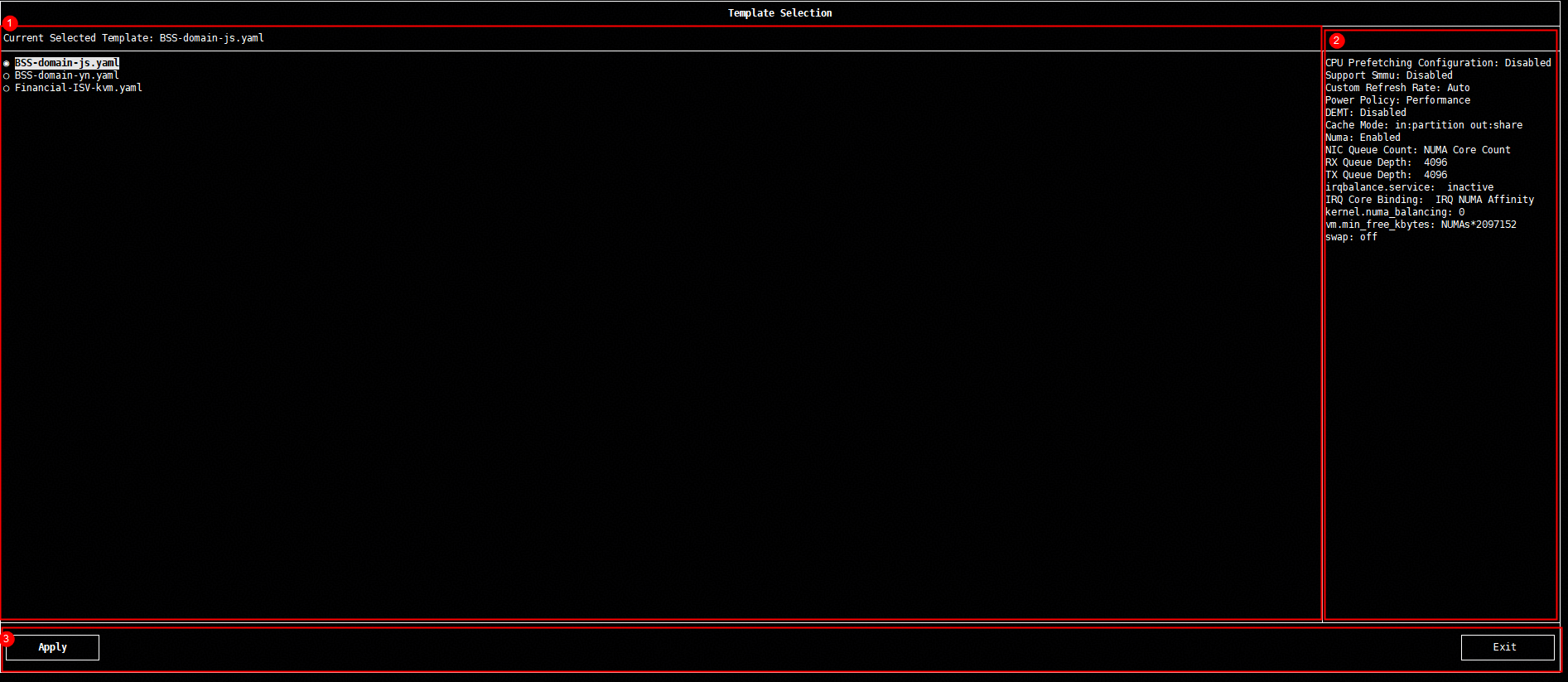
Table 3 Selection screen Area
Name
Description
①
Template selection
Use the mouse or keyboard to select a template.
②
Parameter configuration preview
Preview the full configuration of the template, including all configuration items and recommended values in the template.
③
Operation bar
Apply a template or exit.
- Configure parameters.
You can change the parameter values in the Modify Value column.
If BIOS parameters fail to be modified, resolve the issue following the instructions in Failed to Modify BIOS Parameters.
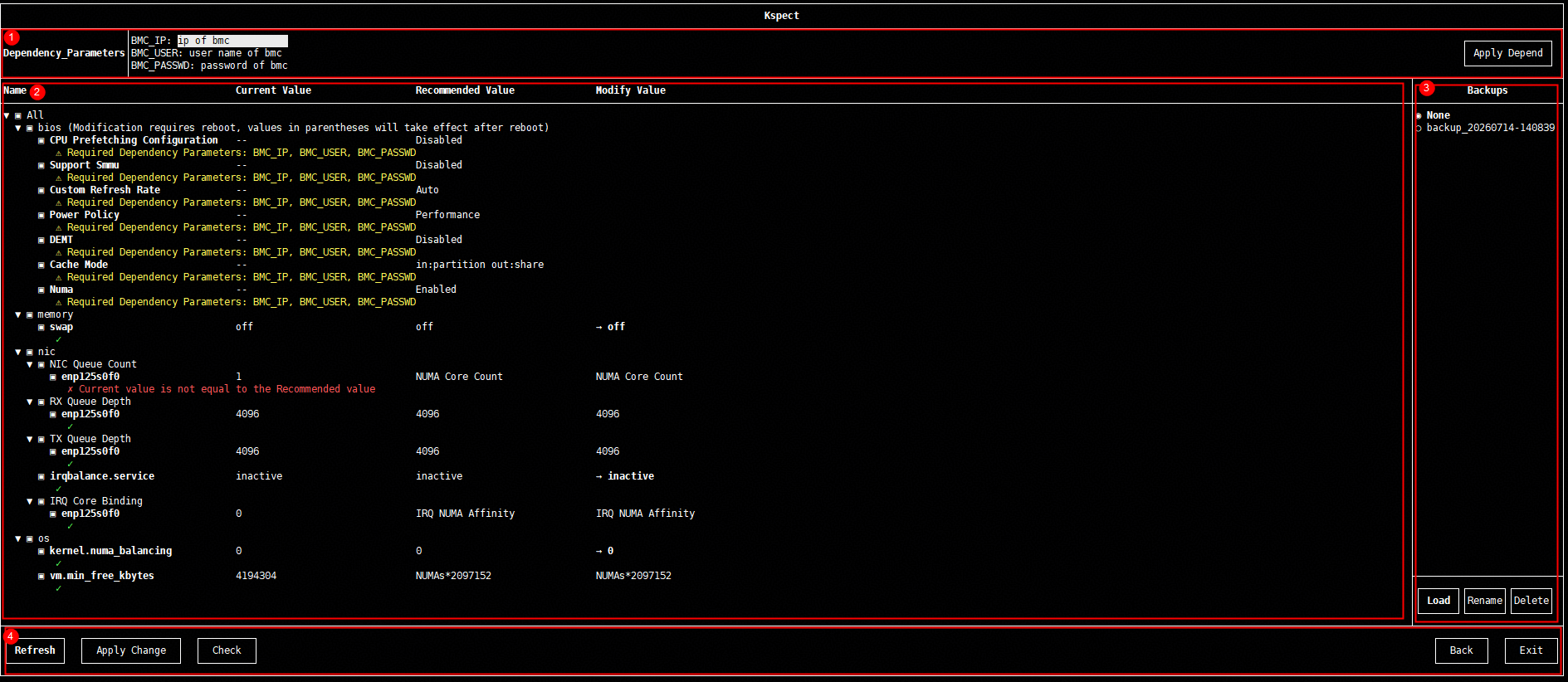
Table 4 Parameter configurations Area
Name
Description
①
Dependency configurations
Some parameters can only be collected with
BMC information. A BMC information input window is provided. After entering the information, click Apply Depend to refresh the parameters in the parameter details area that depend on the BMC.②
Parameter details
Displays detailed parameter information.
- Name: Parameter option name. You can click the check box or parameter name before a parameter to select or deselect the parameter.
- Current Value: Current parameter value.
- Recommended Value: Recommended parameter value.
- Modify Value: Updated parameter value. For text settings, click the current value and enter the desired content. For values marked with a right arrow (→), click the current value and select another from the drop-down list.
③
Backup details
In the file backup area, when you click Apply Change, a backup file of the previous parameter configuration is automatically created. You can load, rename, or delete the backup file.
④
Operation bar
Provides the Refresh, Apply Change, Check, Back, and Exit options.
Table 5 Recommended values of parameters in the BSS-domain-js.yaml file Parameter
Recommended Value
Description
NIC Queue Count
NUMA Core Count
Set the NIC queue count to the number of CPU cores in the
NUMA node where the NIC resides.IRQ Core Bindg
IRQ NUMA Affinity
Bind NIC hardware interrupts to CPU cores in the same NUMA node as the NIC.
vm.min_free_kbytes
NUMAs*2097152
Set the minimum free memory in the system to 2 GB multiplied by the number of NUMA nodes in the current environment.
Table 6 Recommended values of parameters in the Financial-ISV-kvm.yaml file Parameter
Recommended Value
Description
vm_interrupt_passthrough
enabled
Enable virtual device interrupt passthrough, allowing VMs to achieve better interrupt handling performance. (Only openEuler 22.03 LTS SP3 and later are supported.)
transparent_hugepage
never
Disable transparent huge pages. This setting is suitable for latency-sensitive scenarios or scenarios where transparent huge page fragmentation needs to be avoided.
VM Hugepage Size
max
Use huge pages to reduce TLB pressure and increase the TLB hit rate.
VM Cache Mode
none
In none mode, no QEMU-layer cache is used. The I/O path is shorter, latency is reduced, and buffer coherency risks are avoided, providing both security and performance.
VM IO Mode
native
Use the native asynchronous I/O (AIO) interface of the Linux kernel to reduce I/O latency and improve throughput.
Table 7 Format of customized parameters in the Financial-ISV-kvm.yaml file Parameter
Option
Format Description
vCPU Bind
Custom_Input
You can customize the parameter value as required. The value can be a single number or multiple numbers and ranges separated by spaces, for example, 1/0-1/3 5-10 12-15.
Emulator Bind
Custom_Input
You can customize the parameter value as required. The value can be a single number or multiple numbers and ranges separated by spaces, for example, 1/0-1/3 5-10 12-15.
IOThread Num
Custom_Input
You can customize the parameter value as required. The value can be a single number or a specific ID enclosed in parentheses, for example, 2/2(iothread id:1 3).
IOThread Bind CPU
Custom_Input
You can customize the parameter value as required. Specify the value in the format of iothread_id+cpu_range, for example, iothread1:1 iothread2:2-3. Separate multiple iothreads with spaces.
IOThread Bind Disk
Custom_Input
You can customize the parameter value as required. Specify the value in the format of iothread_id+drive_id, for example, iothread1:/dev/disk1 iothread2:/dev/disk2. Separate multiple iothreads with spaces.
VM Cache Mode
Custom_Input
You can customize the parameter value as required. Specify the value in the format of drive_id+cache_attribute, for example, /dev/disk1:none /dev/disk2:default. Separate multiple drives with spaces.
VM IO Mode
Custom_Input
You can customize the parameter value as required. Specify the value in the format of drive_id+cache_attribute, for example, /dev/disk1:native /dev/disk2:io_uring. Separate multiple drives with spaces.
- If the VM IO Mode parameter of a VM is set to native, the Cache Mode parameter of the VM must be set to none or directsync. Otherwise, the configuration fails and an error message is displayed. Figure 1 shows a configuration error.
- If core binding fails, resolve the issue following the instructions in Failed to Bind CPU Cores to a VM.
- If the VM fails to start after the huge page memory parameters of the physical machine and the huge page memory and memory binding settings of the VM are configured, resolve the issue following the instructions in VM Startup Failure.
- Load the modified parameter values.
After completing the modification, click Apply Change and then confirm it by clicking Yes in the dialog box that is displayed. Once the changes are applied, a backup of the previous parameter configuration is automatically created.
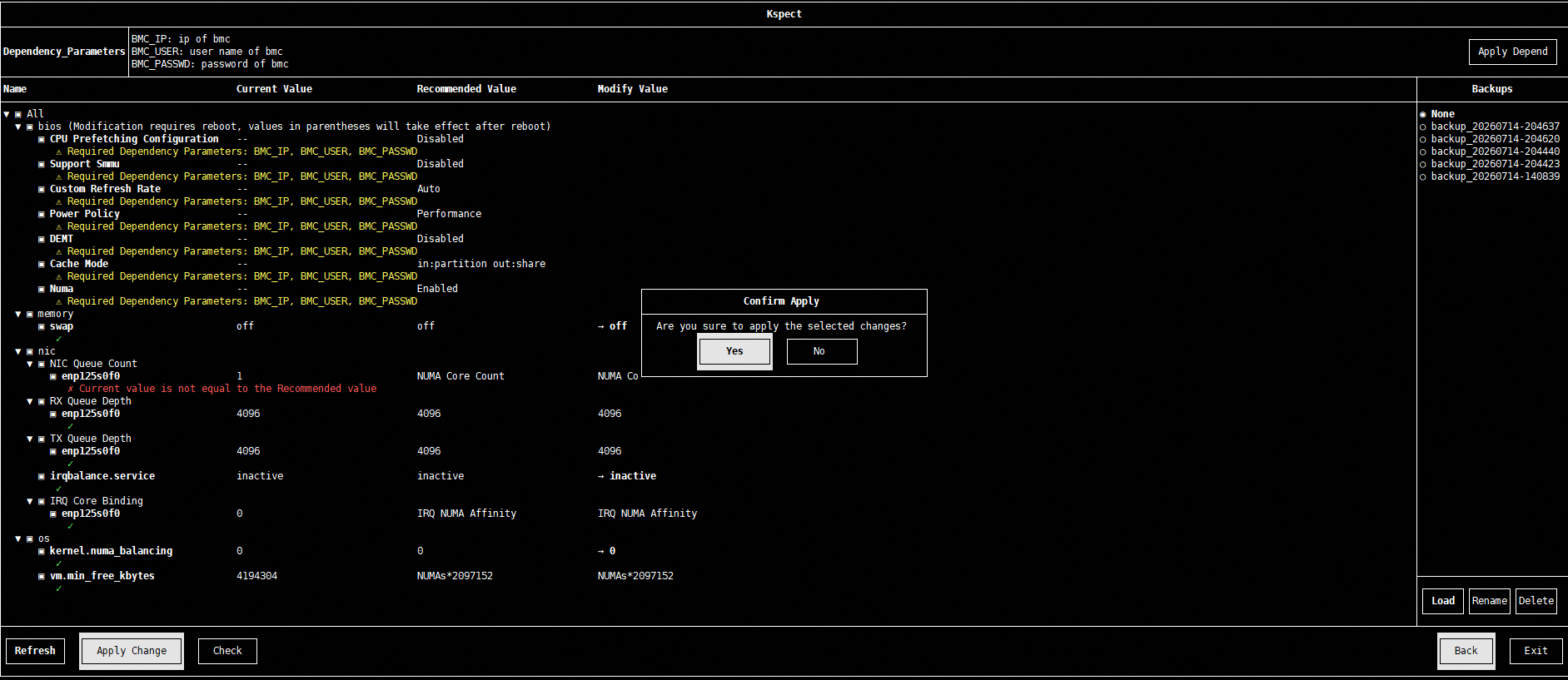
Modifying BIOS parameters is a high-risk operation and may prevent the system from starting. Confirm the parameters, and click Yes to continue.
- Exit the screen.
After completing the configuration, click Exit in the lower right corner.
