Automatic Parameter Tuning Interface
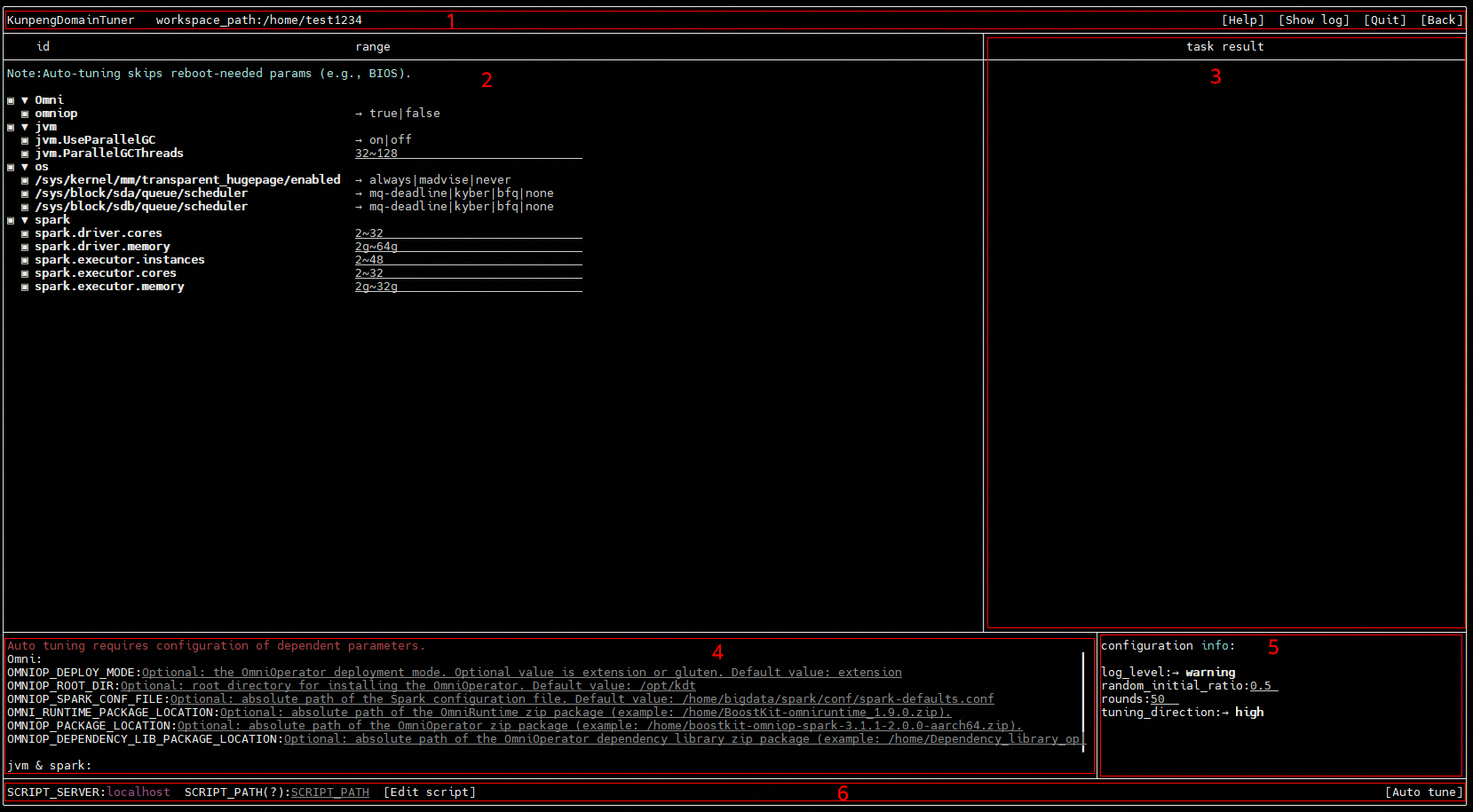
Click the Auto tune button in the configuration editing area in the middle of the one-click configuration interface to enter the automatic parameter tuning interface, as shown in Figure 1. Currently, only dynamic tuning of local parameters is supported.
|
Area |
Name |
Description |
|---|---|---|
|
1 |
Information area |
Displays the tool name and workspace path. You can view help and log information, exit the tool, and return to the one-click configuration interface. |
|
2 |
Dynamic parameter configuration area |
Supports configuring dynamic tuning parameters and ranges. |
|
3 |
Tuning task area |
Supports querying, stopping, and configuring results of automatic tuning tasks. |
|
4 |
Dependency parameter area |
Allows you to configure dependency parameters. Some parameter configurations have dependency parameters. For example, BIOS parameters depend on the BMC IP address, user name, and password, and Spark service parameters depend on the Spark configuration file path. |
|
5 |
Tuning task configuration area |
Supports configuring automatic tuning information, such as the log level, number of tuning rounds, random sampling round ratio, and tuning direction. |
|
6 |
Functional area |
Supports specifying the performance test script file (SCRIPT_PATH) and automatic parameter tuning. |
Information area
Displays the tool name and workspace path. You can view help and log information, exit the tool, and return to the one-click configuration interface.
|
Button |
Description |
|---|---|
|
Help |
Displays help information. |
|
Show log |
Displays log information. |
|
Quit |
Exits the tool. |
|
Back |
Returns to the one-click configuration interface. |
Dynamic Parameter Configuration Area
This area supports configuring dynamic tuning parameters and ranges.
Tuning Task Area
This area supports querying, stopping, and configuring results of automatic tuning tasks.
|
Button |
Description |
|---|---|
|
Set top |
Sends the optimal round parameter values to the set_value column in the one-click configuration interface. |
|
Show log |
Displays the execution output of each automatic tuning result. |
|
Stop |
Stops automatic tuning. |
Dependency Parameter Area
This area allows you to configure dependency parameters. Some parameter configurations have dependency parameters. For example, BIOS parameters depend on the BMC IP address, user name, and password, and Spark service parameters depend on the Spark configuration file path.
Tuning Task Configuration Area
This area supports configuring automatic tuning information, such as the log level, number of tuning rounds, random sampling round ratio, and tuning direction.
Functional Area
This area supports configuring and editing the performance test script file (SCRIPT_PATH) and automatic parameter tuning.
|
Button |
Description |
|---|---|
|
Edit script |
Edits the performance test script file. |
|
Auto tune |
Starts automatic tuning. |