Quick Start (Source Code Porting)
This document uses the source code porting CLI tool as an example to describe how to use the DevKit to scan and analyze software packages and quickly complete porting. It is intended for development engineers who need to port projects written in C, C++, ASM, Fortran, Go, or interpreted languages from x86 environments to the Kunpeng platform.
Overview
The Kunpeng DevKit is a set of development enablement tools covering code porting, development and debugging, compilation, testing, performance tuning, and system diagnosis. The porting scenario provides system migration, source code porting, and software porting assessment features. The source code porting feature supports CLI, VS Code, and WebUI modes. It can automatically scan and analyze source files written in C, C++, ASM, Fortran, Go, and interpreted languages, identify code that needs to be ported, and provide porting guidance. This greatly improves the efficiency of porting x86 Linux software to Kunpeng Linux systems.
Applicable version: Kunpeng DevKit 26.2.RC1
Installing the Source Code Porting CLI Tool
This document applies to the OS versions listed in the DevKit Compatibility Checker.
In CLI mode, the source code porting feature is included in the Porting Advisor tool package. You need to install the Porting Advisor tool package to use this feature.
- Obtain the software package.
- Visit DevKit Download.
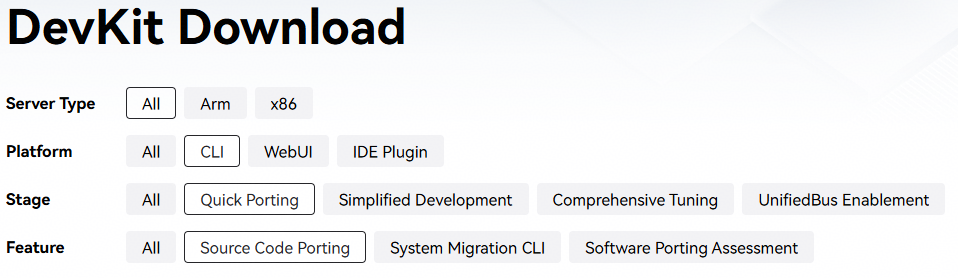
- Filter parameters. Set Server Type as required, Platform to CLI, Stage to Quick Porting, and Feature to Source Code Porting.
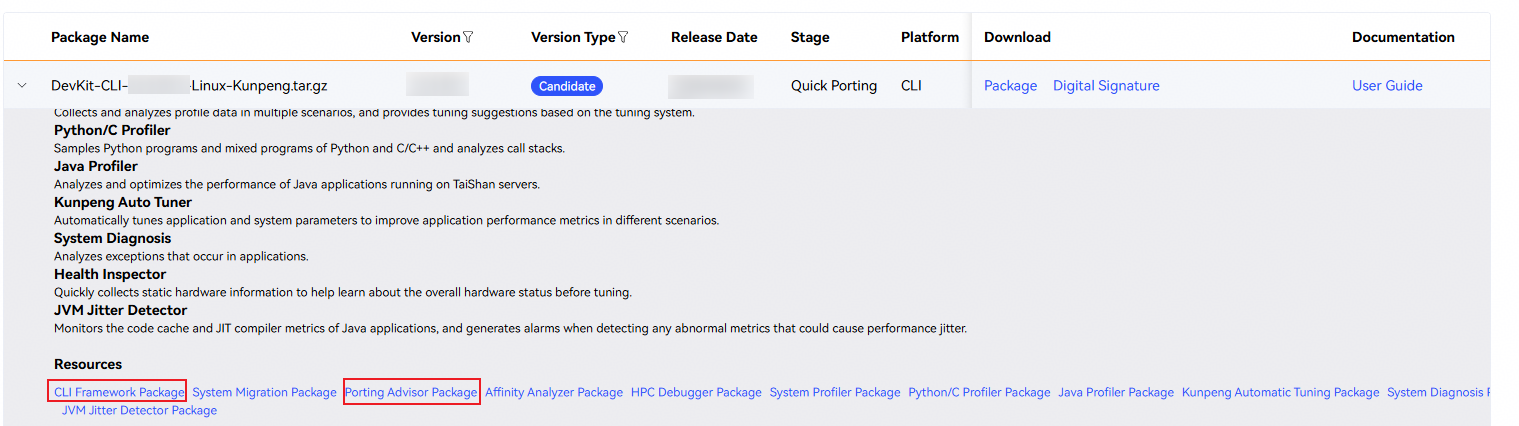
- Select an applicable version. The following uses the Kunpeng platform as an example to describe how to expand and download the CLI framework RPM package and Porting Advisor RPM package.
- Upload the packages to a user-defined directory (for example, /home/DevKit) on the server.
- Install the framework package and Porting Advisor feature package.
1rpm -ivh devkit-x.x.x-1.aarch64.rpm devkit-porting-x.x.x-1.aarch64.rpm

- On the x86 platform, the file name extension of the software packages is x86_64.rpm.
- Install the framework package (devkit-x.x.x-1.aarch64.rpm or devkit-x.x.x-1.x86_64.rpm) before installing the feature package.
Command output:
1
2
3
4
5
6
7
Verifying...                          ################################# [100%]
Preparing...                          ################################# [100%]
Updating / installing...
   1:devkit-x.x.x-1                ################################# [ 33%]
devkit installed
   2:devkit-porting-x.x.x-1        ################################# [ 67%]
devkit-porting installed
- Check whether the installation is successful.
1rpm -qa | grep devkit
The installation is successful if the installation package name is displayed in the command output.
1devkit versionCommand output:
1devkit version x.x.x
Scanning Software Packages Using Source Code Porting
This section uses the porting of the open source smartdenovo-master software to the Kunpeng platform as an example to describe how to quickly scan and analyze an x86 software package, identify code that needs to be ported, modify the source code as recommended, and complete the software porting.
- Obtain the source code. Download the source package smartdenovo-master.zip from GitHub.
- Upload the source package to the user-defined directory (for example, /home/devkit_demo) on the Kunpeng server where the Kunpeng DevKit CLI is deployed. Then extract the package.
cd /home/devkit_demo/ && unzip smartdenovo-master.zip
- Scan the source code. Use the DevKit CLI to scan the uploaded source package.
devkit porting src-mig -i /home/devkit_demo/smartdenovo-master -b make -c make
-i: Path to the folder or package of the source code to be scanned.
-b: specifies the build tool as make.
-c: specifies the source code build command as make.
The following information is displayed. The tool generates JSON, CSV, HTML, and .patch reports.
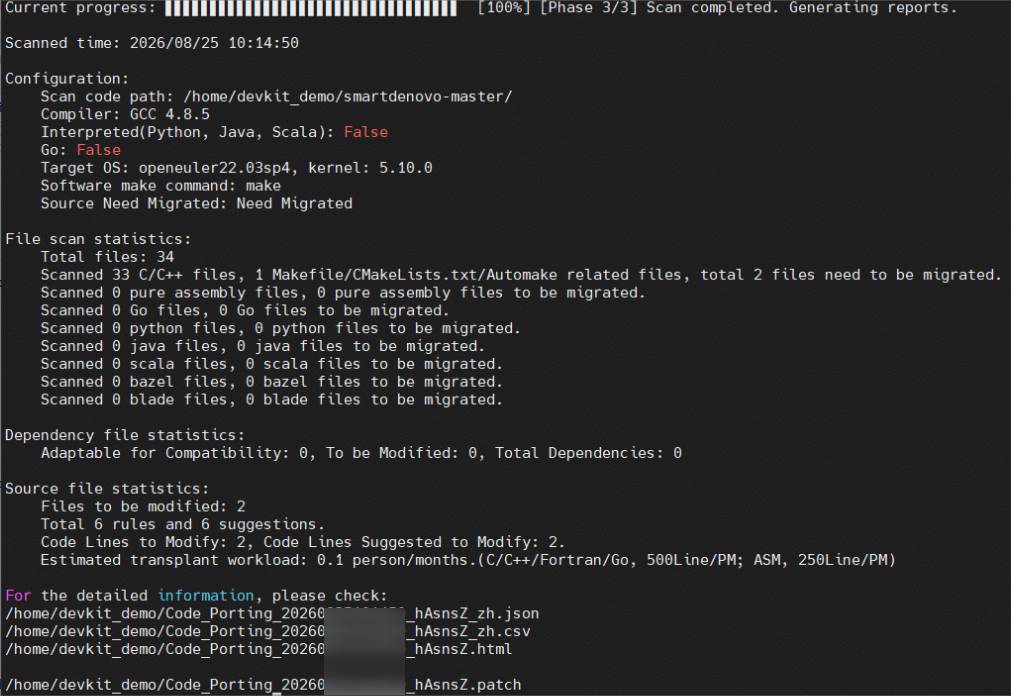
You can directly use the .patch file generated by the tool to apply source code modifications to source files. For details, see Source Code SQL Writeback Patch.
cd /home/devkit_demo/smartdenovo-master
patch -p1 < /home/devkit_demo/Code_Porting_20260XXXXXXXXX_hAsnsZ.patch

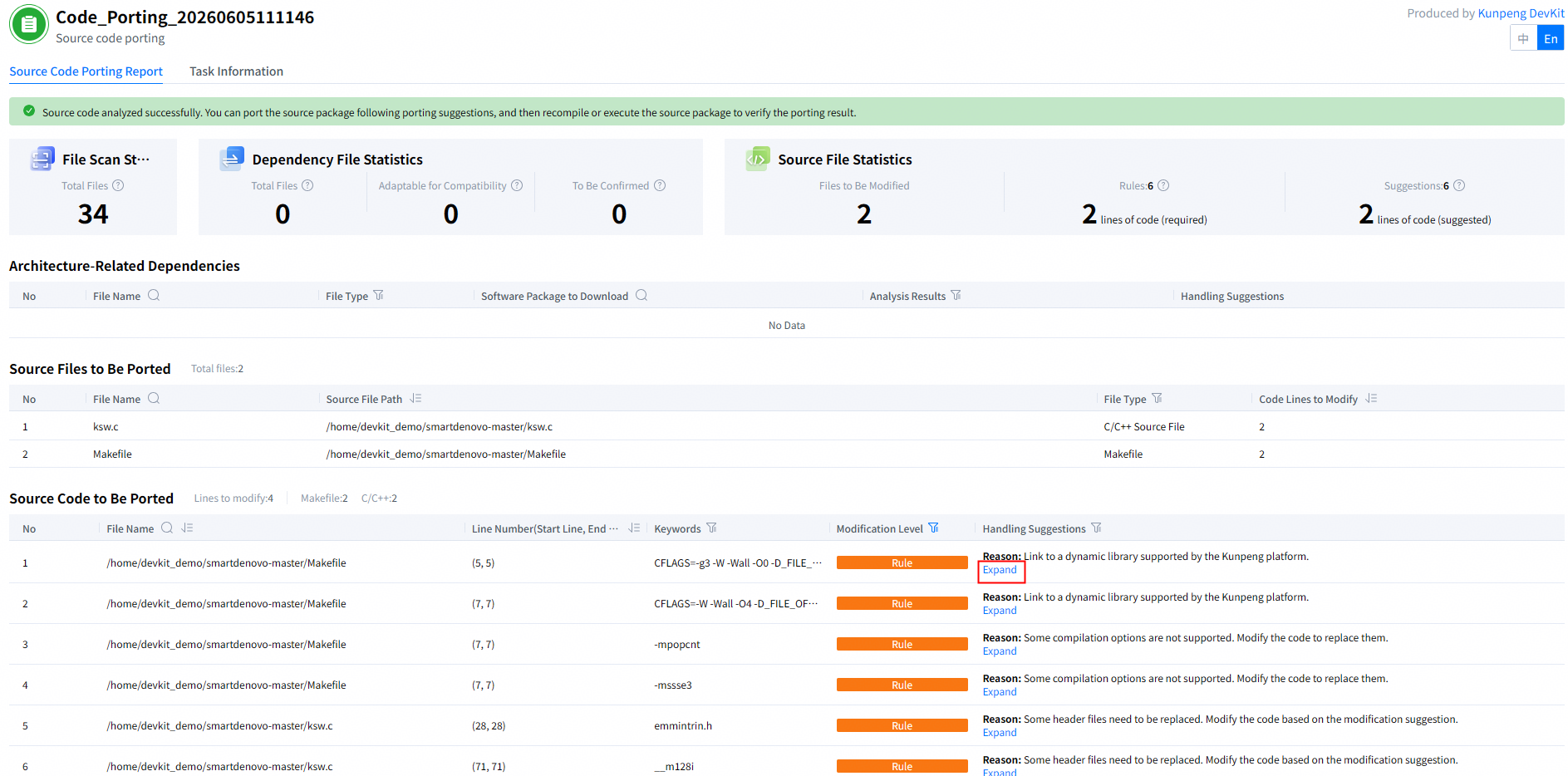
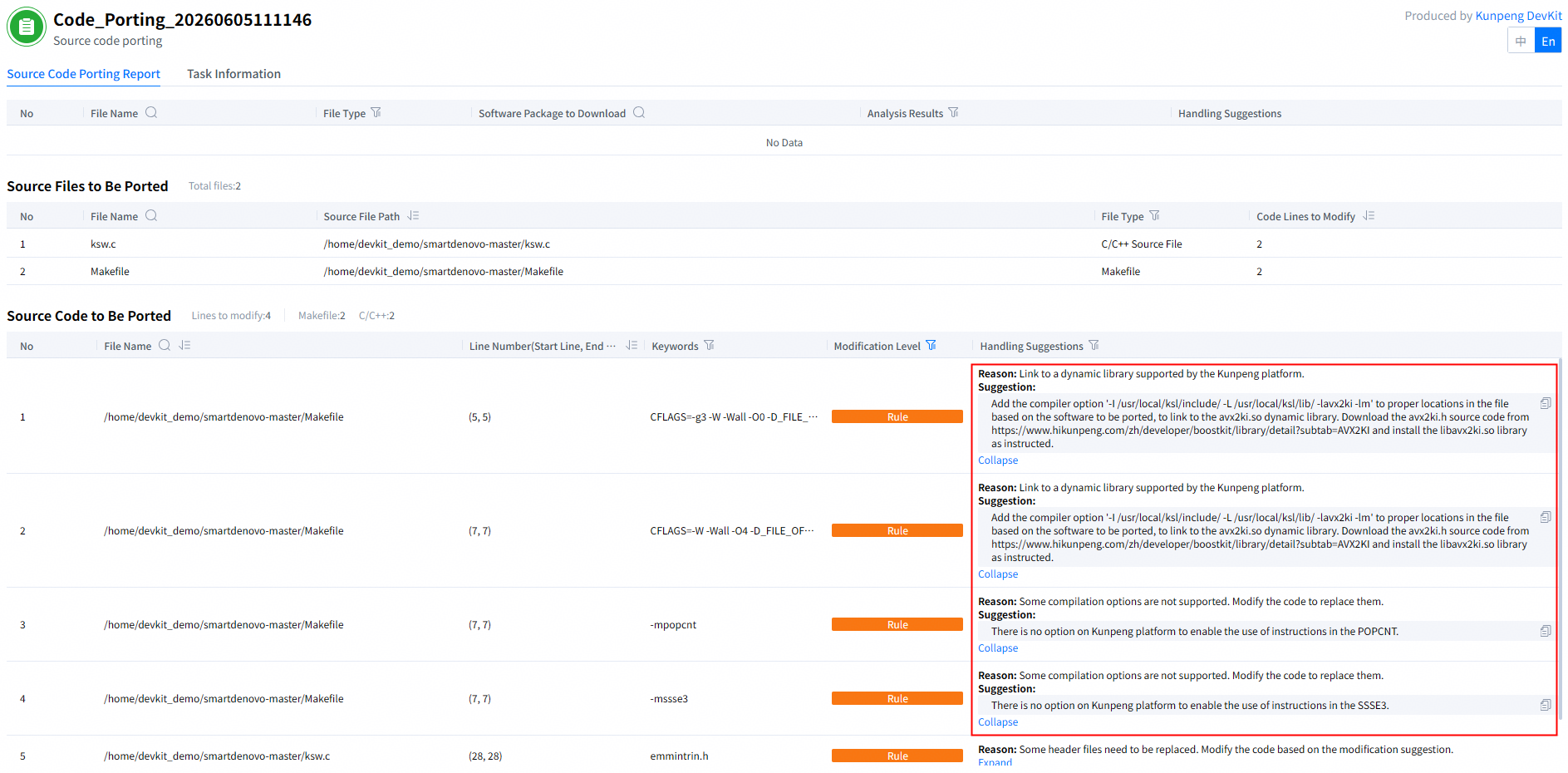
- View the source code porting report (HTML format).On the Source Code Porting Report tab page, locate the row for the line of code to be ported and click Expand in the Handling Suggestions column. See Figure 1.
The porting report indicates that two files must be modified. View the modification suggestion for each file and modify the source code based on the suggestions.
- Modify the source code.
- Modify the Makefile.
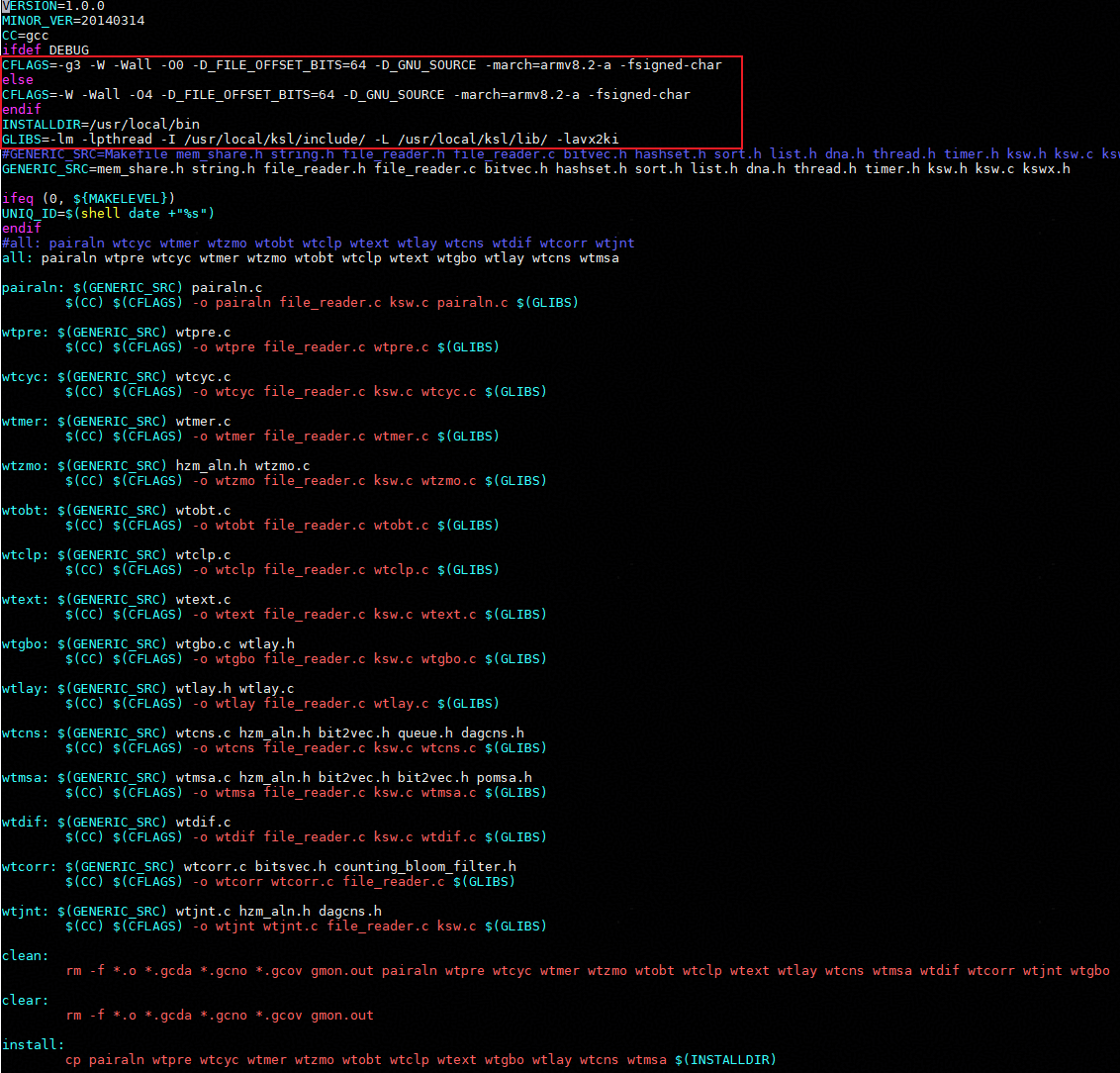
Modify the Makefile based on the source code processing suggestions in the source code porting report. See Figure 2.
According to the preceding suggestions, add the -march=armv8.2-a -fsigned-char option to the CFLAGS variable in the makefile, and delete the -mpopcnt and -mssse3 options of the CFLAGS variable. After obtaining and installing the Kunpeng System Library (BoostKit-ksl installation package), add -I /usr/local/ksl/include/ -L /usr/local/ksl/lib/ -lavx2ki to the GLIBS variable.
Figure 3 shows the modified code (x86_64 and AArch64 are distinguished from each other).
- Modify the ksw.c file.
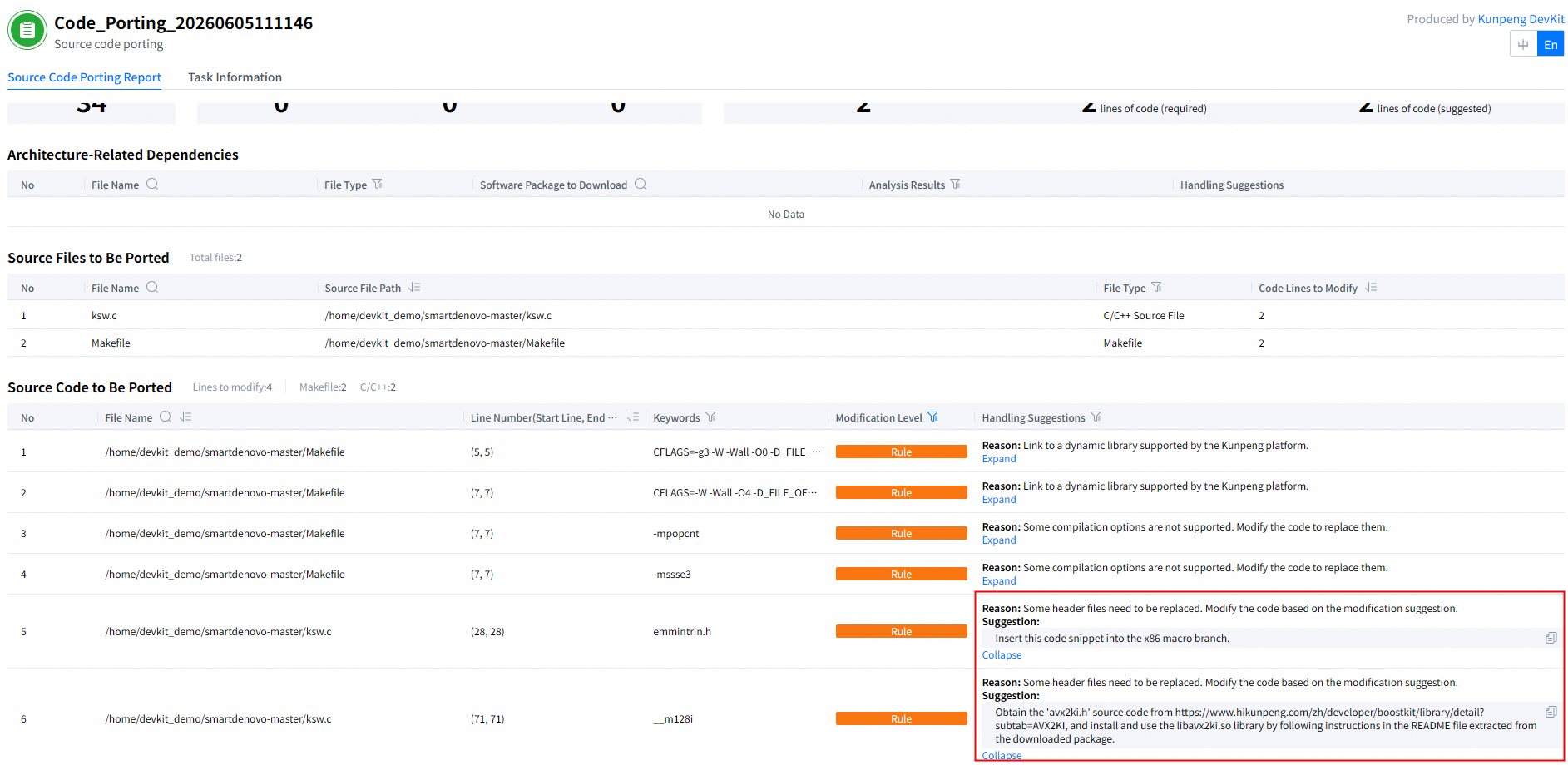
Modify the ksw.c file based on the source code processing suggestions in the source code porting report. See Figure 4.
According to the suggestion, set the branch definitions contained in the header files for x86 and AArch64. This ensures that the code is adapted to both x86 and AArch64. The following information is displayed (using GCC 4.8.5 as an example):
Add lines 1 to 3 and replace line 31 with lines 31 to 33.
1    #if defined(__aarch64__)
2       #include "avx2ki.h"
3    #endif
...
31   #if defined(__x86_64__)
32      #include <emmintrin.h>
33   #endif
- Modify the Makefile.
- Perform the verification.
- Go to the source code directory and run the following command to complete the compilation. See Figure 5. If the compilation fails, see Troubleshooting Cases.
1make clean && make
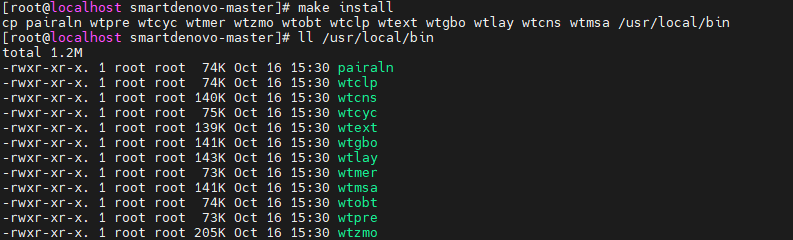
- After the compilation, run the following command to perform the installation and check the installation result. See Figure 6.
1make installThe preceding information indicates that the SMARTdenovo software has been installed on the Kunpeng platform.
- Go to the source code directory and run the following command to complete the compilation. See Figure 5. If the compilation fails, see Troubleshooting Cases.

More Functions
- For more functions of the source code porting CLI tool, see, see Kunpeng DevKit Source Code Porting (CLI).
- If you want to experience the source code porting tool in WebUI or VS Code mode, see Kunpeng DevKit Source Code Porting Guide (WebUI & VS Code).
- If you want to explore features in other DevKit scenarios, see Kunpeng DevKit Product Documentation.