Enabling Confidential Containers
- Use the one-click deployment script of virtCCA_sdk to deploy containerd and Kubernetes.
git clone https://gitcode.com/openeuler/virtCCA_sdk.git
cd virtCCA_sdk/kata-v3.15.0/tools && chmod 755 build.sh
./build.sh containerd && ./build.sh k8s
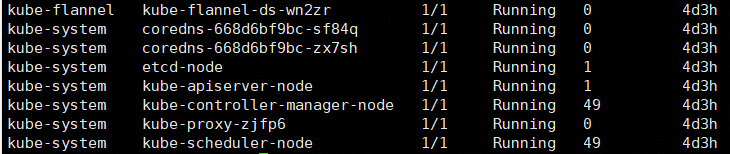
Run the kubectl get pod -A command to verify that the cluster pods are running properly.
- Untaint the control plane node and add a worker label to allow scheduling on the current node.
kubectl taint nodes <node-name> node-role.kubernetes.io/control-plane:NoSchedule-
kubectl label node <node-name> node.kubernetes.io/worker=
- Download and install Helm, the Kubernetes package management tool.
wget https://get.helm.sh/helm-v4.1.4-linux-arm64.tar.gz
tar -zxvf helm-v4.1.4-linux-arm64.tar.gz
cp linux-arm64/helm /usr/local/bin/
If the helm version command returns the version information, the installation is successful.

- Install the community kata-deploy Helm chart.
export CHART="oci://ghcr.io/kata-containers/kata-deploy-charts/kata-deploy"
export VERSION=3.30.0
helm install kata-deploy --set shims.disableAll=true --set shims.qemu.enabled=true --set shims.qemu-cca.enabled=true  --set debug=true "${CHART}" --version "${VERSION}"
Verify that kata-deploy is successfully installed.

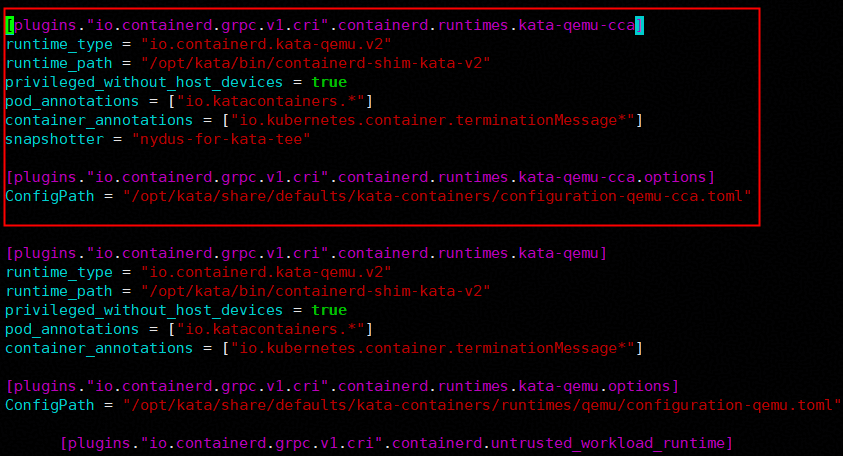
- Add the kata-qemu-cca runtime configuration to the containerd configuration file.
- Add the kata-qemu-cca block right before the kata-qemu runtime section.
[plugins."io.containerd.grpc.v1.cri".containerd.runtimes.kata-qemu-cca]
runtime_type = "io.containerd.kata-qemu.v2"
runtime_path = "/opt/kata/bin/containerd-shim-kata-v2"
privileged_without_host_devices = true
pod_annotations = ["io.katacontainers.*"]
container_annotations = ["io.kubernetes.container.terminationMessage*"]
snapshotter = "nydus-for-kata-tee"

[plugins."io.containerd.grpc.v1.cri".containerd.runtimes.kata-qemu-cca.options]
ConfigPath = "/opt/kata/share/defaults/kata-containers/configuration-qemu-cca.toml"
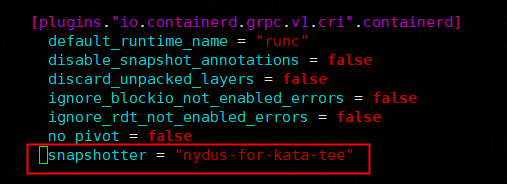
- Change the default containerd snapshotter to nydus-for-kata-tee.
- Restart containerd to apply the configuration: systemctl restart containerd.
- Add the kata-qemu-cca block right before the kata-qemu runtime section.
- Modify the configuration file for the kata-qemu-cca runtime. Leave the firmware-related settings empty since they are not required, and enable guest pull.
sudo sed -i 's#experimental_force_guest_pull = false#experimental_force_guest_pull = true#; s#firmware = "/opt/kata/share/aavmf/AAVMF_CODE.fd"#firmware = ""#; s#firmware_volume = "/opt/kata/share/aavmf/AAVMF_VARS.fd"#firmware_volume = ""#' /opt/kata/share/defaults/kata-containers/configuration-qemu-cca.toml
- Compile and deploy the Kata shim used by Kunpeng CCA.
git clone https://github.com/kata-containers/kata-containers.git -b 3.30.0
cd kata-containers
- If the openEuler kernel macro definition differs from that of the Linaro kernel, run the following command:
sed -i 's/KVM_ARM_CAP_RME_ID = 240/KVM_ARM_CAP_RME_ID = 300/' src/runtime/virtcontainers/hypervisor_linux_arm64.go
- Run the following command for containerized compilation:
docker exec -it coco-build-env /bin/bash
make -C src/runtime
- Copy the compiled binary to the target path.
cp src/runtime/containerd-shim-kata-v2 /opt/kata/bin/containerd-shim-kata-v2
- If the openEuler kernel macro definition differs from that of the Linaro kernel, run the following command:
- Compile the guest kernel Image used by Kunpeng CCA.
- Use tag 6.6.0-147.0.0:
git clone https://gitcode.com/openeuler/kernel.git -b 6.6.0-147.0.0 --depth=1
- Prepare compilation options for Kata startup.
cd ./kernel
make openeuler_defconfig
opts="VSOCKETS VSOCKETS_LOOPBACK VIRTIO_VSOCKETS VIRTIO_VSOCKETS_COMMON NET_9P NET_9P_FD NET_9P_VIRTIO FAILOVER VIRTIO_BLK SCSI_VIRTIO VIRTIO_NET NET_FAILOVER VIRTIO_CONSOLE VIRTIO VIRTIO_PCI_LIB VIRTIO_PCI_LIB_LEGACY VIRTIO_PCI VIRTIO_BALLOON VIRTIO_MMIO EXT4_FS JBD2 FS_MBCACHE FUSE_FS VIRTIO_FS NETFS_SUPPORT 9P_FS CONFIG_TSM_REPORTS CONFIG_ARM_CCA_GUEST CONFIG_OVERLAY_FS"
for opt in $opts; do ./scripts/config -e $opt; done
- Compile the kernel.
make -j `nproc`
- Create a symlink to the compiled Image.
sudo ln -s ./arch/arm64/boot/Image /opt/kata/share/kata-containers/vmlinuz-confidential.container
- Use tag 6.6.0-147.0.0:
- Use the QEMU binary for Kunpeng CCA. For details about how to install QEMU for Kunpeng CCA, see Installing QEMU Using the Yum Repository.
# Create a symlink for the QEMU path configured in kata-qemu-cca to the actual CCA QEMU binary path.
ln -s /usr/bin/qemu-kvm /opt/kata/bin/qemu-system-aarch64-cca-experimental
- Configure the local image repository's root certificate and DNS resolution in the file system to support guest pull.
losetup -fP --show /opt/kata/share/kata-containers/kata-containers-confidential.img
mount /dev/loop0p1 /mnt  //loop0p1 is a reference value; use the actual loop device number during deployment.
cat rootCA.crt >> /mnt/etc/ssl/certs/ca-certificates.crt
echo "<IP> registry.hw.com" >> /mnt/etc/hosts
umount /mnt
losetup -d /dev/loop0

Replace rootCA.crt with the actual path to your local repository's root certificate. Replace IP and registry.hw.com with the actual IP and domain name of your local image repository.
- To start a Kunpeng CCA confidential container, add rodata=full to the kernel_params annotation in the pod configuration file.
The following is an example test-cca.yaml configuration:
apiVersion: v1
kind: Pod
metadata:
  name: test-kata-qemu-cca
  annotations:
    io.containerd.cri.runtime-handler: "kata-qemu-cca"
    io.katacontainers.config.hypervisor.kernel_params: "agent.debug_console agent.log=debug rodata=full"
spec:
  runtimeClassName: kata-qemu-cca
  terminationGracePeriodSeconds: 5
  containers:
  - name: box-1
    image: registry.hw.com:5000/busybox:latest
    imagePullPolicy: Always
    command:
    - sh
    tty: true
To start the container:
kubectl apply -f test-cca.yaml
- (Optional) Configure remote attestation.
Compile and deploy the remote attestation components by following the instructions in Remote Attestation Component Deployment.
- (Optional) Start the confidential container with remote attestation enabled (using the same startup command as above). The container will boot successfully once remote attestation is verified.The following is an example test-remote-attestation.yaml configuration:
apiVersion: v1
kind: Pod
metadata:
  name: cca
  annotations:
    io.containerd.cri.runtime-handler: "kata-qemu-cca"
    io.katacontainers.config.hypervisor.kernel_params: "agent.debug_console agent.log=debug rodata=full agent.image_policy_file=kbs:///default/security-policy/test agent.enable_signature_verification=true agent.guest_components_rest_api=all agent.aa_kbc_params=cc_kbc::http://90.91.185.34:8080"
spec:
  runtimeClassName: kata-qemu-cca
  terminationGracePeriodSeconds: 5
  containers:
  - name: box-1
    image: registry.hw.com:5000/busybox:latest
    imagePullPolicy: Always
    command:
    - sh
    tty: true
Parent topic: Feature Usage