Configuring cVMs
After you set up the necessary operating environment, you can start cVMs.
Startup with libvirt
- Copy the QCOW2 image generated in Creating a QCOW2 Image for a cVM to the target environment, for example:

- Create and edit the cvm.xml file for libvirt to start the cVM.
<domain type='kvm' xmlns:qemu="http://libvirt.org/schemas/domain/qemu/1.0">
  <name>cvm</name>
  <memory unit='GiB'>8</memory>
  <vcpu placement='static'>4</vcpu>
  <cputune>
    <vcpupin vcpu='0' cpuset='0'/>
    <vcpupin vcpu='1' cpuset='1'/>
    <vcpupin vcpu='2' cpuset='2'/>
    <vcpupin vcpu='3' cpuset='3'/>
    <emulatorpin cpuset='0-3'/>
  </cputune>
    <numatune>
    <memnode cellid='0' mode='strict' nodeset='0'/>
  </numatune>
  <os>
    <type arch='aarch64' machine='virt'>hvm</type>
    <loader readonly='yes' type='rom'>/usr/share/edk2/aarch64/QEMU_EFI.fd</loader>
     <boot dev='hd'/>
  </os>
  <features>
    <acpi/>
    <gic version='3'/>
  </features>
  <cpu mode='host-passthrough'>
    <topology sockets='1' dies='1' clusters='1' cores='4' threads='1'/>
           <numa>
      <cell id='0' cpus='0-3' memory='8' unit='GiB'/>
    </numa>
  </cpu>
  <on_poweroff>destroy</on_poweroff>
  <on_reboot>restart</on_reboot>
  <on_crash>destroy</on_crash>
  <devices>
    <emulator>/usr/libexec/qemu-kvm</emulator>
         <console type='pty'/>
    <disk type='file' device='disk' model='virtio-non-transitional'>
      <driver name='qemu' type='qcow2' queues='2' cache='none' iommu='on'/>
      <source file='/home/virsh/cvm/openEuler-24.03-SP3-cvm-aarch64.qcow2'/>
      <target dev='vda' bus='virtio'/>
    </disk>
<interface type='bridge'>
<source bridge='virbr0'/>
<driver iommu='on' event_idx='off'/>
<model type='virtio-non-transitional'/>
</interface>
  </devices>
  <launchSecurity type='cvm'/>
  <qemu:commandline>
    <qemu:arg value='-object'/>
    <qemu:arg value='tmm-guest,id=tmm0,sve-vector-length=128,num-pmu-counters=1'/>
  </qemu:commandline>
</domain>
- The sve-vector-length and num-pmu-counters parameters are optional. The sve-vector-length parameter can be configured only after the Scalable Vector Extension (SVE) feature is enabled.
- The cpuset range of the emulatorpin parameter under cputune must overlap that of vcpupin. Otherwise, ttyAMA0 times out.
- In stress tests such as frequently starting and destroying cVMs, you are advised to disable the event_idx mechanism of virtio-net to improve the virtio network stability. The following is a configuration example:
<interface type='bridge'>
<source bridge='virbr0'/>
<driver iommu='on' event_idx='off'/>
<model type='virtio-non-transitional'/>
</interface>
- Edit the libvirt configuration XML file of the cVM.
Change the source file path of the vda disk to the file system's absolute path specified in 1.

- Run virsh define to define the cVM configuration.
virsh define cvm.xml

- View the cVM definition.
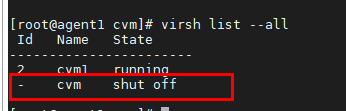
virsh list --all
The value of Name is the same as <name>cvm</name> in the XML file.
- Disable SELinux. For details, see SELinux Configuration.
- Start the cVM.
virsh start cvm

- Connect to the serial port of the cVM.
virsh console cvm
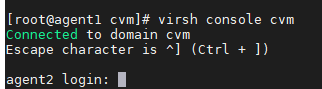
The default image user is root.
Startup with the QEMU CLI
- Copy the QCOW2 image generated in Creating a QCOW2 Image for a cVM to the target environment, for example:

- Create and edit the run-qemu.sh file for the QEMU CLI to start the cVM.
#!/bin/sh MAC_ADDR_0=DE:AD:BE:EF:FA:28 function launch_uefi() { taskset -c 0 /usr/libexec/qemu-kvm \ -M virt,usb=off,gic-version=host,accel=kvm,kvm-type=cvm \ --enable-kvm \ -bios /usr/share/edk2/aarch64/QEMU_EFI.fd \ -cpu host \ -m 2048 \ -smp 1 \ -no-user-config \ -nographic \ --no-reboot \ -object tmm-guest,id=tmm0,num-pmu-counters=1 \ -drive if=none,file=/home/virsh/cvm/openEuler-24.03-SP3-cvm-aarch64.qcow2,format=qcow2,id=disk01 \ -device virtio-blk-pci-non-transitional,drive=disk01,num-queues=1,bootindex=1,iommu_platform=on \ -netdev tap,id=vnet,ifname=tap0,script=/home/uefi/qemu-ifup,queues=2 \ -device virtio-net-pci-non-transitional,netdev=vnet,iommu_platform=on } function launch_uefi_normal() { /usr/libexec/qemu-kvm \ -M virt,usb=off,gic-version=host,accel=kvm \ --enable-kvm \ -bios /usr/share/edk2/aarch64/QEMU_EFI.fd \ -cpu host \ -m 2048 \ -smp 1\ -no-user-config \ -nographic \ --no-reboot \ -drive if=none,file=/home/virsh/cvm/openEuler-24.03-SP3-cvm-aarch64.qcow2,format=qcow2,id=disk01 \ -device virtio-blk-pci-non-transitional,drive=disk01,num-queues=1,bootindex=1 \ -netdev tap,id=vnet,ifname=tap0,script=/home/uefi/qemu-ifup,queues=2 \ -device virtio-net-pci,netdev=vnet,mac=${MAC_ADDR_0} } if [ "$1" == "u" ] then launch_uefi fi # Launch cVM to test KATA if [ "$1" == "nu" ] then launch_uefi_normal fi- launch_uefi indicates starting a cVM and launch_uefi_normal indicates starting a common VM.
- If you need to connect the VM to the Internet, create a qemu-ifup file and copy the following content to the file. Configure the bridge in switch = virbr0 based on your requirements.
#!/bin/sh
set -x
switch=virbr0
if [ -n "$1" ];then
        ip tuntap add $1 mode tap user `whoami`
        ip link set $1 up
        sleep 1s
        ip link set $1 master $switch
        exit 0
else
        echo "Error: no interface specified"
        exit 1
fi
- Modify the run-qemu.sh script.
Change the source file path of the vda disk to the file system's absolute path specified in 1.

The default image user is root.
Enabling Multiple NUMA Nodes
Modify the cVM XML file created in step 2 of Startup with libvirt.
- A virtual NUMA node can be bound to a range of physical NUMA nodes. The secure memory space for the cVM is allocated within the specified NUMA node range. The following is an example of the bound physical NUMA node range in the libvirt cVM configuration:
<numatune>
          <memnode cellid='0' mode='strict' nodeset='1-3' />
</numatune>
For the preceding configuration, the secure memory space will be allocated from NUMA nodes 1, 2, and 3. The configuration is nodeset='1,2,3'.
- Secure memory can be allocated from multiple NUMA nodes to start a large cVM. See the example configuration:
<numatune> <memnode cellid='0' mode='strict' nodeset='0' /> <memnode cellid='1' mode='strict' nodeset='3' /> </numatune> <cpu mode='host-passthrough'> <topology sockets='1' dies='1' clusters='1' cores='8' threads='1'/> <numa> <cell id='0' cpus='0-3' memory='4' unit='GiB'/> <cell id='1' cpus='4-7' memory='4' unit='GiB'/> </numa> </cpu>- For the preceding configuration, the cVM will be allocated 4 GB of secure memory from both of NUMA nodes 0 and 3.
- In the example configuration, the number of vCPUs is 8. Modify the configuration in the cvm.xml file as follows: <vcpu placement='static'>8</vcpu>.
- For details about known upstream issues and the solutions, see QEMU Errors Logged upon VM Startup Failure.
Parent topic: Software Deployment