One-Click Configuration Interface
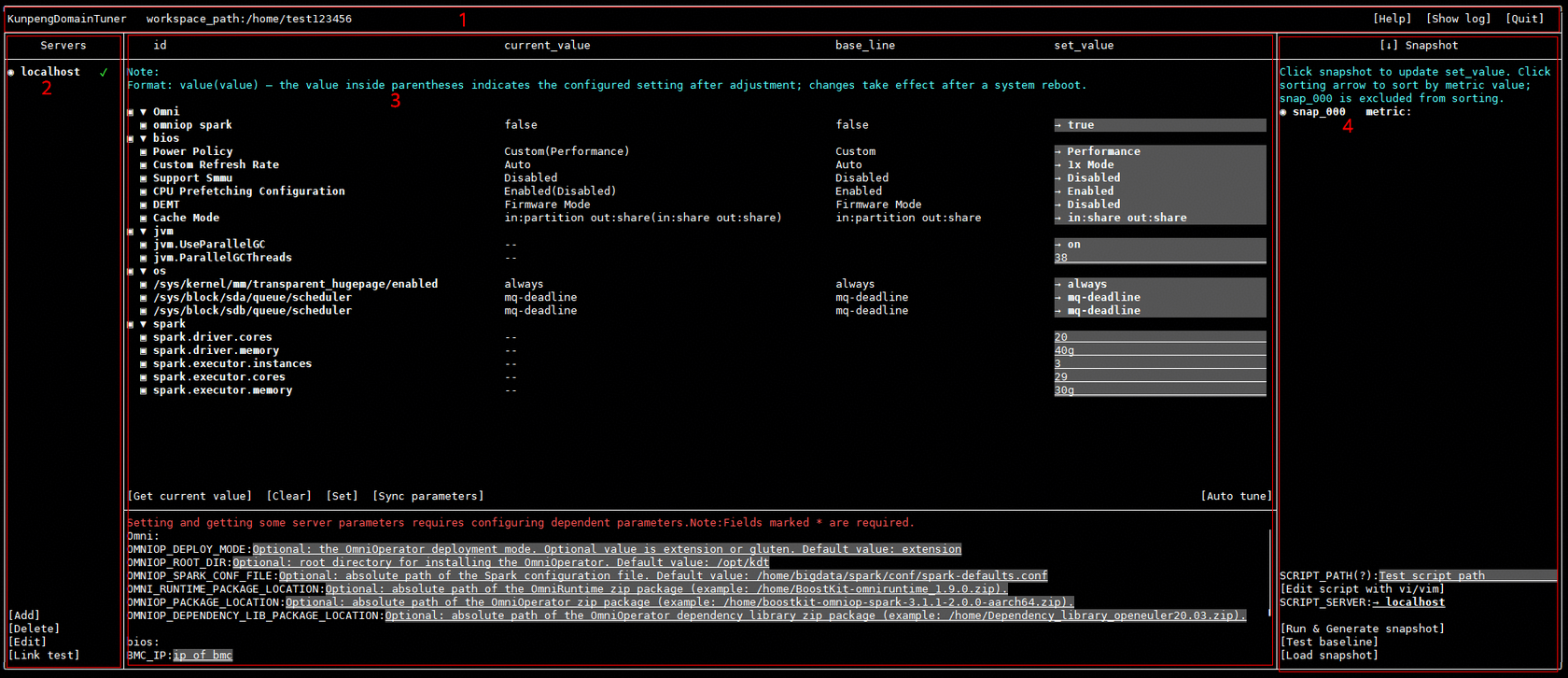
|
Area |
Name |
Description |
|---|---|---|
|
1 |
Information area |
Displays the tool name and workspace path. You can view help and log information and exit the tool. |
|
2 |
Server list area |
Provides server operations, including adding, deleting, editing, and testing server connections. |
|
3 |
Configuration editing area |
Supports configuring parameters for OmniOperator, BIOS, JVM, OS, applications, and other components. |
|
4 |
Snapshot area |
Supports configuring the performance test script file (SCRIPT_PATH) and script execution server (SCRIPT_SERVER), and provides functions such as editing performance test scripts, generating snapshots, and loading snapshots. |
Information area
This area displays the tool name and workspace path. You can view help and log information and exit the tool.
|
Button |
Description |
|---|---|
|
Help |
Displays help information. |
|
Show log |
Displays log information. |
|
Quit |
Exits the tool. |
Server list area
This area provides server operations, including adding, deleting, editing, and testing server connections.
|
Button |
Description |
|---|---|
|
Add |
Adds a server. |
|
Delete |
Deletes a server. |
|
Edit |
Edits a server. You can modify server information. |
|
Link test |
Tests server connections. |
Configuration editing area
This area supports configuring parameters for OmniOperator, BIOS, JVM, OS, applications, and other components.
|
Button |
Description |
|---|---|
|
Get current value |
Updates current_value. |
|
Clear |
Clears some parameter configurations, temporary files, and other data. |
|
Set |
Changes the value of the selected parameter to set_value. |
|
Sync parameters |
Synchronizes the set_value of the current server to the set_value of all servers. |
|
Auto tune |
Navigates to the automatic parameter tuning interface. For details, see Automatic Parameter Tuning Interface. |

Some parameters have prerequisites for taking effect. For example, BIOS configurations take effect only after the server is restarted.
Snapshot area
This area supports configuring the performance test script file (SCRIPT_PATH) and script execution server (SCRIPT_SERVER), and provides functions such as editing performance test scripts, generating snapshots, and loading snapshots.
The tool provides a performance test script template (script/spark_run.sh in the tool installation directory). You can modify the template file based on the actual scenario.
|
Button |
Description |
|---|---|
|
Edit script |
Edits the performance test script file. |
|
Run & Generate snapshot |
Runs the performance test script and generates a snapshot. |
|
Test baseline |
Performs a baseline test. |
|
Load snapshot |
Loads a snapshot. |