KAE MD5 Digest Algorithm Tuning
- Purpose
Optimize the MD5 calculation process when the RGW writes objects to maximize the CPU capability of processing the RGW process and maximize the hardware performance.
- Procedure
Enable the Kunpeng Accelerator Engine (KAE) to implement MD5 calculation.
Environment Preparations

Download the acceleration engine installation package and developer Guide.
https://gitee.com/mirrors_kunpengcompute/KAE/tree/v1.3.6-bata
Installing the Accelerator Engine
- The developer guide describes how to install and use all modules of the accelerator engine. After reading the guide, select an appropriate installation mode.
- If the CentOS 7.6 and OpenSSL 1.0.2k are used, you need to download the corresponding libkae engine software package. The installation method of the package is the same as that in the developer guide.
Install the accelerator engine as instructed by the developer guide.
Changing the Default Number of Accelerator Queues
The default number of hardware accelerator queues is 256. When the number of accelerator queues remaining (which can be obtained in 4) is 0 or a small value during service running, you can change the number of queues to 512 or 1024 to maximize the accelerator performance.
- Uninstall hisi_sec2.
1rmmod hisi_sec2 - Set the default accelerator queue parameter pf_q_num=512.
1vi /etc/modprobe.d/hisi_sec2.conf1options hisi_sec2 uacce_mode=2 enable_sm4_ctr=1 pf_q_num=512
- Load hisi_sec2.
1modprobe hisi_sec2 - Check the hardware accelerator queue.
1cat /sys/class/uacce/hisi_sec2-*/attrs/available_instancesThe change is successful if the following information is displayed.

Adapting Ceph to the Accelerator
Currently, the Ceph mainline version supports the configuration of the OpenSSL external engine using the configuration file. However, this feature is not available in the released Ceph versions (by 15.2.3). To use MD5 hardware acceleration in these versions, you need to modify the Ceph source code. For details about the modification method, see the latest patch that has been incorporated into the mainline versions.
https://github.com/ceph/ceph/pull/33964/
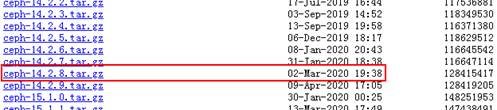
The following uses Ceph 14.2.8 as an example to describe how to adapt Ceph to MD5 hardware acceleration.
- Obtain the source code.
- Obtain the adaptation patch. Download the patch that enables the OpenSSL external engine of Ceph 14.2.8. After downloading the patch, save it to the /home directory.
- Go to the /home directory, decompress the source package and go to the directory generated after decompression.
1cd /home && tar -zxvf ceph-14.2.8.tar.gz && cd ceph-14.2.8/
- Apply the patch in the root directory of the source code.
1patch -p1 < ../ceph-14.2.8-common-rgw-add-openssl-engine-support.patch

- After modifying the source code, compile Ceph.
- Install Ceph.
- Modify the systemd permissions. In Ceph, the RGW process service is managed by systemd. To enable systemd to access hardware acceleration devices, you need to modify the configuration on each RGW node as follows:
- Open the configuration file.
1vi /usr/lib/systemd/system/ceph-radosgw@.serviceChange PrivateDevices=yes to PrivateDevices=no.
- Make the modification take effect.
1systemctl daemon-reload
- Open the configuration file.
- Use KAE to accelerate RGW digest computing. Add the following OpenSSL engine options to the global section in the ceph.conf file on the node where RGW is deployed:
1openssl_engine_opts = "engine_id=kae,dynamic_path=/usr/local/lib/engines-1.1/libkae.so,KAE_CMD_ENABLE_ASYNC=0,default_algorithms=DIGESTS,init=1"
dynamic_path is the default installation path of libkae.so in the libkae engine software package. default_algorithms=DIGESTS indicates that this engine is used for digest algorithms including MD5. After completing the configuration, synchronize the configuration to all nodes where the RGW is deployed.
- Restart RGW for the settings to take effect. Run the following command on each node where the RGW is deployed:
1systemctl restart ceph-radosgw.target